50
51
Settings | HOOK series
Settings | HOOK series
Saving screenshots
You can save screenshots to a microSD card by
inserting a microSD card into the card slot and
pressing Power and then Zoom (+).
You must view les on a computer or other microSD
compatible device.
About
Displays software information about this unit.
Before attempting a software update, you can
check the version of software your unit is using by
accessing the About screen.
Lowrance periodically updates unit software to
add features and improve functionality.
To see the latest available software version go to
www.lowrance.com.
NOTE: You cannot save screenshots
to internal memory, Navionics cards, or
other mapping cards.
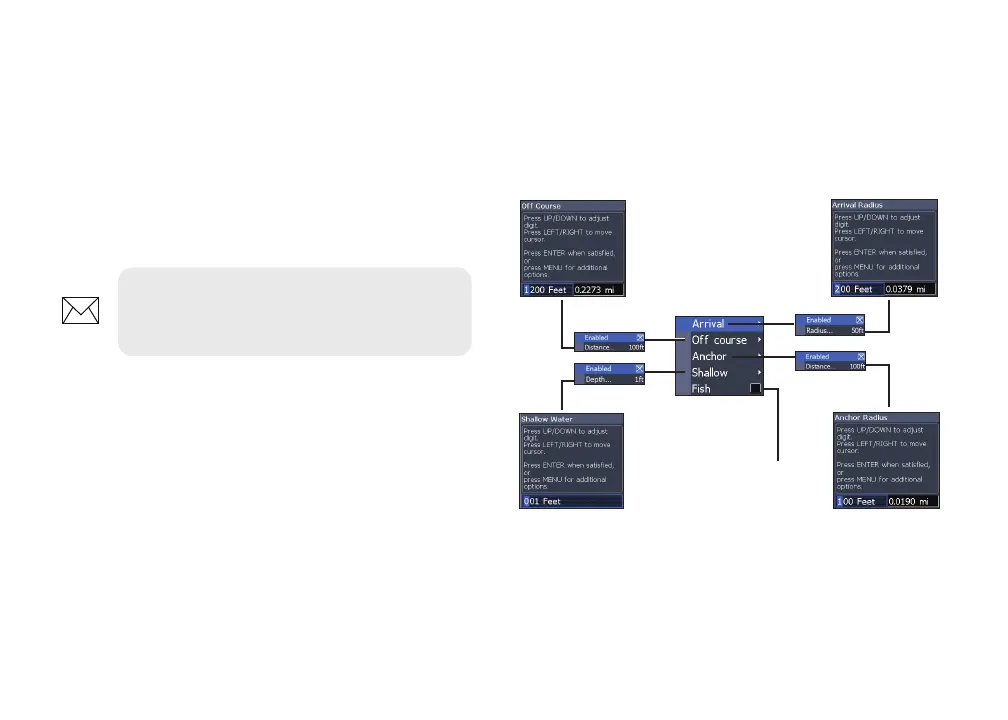
Alarms
Enables alarms and selects alarm thresholds.
Arrival, O Course and Anchor alarms are only
available in Advanced mode.
Alarms
menu
Sounds alarm when
Fish ID symbol
appears on display










 To Next Page