26
27
Sonar Operation | HOOK series
Sonar Operation | HOOK series
When the unit is in manual mode, you may not
receive any depth readings, or you may receive
incorrect depth information.
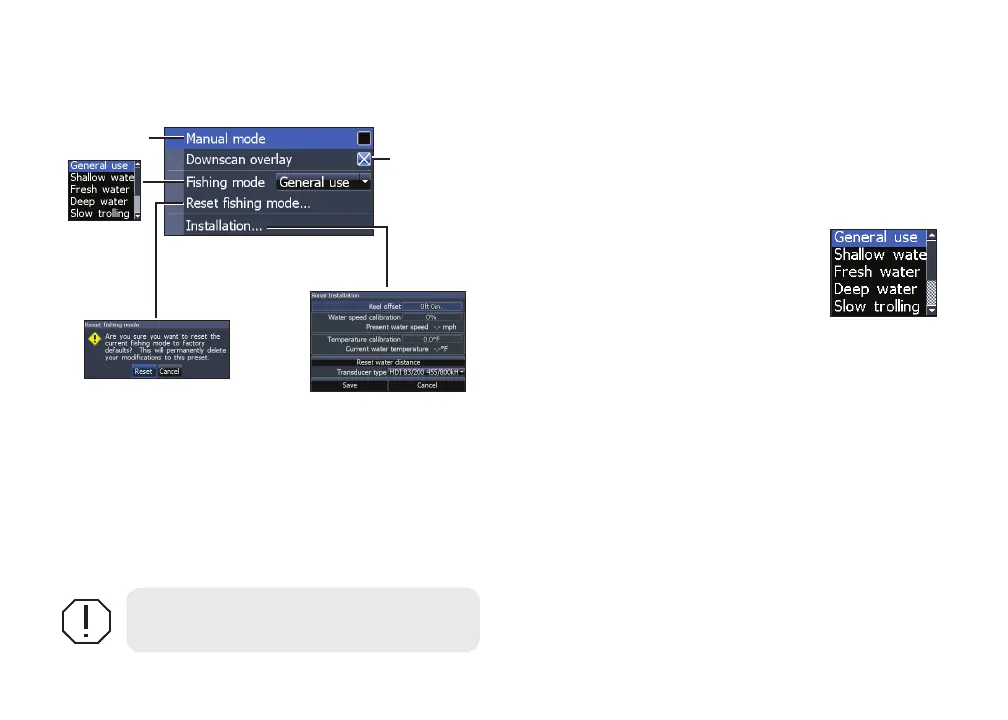
Fishing mode
Enhances the performance of your
unit by providing preset packages
of sonar settings geared to specic
shing conditions. For more
information about shing modes,
refer to the Basic Operation section.
Reset shing mode
Resets selected shing mode to default settings.
That is useful when you want to clear settings
adjustments made while using a shing mode.
WARNING: Manual mode should only
be used by advanced sonar users.
Manual mode
Restricts digital depth capability, so the unit will
only send sonar signals to the selected depth
range. That allows the display to continue smooth
scrolling if the bottom depth is out of transducer
range.
Sonar settings menu
Restricts
unit’s digital
depth search
capability
Turns on/off
Downscan
overlay










 To Next Page