36
37
Chart Operation | HOOK series
Chart Operation | HOOK series
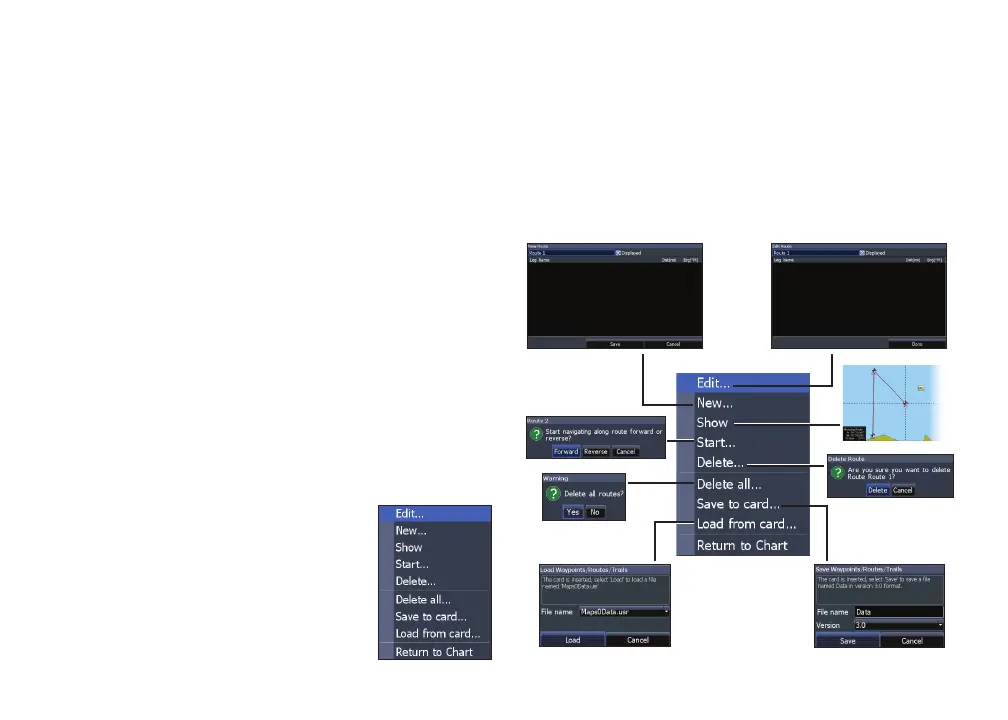
1. Select the desired route on the Route
screen and press MENU.
2. Select Start and press ENTER.
3. Select Forward or Reverse and press
ENTER.
Creating a route using points from chart:
1. Repeat Steps 1-4 from the instructions
for Creating a route from waypoint list.
2. Select Point using chart and press
ENTER. The chart page will appear.
3. Move the cursor to the desired location.
Press ENTER to set a waypoint.
4. Repeat Step 3 to add more route
waypoints.
5. Press MENU and select Stop Adding.
Press ENTER.
6. Press MENU, select Stop Editing and
press ENTER.
7. Highlight the Save button and press
ENTER.
Navigating a route
Routes can be navigated in forward
or reverse.
Routes menu










 To Next Page