Atom Operator Manual Memory Structure
LSC Lighting Systems (Aust) Pty. Ltd. 16
6.0 MEMORY STRUCTURE
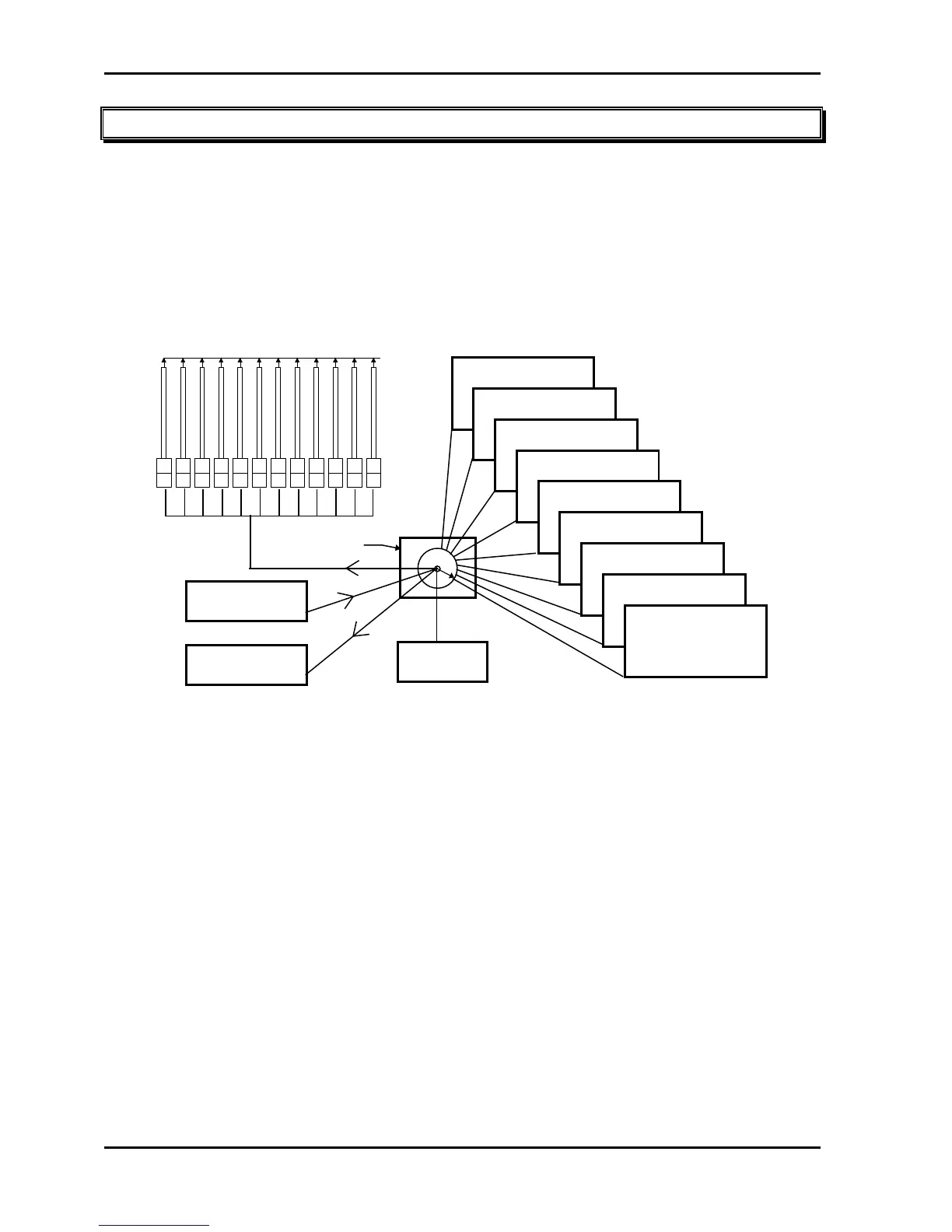
Scenes and Chases are stored in battery backed up memory. There are 9 pages of memory available and 12
(24) memory (submaster) numbers in each page. The PAGE key selects the page and the Red S/A keys
select the memory numbers. The contents of each number in each page is determined by what you record
(or copy) into them. It may be a Scene or a Chase or it may be empty.
The memory capacity of each model is;
• Atom 12/24; 9 (pages) x 12 (S/A numbers) = 108 (max) scenes or chases.
• Atom 24/48; 9 (pages) x 24 (S/A numbers) = 216 (max) scenes or chases.
Scenes and Chases share the same area of memory. If a Page/Scene number has been used for a Scene,
then it cannot be used for a Chase. A Chase recorded in the same number would overwrite the Scene.
Likewise, if the number has been used for a Chase, it cannot be used for a Scene. A Scene recorded in the
same number would overwrite the Chase.
123456789101112
SUB MASTERS 1 - 12
1
PAGE KEY
PAGE 2
1 2 3 4 5 6 7 8 9 10 11 12
PAGE 3
1 2 3 4 5 6 7 8 9 10 11 12
PAGE 4
1 2 3 4 5 6 7 8 9 10 11 12
PAGE 5
1 2 3 4 5 6 7 8 9 10 11 12
PAGE 6
1 2 3 4 5 6 7 8 9 10 11 12
PAGE 7
1 2 3 4 5 6 7 8 9 10 11 12
PAGE 1
1 2 3 4 5 6 7 8 9 10 11 12
PAGE 8
1 2 3 4 5 6 7 8 9 10 11 12
PAGE 9
1 2 3 4 5 6 7 8 9 10 11 12
Scenes or Chases
RECORD & COPY
FUNCTIONS
PREVIEW/EDIT
FUNCTION
GRAB
MASTER
Page structure of an Atom 12/24. (An atom 24/48 has 24 Scenes or Chases in each page).
• In any mode, when a RECORD key is pressed, a Scene or Chase may be recorded (or copied) into any
number in any page.
• In Scene mode, any one of the 9 pages may be selected as the current page and the scenes or chases in
that page are assigned, in order, to their respective Submasters, 1 to 12 (24).
• In any mode, when the PREVIEW/EDIT key is pressed, the contents of any number in any page may be
Previewed or Edited.
• The contents of any number in any page may also be copied to or from the Grab master.
Note; The PAGE key is also used to Preview Channel levels (Page C) (see below) and to Preview/Edit
the Softpatch (Page P) (see the PATCH chapter).
6.1 Mode/Page Freeze
A “MODE/PAGE FREEZE” feature prevents the contents of any Red preset fader (be it a channel or
Submaster) from being changed if its fader is above a level of about 5% when a different MODE (Preset,
WIDE Preset or Scene) is selected or if the PAGE is changed. The current contents of any active fader is held
until such time as the fader in question is faded down below about 5%. When it is faded down below about
5%, it will be automatically updated with its pending assignment for the new mode or page.
This prevents scenes, chases or channels “crashing in” on stage if their fader is contributing to the output
when a different mode or page is selected.
Note; Whenever there is a
pending scene, chase or channel change due to a 'Mode or Page freeze',
the “FREEZE” indicator in the MODE key will flash and on the VGA monitor the pending submaster
will turn RED. This acts as a warning to you that the contents of a fader on the Red preset may
change when it is faded below about 5%.



 To Next Page