EasyManua.ls Logo

Lumens VC-A61P - Page 34

Lumens VC-A61P
52 pages
Print Icon
To Next Page IconTo Next Page
To Previous Page IconTo Previous Page
Loading...
English - 33
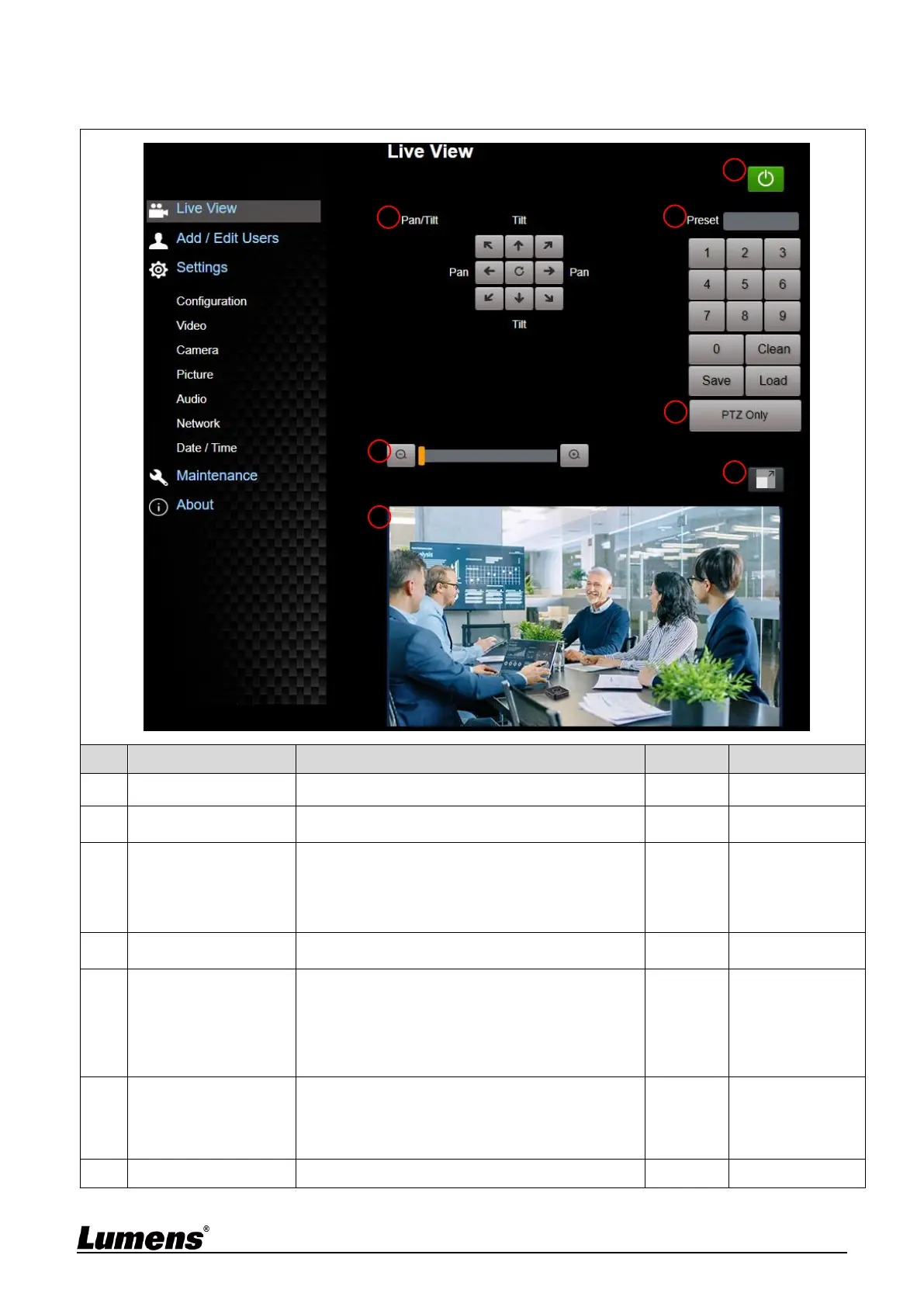
6.2.2 Live View
No
Item
Function Descriptions
VC-A61P
VC-A61PN
1
Pan / Tilt setting
Adjust the Pan/Tilt position of the camera screen
V
V
2
Zoom ratio
Adjust the zoom-in or zoom-out ratio via scroll
bar
V
V
3
Preview window
Display the screen currently captured by the
camera
V
Support when
NDI|HX is Off
4
Preset setting
Select the number first and then select SAVE or
LOAD
V
V
5
PTZ Only
Enable/Disable PTZ setting
Disable (Default): Call the preset, execute
Pan/Tilt/Zoom/Focus + picture parameters
setting
Enable: Call the preset, only execute
Pan/Tilt/Zoom/Focus
V
V
6
Switch to Full Screen
Switch the preview window to full screen
V
Support when
NDI|HX is Off
7
Power button
Turn on or turn off the camera power
V
V
4
3
2
1
5
6
7

Other manuals for Lumens VC-A61P

Related product manuals