8
USING THE SYSTEM
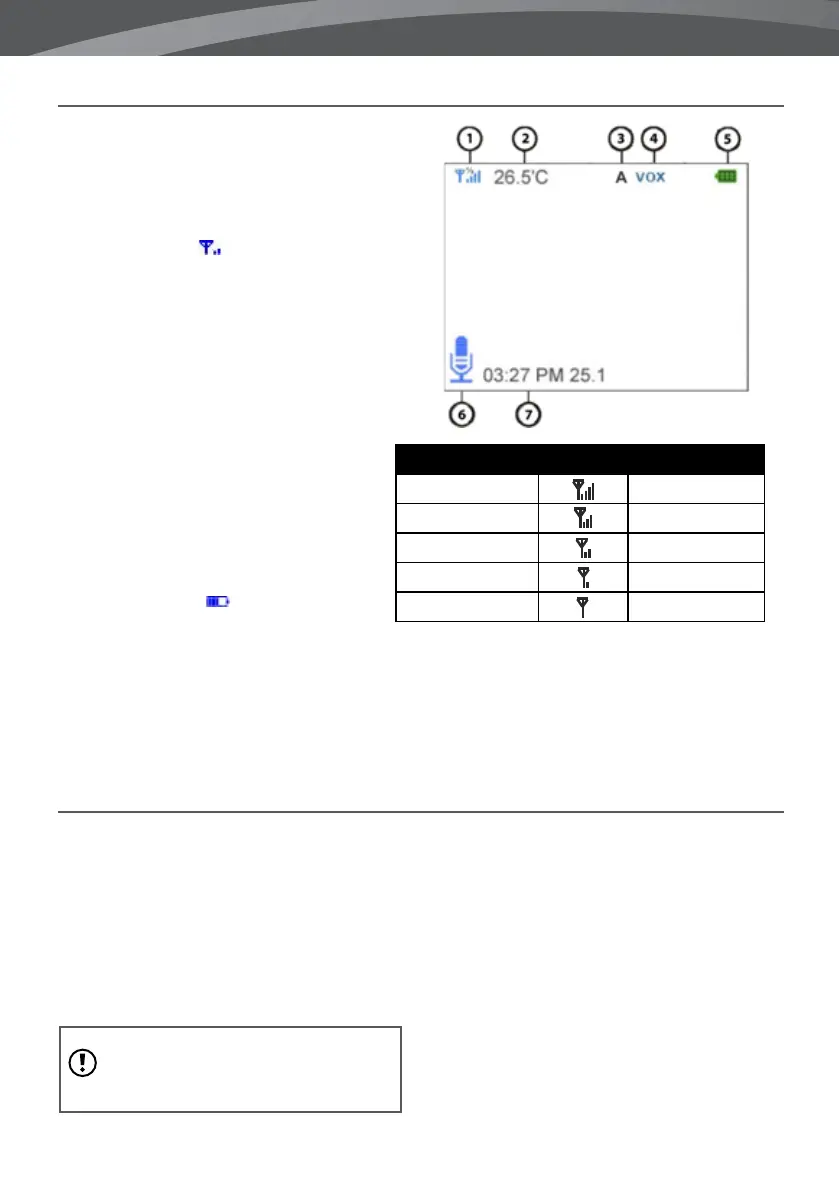
The video of the baby unit will be displayed
on the screen of the parent unit when both
are switched on. The icons on the screen are
explained below.
1. Signal indicator
- The signal indicator
shows the strength of the connection
between units. no bars indicate a poor
signal and 4 bars indicate the strongest
signal (see table).
2. Temperature indicator - Displays the
temperature measured by the baby unit.
3. Switch Indicator - Monitor will
automatically switch between cameras
when activated
4. VOX indicator - Appears when the VOX
mode is activated.
5. Battery indicator - Indicates the
battery life of the parent unit.
6. ‘Talk’-indicator - Appears when the talk button is pressed. You can now talk through the baby unit.
7. Date and time - Displays the current date and time.
Signal strength Indicator Warning
Perfect None
Good None
Fair None
Low Out of Range
No Signal Out of Range
OUT OF RANGE
When the baby unit is positioned too far away
from the parent unit, the message “Connecting...” will
appear on the screen of the parent
unit and the video will start to icker. When
there is no connection between the baby and
the parent unit, the screen of the parent unit will
be black and display the message “Connecting...”
note: If moving the baby and parent unit
closer together does not help, try pairing the
baby and parent unit. see Pairing chapter.















 To Next Page