1 2
3
4
5
1 2
3
[ 32 ] [ 33 ]
Using Repeaters in the PowerView® App: Scenes
Create a Repeater(s) Scene(s) to change the light color of Generation 2 Repeaters. Then, customize shade operation
by using a Repeater Scene in a Multi-Room Scene to change a Repeater’s light color when that Multi-Room Scene
is activated.
Note: A Repeater Scene by itself will only change the light color of a Generation 2 Repeater. It will not operate
the shade. To coordinate a Repeater light color change with shade operation, include a Repeater Scene in a Multi-
Room Scene.
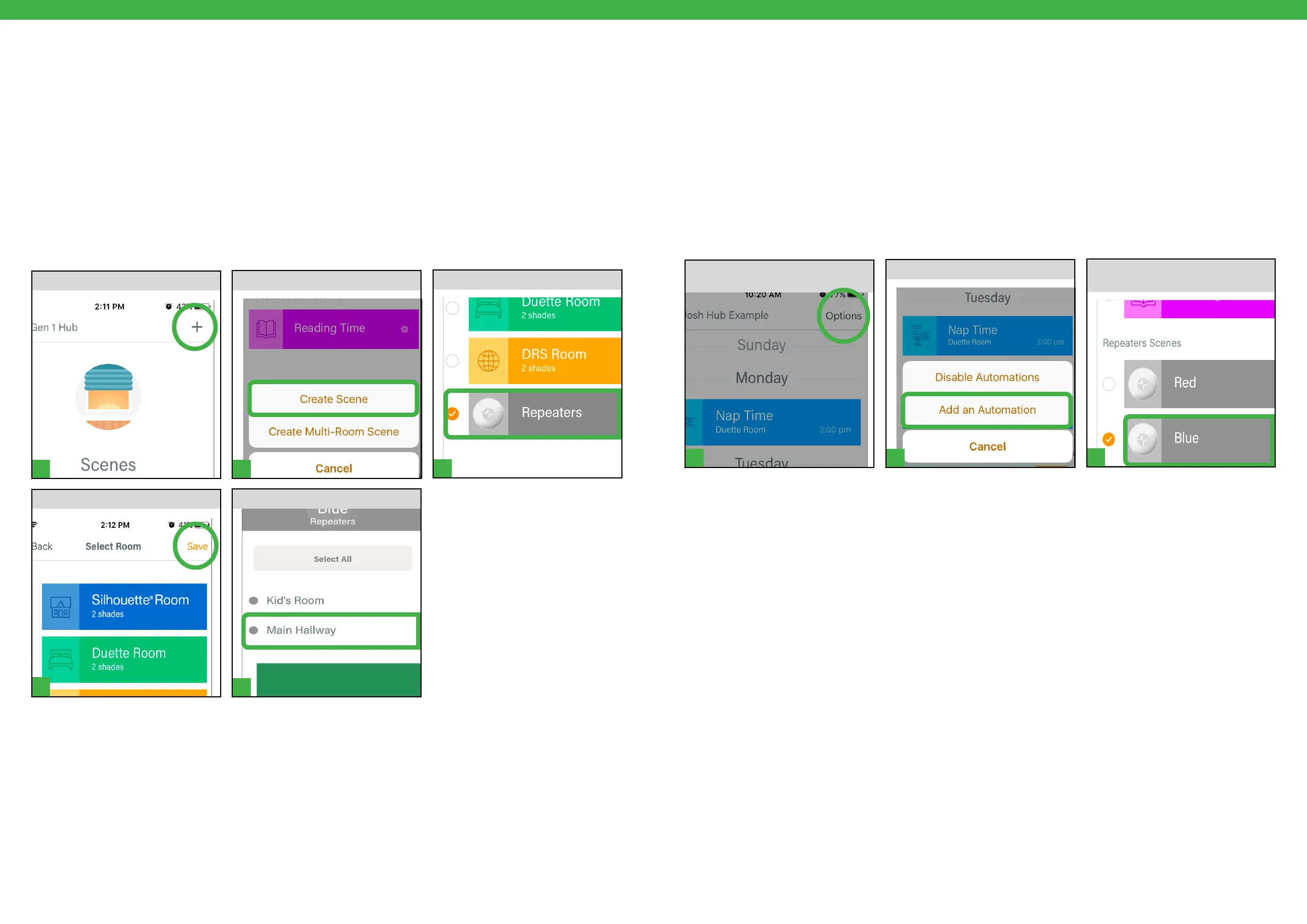
TAP Create Scene.
From the Scenes Tab, TAP +.
Create a Repeater Scene
SELECT Repeaters Room.
Note: Choose a custom light color
to be activated with Scene.
SELECT Repeater(s) for Scene.
TAP Save.
Using Repeaters in the PowerView® App: Automations
TAP Add Automation.
From the Automation Tab, TAP
Options.
Create an Automation
SELECT a Scene or Multiple Room
Scene containing Repeaters.
Automate Scenes and Multi-Room Scenes with Repeaters to schedule timed activation of Repeater light color
change.


 To Next Page
 Loading...