EasyManua.ls Logo

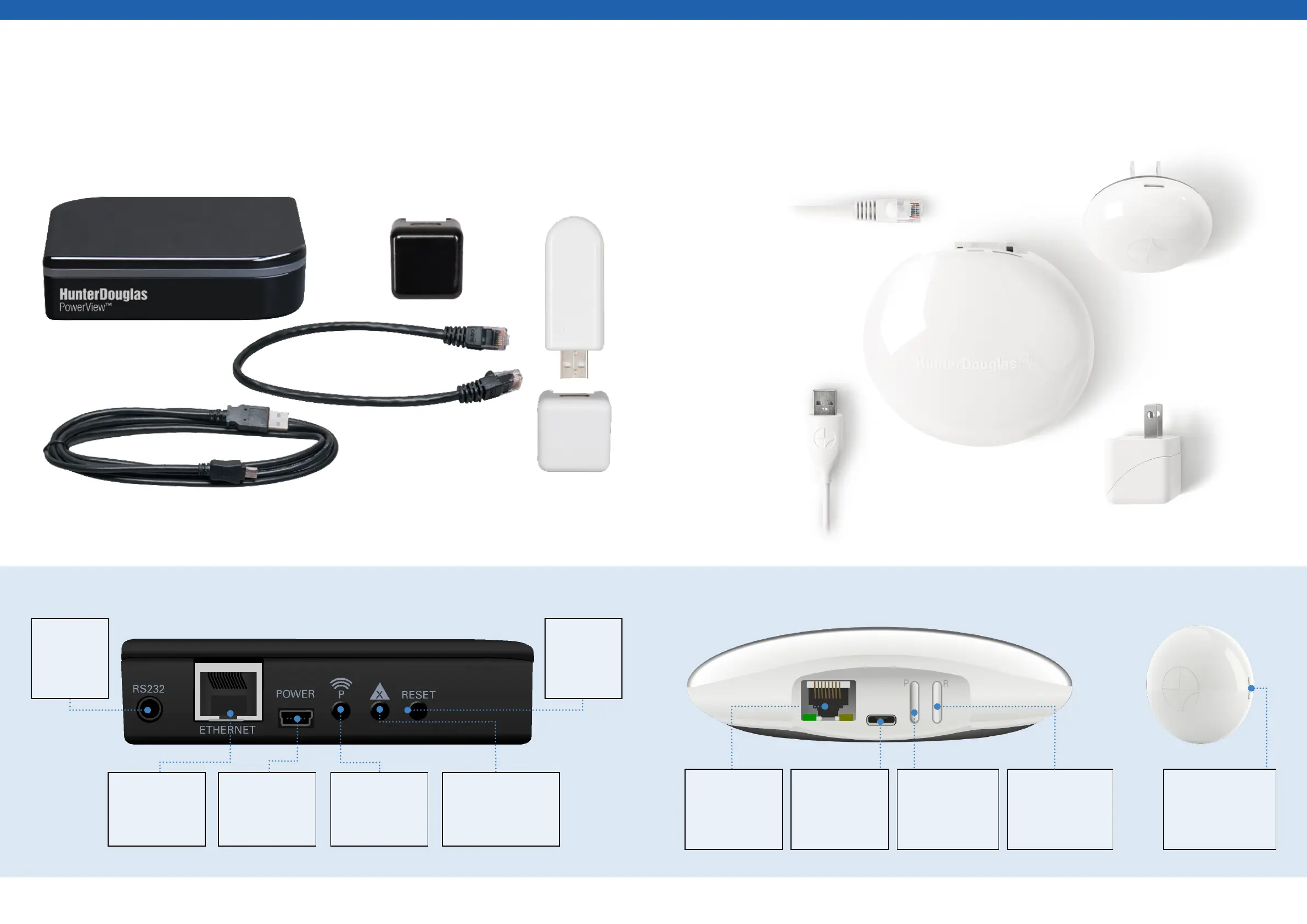
LuxaFlex PowerView Pebble - Getting Started with the Generation 1 Hub; Getting Started with the Generation 2 Hub; Back of Generation 2 Hub; Back of Generation 1 Hub

LuxaFlex PowerView Pebble
43 pages
Print Icon
To Next Page IconTo Next Page
To Previous Page IconTo Previous Page
Loading...
[ 36 ] [ 37 ]
Getting Started with the Generation 1 Hub
Ethernet Port
Connects
Ethernet cable to
a router.
Power
Plug USB cable in
to port to power
the Hub.
Test
Sends signal to
repeaters to test.
Data Erase
Press for 6 seconds to
erase all data stored
on the Hub.
Generation 1
Repeater
Generation
1 Repeater
Power Supply
Generation 1 PowerView® Hub
PowerView® Hub
Power Supply
Ethernet Cable
USB Power Supply Cable
RS232
Plug allows
connection
to Home
Automation.
Reset
Pressing the
reset button
reboots the
system.
Generation 1 Hub and Generation 1 Repeater Components
Back of Generation 1 Hub
Getting Started with the Generation 2 Hub
Generation 2
PowerView® Hub
Ethernet Cable
USB Power
Supply Cable
Generation 2
Repeater
Generation 2 Hub
Power Supply
Ethernet Port
Connects
Ethernet cable to
a router.
Power
Plug USB cable in
to port to power
the Hub.
Reset
Press to cycle
power. Press and
hold to reset/clear
Hub data.
Back of Generation 2 Hub
“P Button
Used for pairing
and sending
test signals to
repeaters.
Reset
Press and hold until
LED turns sold amber
(6-10 seconds) to
reset.
Generation 2 Hub and Generation 2 Repeater Components

Table of Contents

Related product manuals