MCSWP40 by MacAllister
50
Care and maintenance
GB
IE
In more detail...
Spark plug
> Inspect the spark plug every 25 hours or prior to long-term
storage over 30 days if the use has not been this high. Clean or
replace with a new spark plug if necessary.
> Remove the air ltercover (13) and air lter(14) as described.
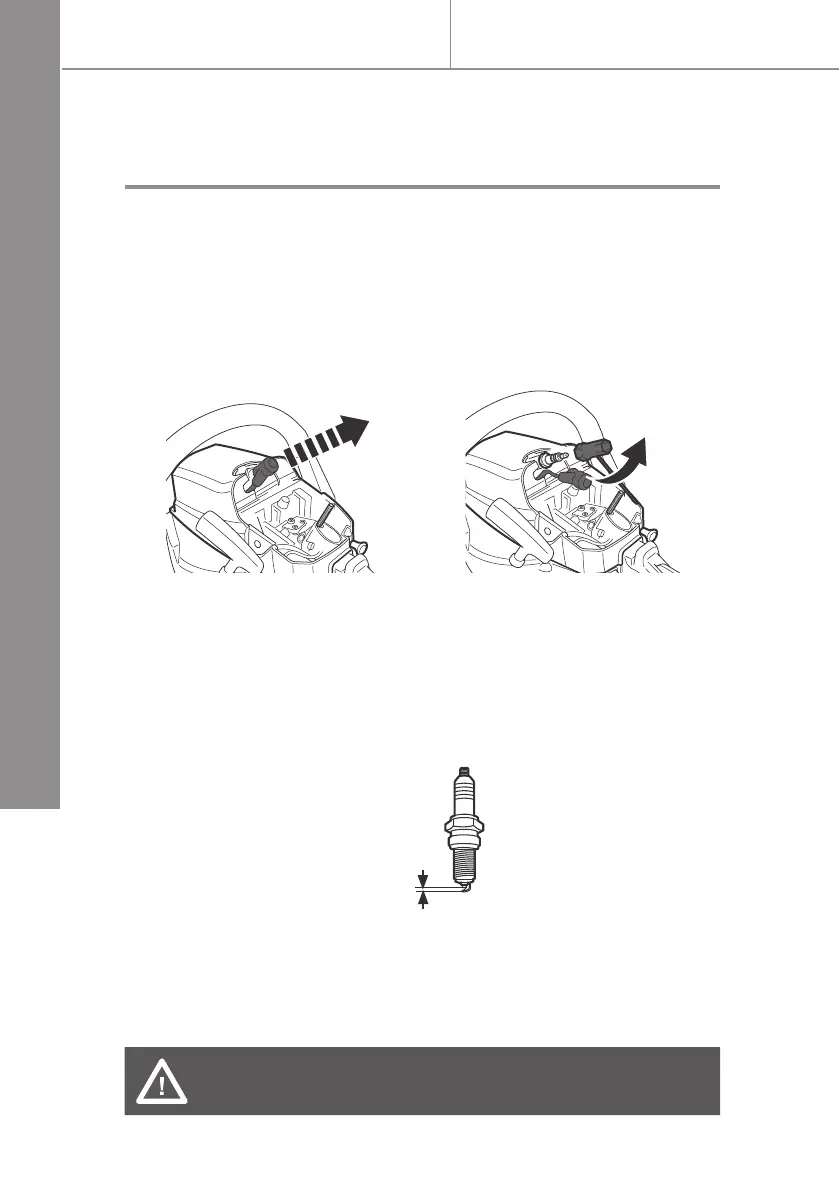
Disconnect the spark plug connector (15) (Fig. 58).
> Use the combination spanner (32) to loosen and remove the
spark plug (Fig. 59).
> Check the spark plug for damage and wear. The colour of the
electrode should be light-brown coloured.
> Remove debris from the electrode with a soft wired brush; avoid
heavy cleaning of the electrode.
> Dry the spark plug with a soft cloth if it is wet from fuel.
> Check the spark plug gap. It should be 0.5 mm (Fig. 60)
> Replace with a new spark plug if either the electrode or the
insulation is damaged.
> When replacing the spark plug, rst screw it in hand tight and
then lightly tighten it with the spark plug wrench (32).
WARNING! Do not over-tighten the spark plug to avoid
any damage!
> Attach the air lter cover (13) and secure it with the screw (12).
Fig. 58 Fig. 59
0,5 mm
Fig. 60


 To Next Page