42
Unit installation and configuration/Setting the signals
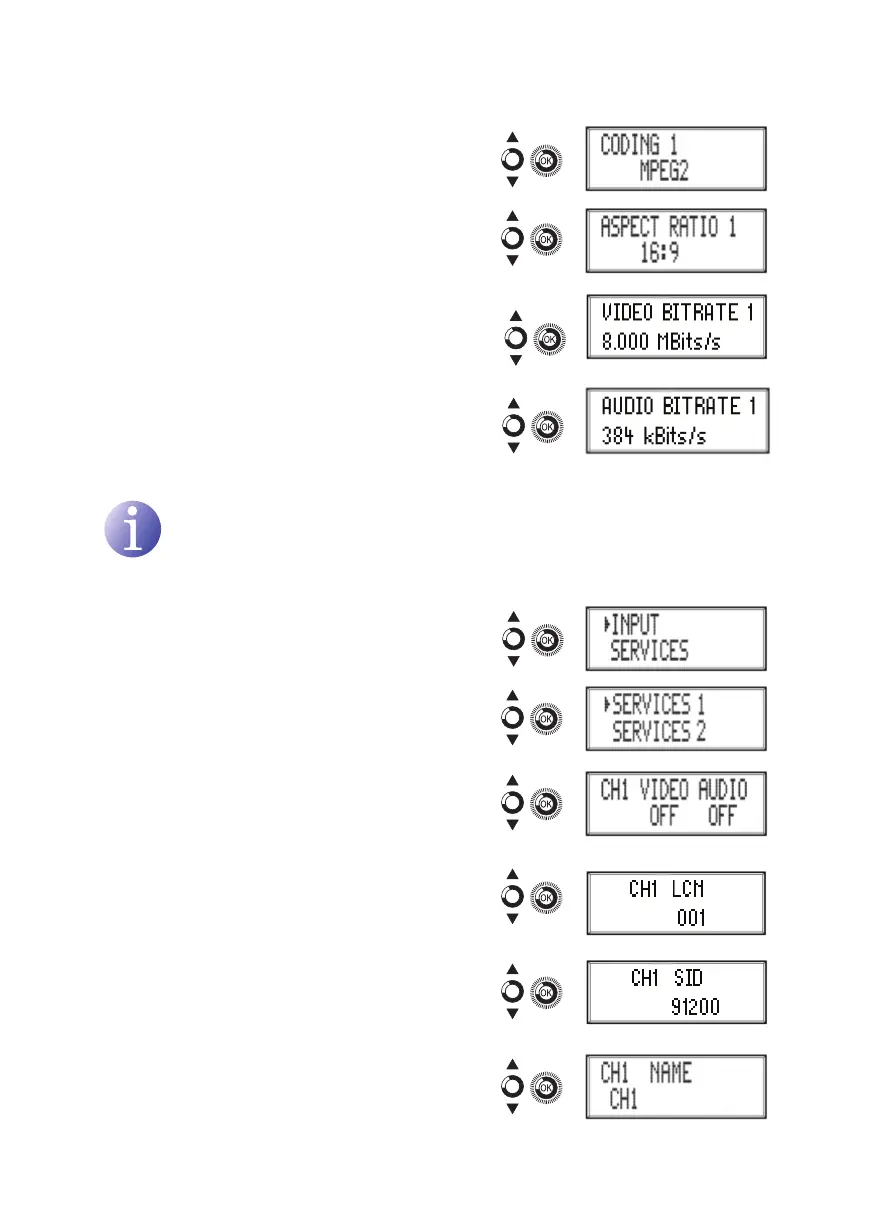
e) Locate and select the option CODING 1.
This congures the coding parameters:
MPEG2 or mPEG4 LAyER2.
f) Locate and select the option ASPECT
RATIO. The possible aspect ratio values
are 1:1, 4:3 and 16:9.
g) Locate and select the option VIDEO BI-
TRATE. The unit can be congured for a
data coding speed at input of 3 to
8 Mbits/s.
h) Locate and select the option AUDIO
BITRATE. The unit can be congured for a
data coding speed at input of 96; 128; 160;
192; 224; 256; 320 and 384 Kbits/s.
NOTE
If you keep pressing the control button down you will access the information and
conguration of the following input signals.
Configuration of the carrier services
1) Locate and select the option SERvICES.
2) Locate and select the option SERvICES and
the number corresponding to the input you
want to congure: 1 to 2 for MAC 201 and 1 to
4 for MAC 401.
a) Locate and select the option CH1 vIDEO
AUDIO. Activate (ON) or deactivate (OFF)
the video and audio signals of the rst
input.
b) Locate and select CH1 LCN. Congure the
LCN value of the signal.
c) Locate and select CH1 SID. Congure the
SID value of the signal.
d) Locate and select CH1 NAmE. Assign a
name to the signal in CH1.



 To Next Page