43
Unit installation and configuration/Setting the signals
NOTE
If you keep pressing the control button down you will access the information and
conguration of the following input signals.
Configuration of the output signal
NOTE
To introduce a sequence of digits in the display move the control button verti-
cally to change the value of the current digit and horizontally to move between
digits.
NOTE
Position the cursor to the right of the current value and move the control button
vertically to increase or decrease the current value. Hold the control button up or
down to increase or decrease the current value more quickly.
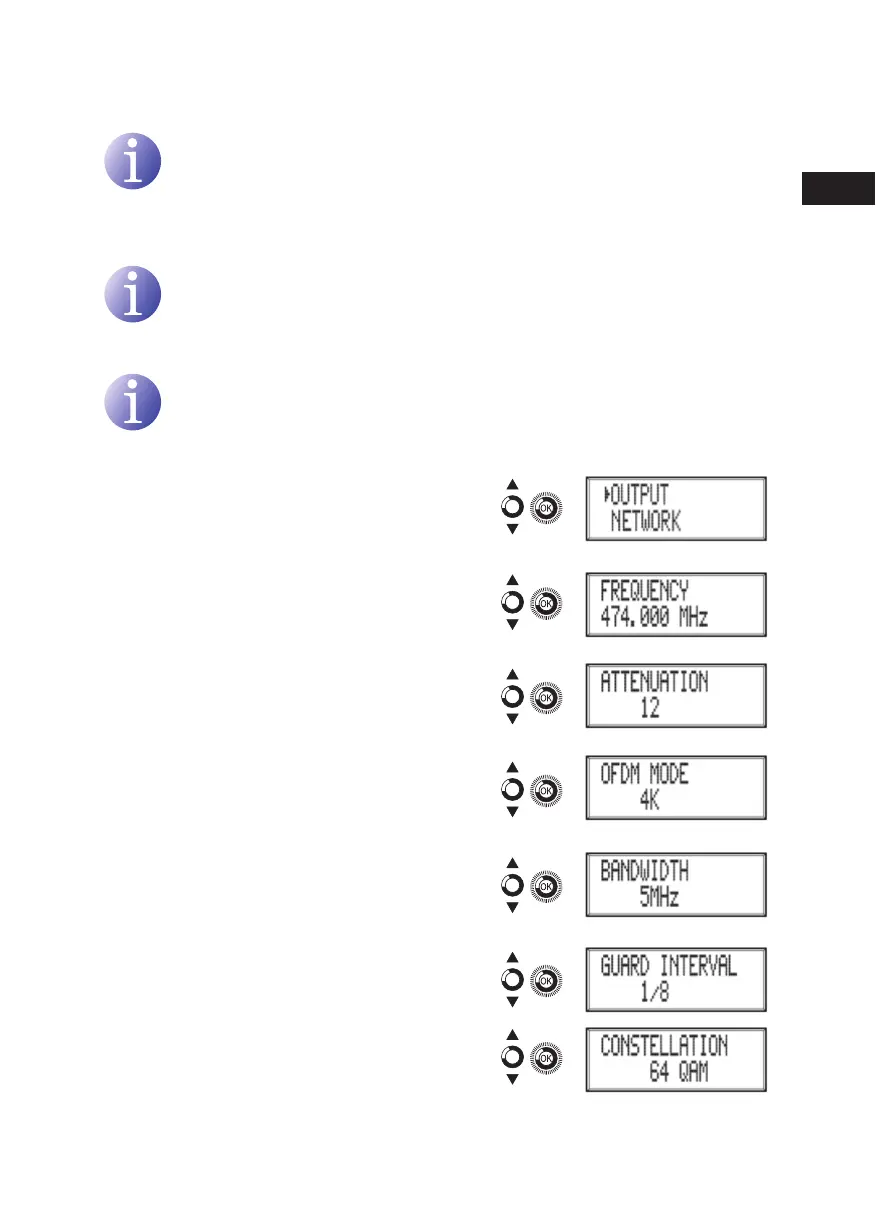
3) Locate and select the option OUTPUT.
a) Locate and select the option FREqUEN-
Cy. Congure the output frequency value
between 45 mHz and 865 mHz.
b) Locate and select the option ATTENU-
ATION. Select the output attenuation
between 0 and 47 dB.
c) Locate and select the option OFDm
mODE. Select the OFDM mode between
2k and 8k subcarriers.
d) Locate and select the option BAND-
wIDTH. Select the bandwidth between 6,
7 and 8 mHz.
e) Locate and select the option GUARD
INTERvAL. Select the guard interval be-
tween 1/32, 1/16, 1/8 and 1/4 of symbol.
f) Locate and select the option CONSTEL-
LATION. Select the modulation constella-
tion between 16qAm and 64qAm.
en



 To Next Page