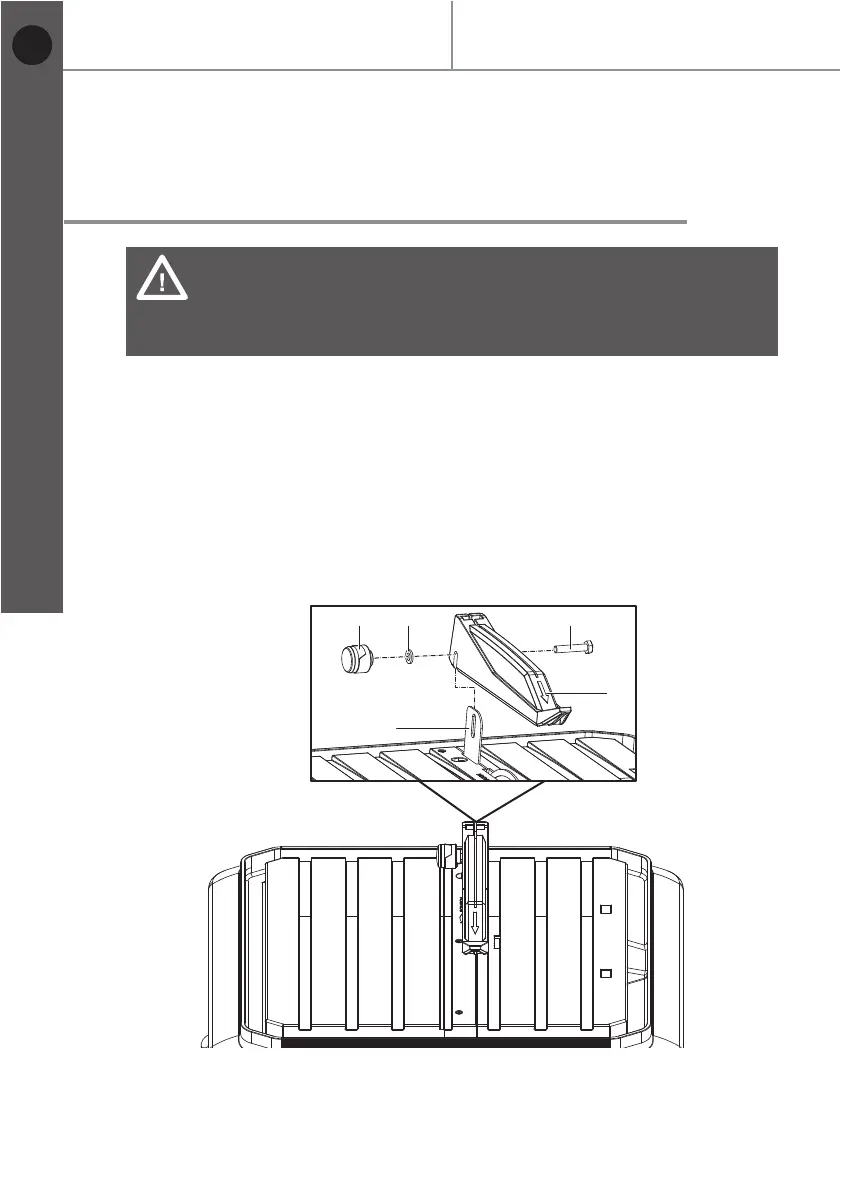
Fig. 10
16
MTC500 by MacAllister
Before you start
Getting started...
Mounting the upper protective guard
to the metal bracket
WARNING: Product damage!
Do not over-tighten socket head bolt (28) and locking knob (17).
The upper protective guard (3) must be free to rise and fall as the
workpiece is pushed towards the cutting disc.
> Unplug the tile cutter from the mains supply.
> Push the upper protective guard (3) onto the metal bracket (16).
> Push socket head bolt (28) through upper protective guard (3) and metal
bracket (16).
> Push the flat washer (29) onto socket head bolt (28).
> Screw and tighten locking knob (17) onto socket head bolt (28).
> Cover the cutting disc with the upper protective guard (3).
> Ensure that upper protective guard (3) can move freely and that it cannot touch
the cutting disc.
3
16
282917
EN


 To Next Page