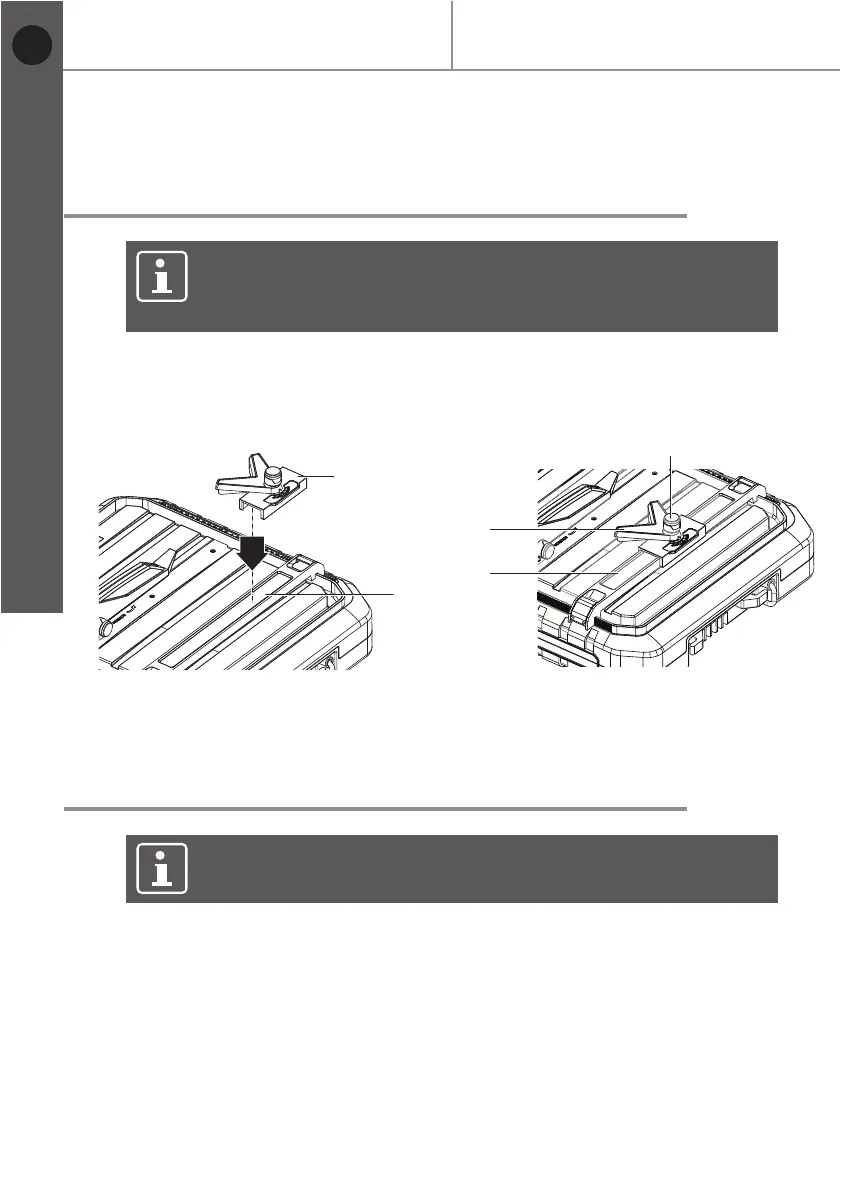
Fig. 13 Fig. 14
18
MTC500 by MacAllister
Before you start
Getting started...
Mounting/setting the mitre cutting
guide
NOTE: The mitre cutting guide can be set to a desired angle (0°~
45°). The mitre cutting guide can only be used when the parallel
cutting guide is mounted.
> Place mitre cutting guide (13) on parallel cutting guide (12).
> Loosen locking knob (14).
> Set mitre cutting guide (13) at desired angle.
> Tighten locking knob (14).
NOTE: The 45° vertical fence can be set to a desired angle
(0°, 45°).
Setting product for bevel cuts
> Raise the 45° vertical fence (1) approx. 45°.
> Fold out the holder (31) and position in the locator (32).
> Ensure that the 45° vertical fence (1) is correctly secured before working.
13
12
12
13
14
EN


 To Next Page