Fig. 8
Fig. 9
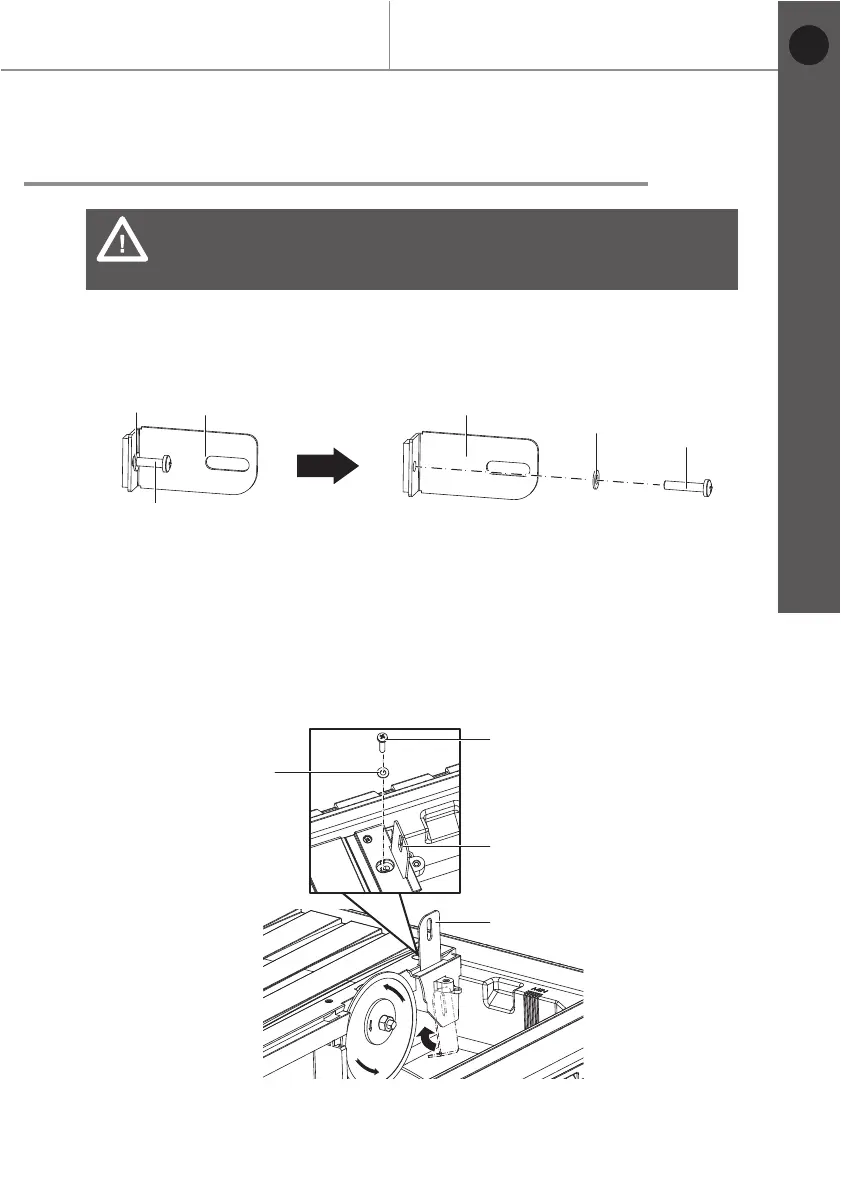
Assemble/adjust metal bracket
> Unplug the tile cutter from the mains supply.
> Raise the 45° Vertical fence (1) approx. 45° and remove. (Refet to Fig. 2)
> Loosen screw (19) and pull off lower protective guard (6). (Refet to Fig. 3)
> Remove the screw (26) and washer (27) from the metal bracket (16).
> Push the metal bracket (16) through gap in the housing from below. Ensuring
the L section is facing forwards.
> Attach the metal bracket (16) to the screw (26) and washer (27).
> Gently tighten the screw (26) with a Phillips screwdriver (not supplied).
> Align metal bracket (16) with the cutting disc (15).
> Tighten the screw (26) with a Phillips screwdriver (not supplied).
> Replace the 45° vertical fence (1).
WARNING: Product damage!
The metal bracket must always be aligned parallel to the cutting
disc.
Before you start
MTC500 by MacAllister
Getting started...
15
26
16
16
27
26
26
27
27
1616
EN


 To Next Page