29
Owner’s Manual
Owner’s Manual
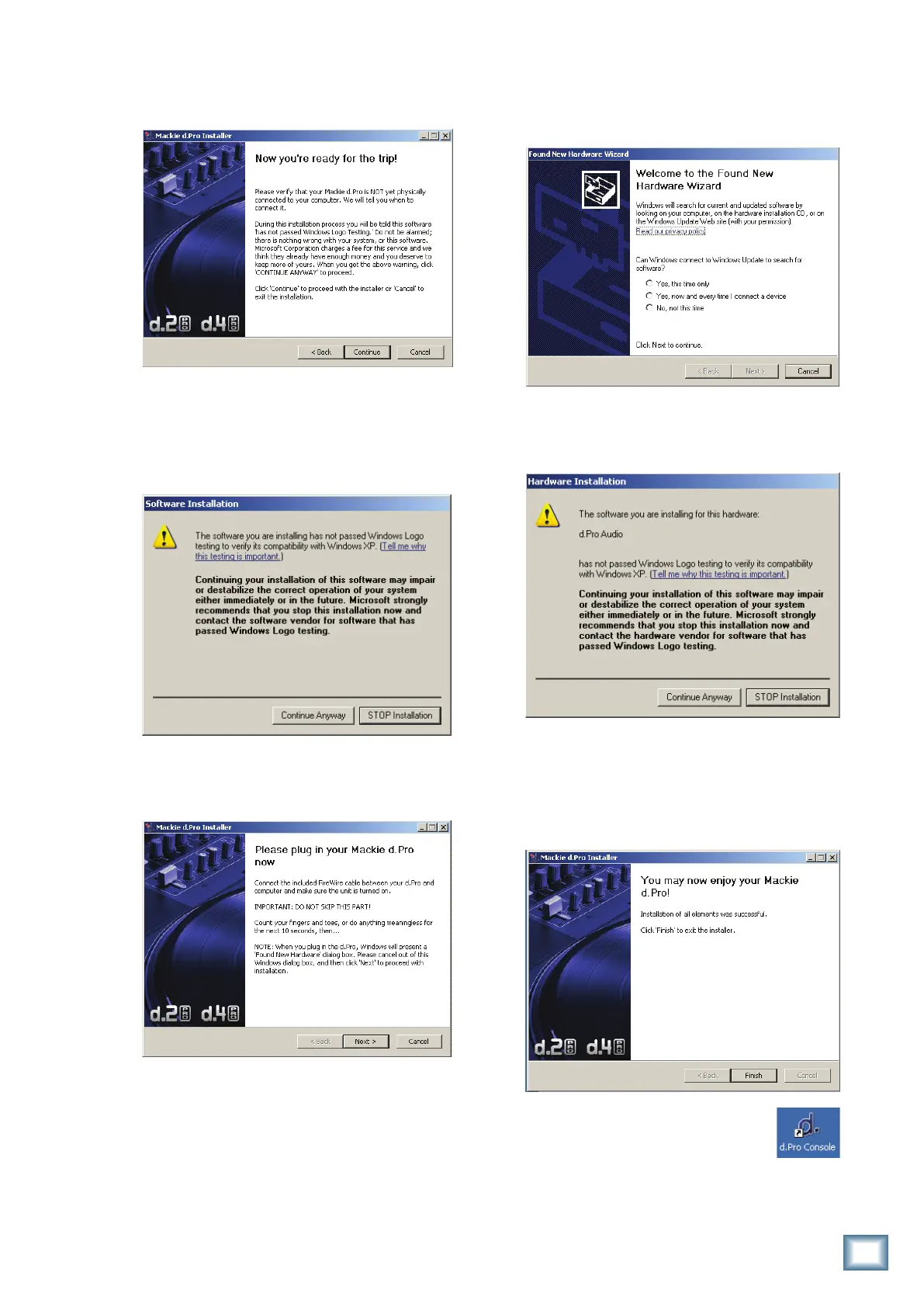
6. Thenextwindowremindsyoutomakesurethe
d.4 Pro is NOT connected to your computer yet.
Readtheinstructionsandclick“Continue.”
7. You may get a warning about running the
installer because it hasn’t passed Windows
Logo testing. It’s okay. We’ve tested it and it is
compatiblewithWindowsXP.Click“Continue
Anyway.”
8. Nowitistimetoconnectyourd.4ProFireWire
connection to your computer. Follow the in-
structionsandthenclick“Next.”
9. Waituntilthe“FoundNewHardwareWizard”
pops up. Do not select any options, just click
“Cancel”tocontinue.Ifthesamescreencomes
backup,click“Cancel”again.
10. You will get another impertinent warning, this
time about installing the hardware. It’s okay.
Click“ContinueAnyway.”
11. The d.Pro drivers and control panel will be
installed on your computer.
12. When the installation is complete, a window
will pop up to let you know that the installation
wassuccessful.Click“Finish”toer...wellnish.
Now you are ready to use the
FireWire capabilities of your d.4 Pro.
The installer also places a shortcut
to the d.Pro Console on your desktop
(see next page).


 To Next Page