Owner’s Manual
11
Owner’s Manual
DLM8/12 Loudspeaker: Rear Panel Features continued...
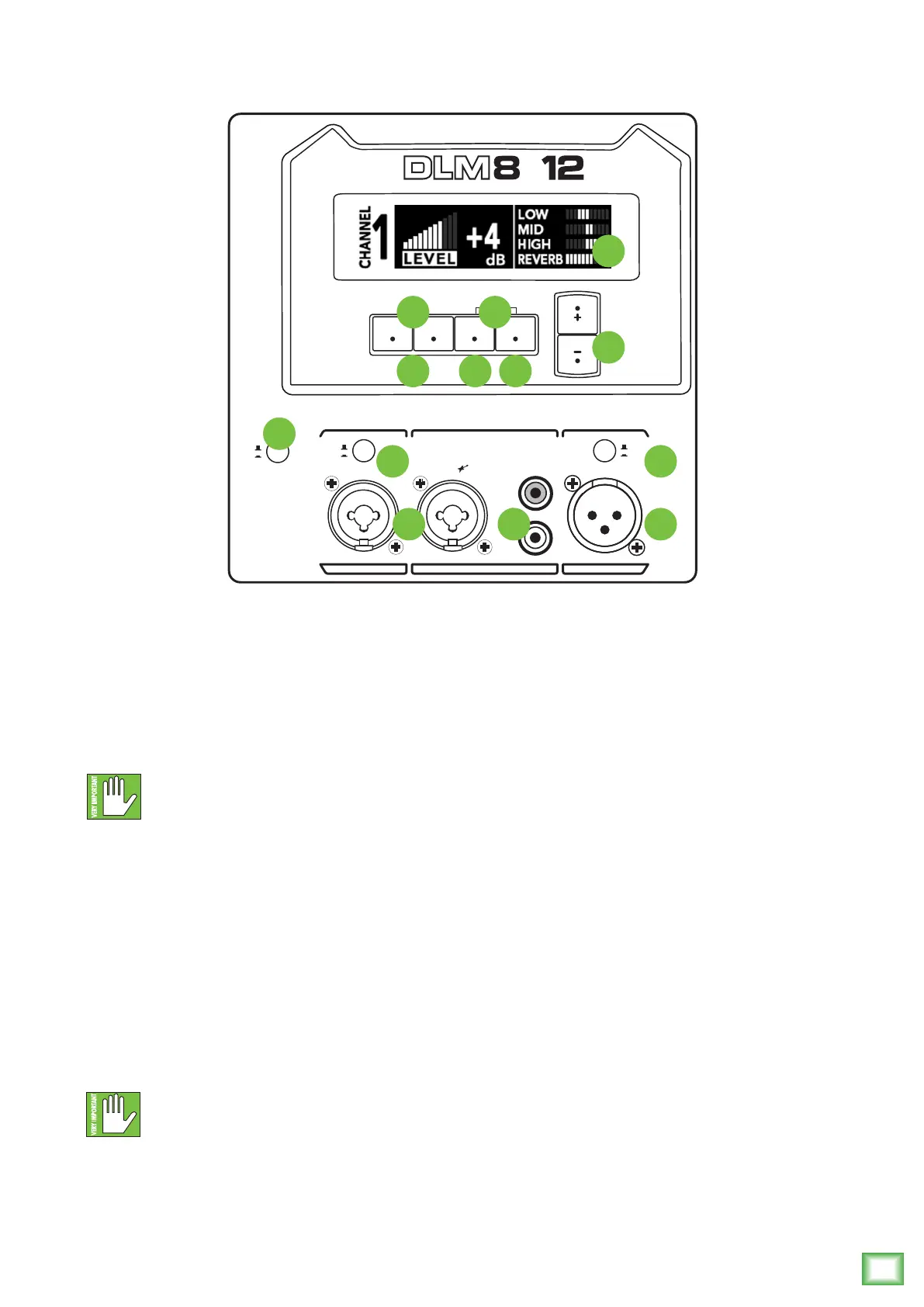
5. XLR and 1/4" Combo Inputs
Channel1mayacceptamicorline-levelsignalvia
XLRorline-levelsignalviaTRS1/4"cable.Beawareof
thepositionofthemic/lineswitch[6].
Channel2mayacceptHi-Zsources(suchasguitars)
viathe1/4"inputwithouttheneedforaseparateDIbox
orline-levelsignalviaXLR.
NEVERconnecttheoutputofanamplier
directlytotheinputoftheloudspeaker.
Thiscoulddamagetheinputcircuitry
oftheactiveloudspeaker.
6. Mic/Line Switch [Channel 1 Only]
Leavethisswitchoutwhenconnectingaline-level
signaltothechannel1inputconnector(fromamixer,
keyboard,orotherline-levelsignalsource).
Pushthisswitchinwhenconnectingamicrophone
directlytothechannel1inputconnector.Sincea
microphoneproducesamuchweakersignalthana
line-levelsource,thisprovidesanadditional30dBof
gaintoboostthemicrophonesignaltoalinelevel.
Readtheparagraphlistedaboveagain...
30dBofgainisalot,sobesuretheswitch
isengagedonlyifamicisconnectedtothe
channel1input!
7. RCA Inputs [Channel 2 Only]
ThestereounbalancedRCAinputsallowyouto
playaCDplayer,iPod
®
,orotherline-levelsource.
Thetapeinjacksacceptanunbalancedsignalusing
standardhi-[RCA]hookupcables.
8. Thru Output
ThisisamaleXLR-typeconnectorthatproduces
exactlythesamesignalthatisconnectedtothe
maininputjackoramixofchannels1and2.Useitto
daisy-chainseveralDLMloudspeakerstogetheroff
thesamesignalsource(s).Seepage8tolearnmore
aboutdaisy-chainingDLMloudspeakers.
9. Ch 1/Mix Switch [Thru Output]
Thisswitchallowsyoutochoosewhetheronlythe
channel1signalissentouttothenextloudspeaker
[switchout–Ch1]orifamixofthechannel1
and2signalsaresentouttothenextloudspeaker
[switchin–Mix].
10. OLED Display
TheOLEDDisplayisoneofthemostvitalfeatures
oftheDLMloudspeaker.Itdisplaysloudspeaker
informationincluding(butnotlimitedto)level,
EQ,FXselectedandlevelsandotherparameters.
WhenaDLMloudspeakerispoweredup,thelast
stateitwasinwillloadupandtheOLEDDisplaywill
presentthechannel1screenandsettings.
DLMloudspeakerswilldisplayarunningRunning
Manscreensaverifparametershaven’tbeenchangedin
awhile.SimplytouchoneoftheDL2buttonsto“wake
up”thedisplay.
BASS +2
TREBLE +2
AUX
LEVEL
R
L
Line
Mic
Ch 1
Mix
1 THRU2
TRS =
TRS = Line
XLR
MEMSYS21
2000W Digital Loudspeaker
/
2000W
2W
POWER
5
6
17
11
12 15
13 14
16
10
9
87



 To Next Page