DLM8/12 Powered Loudspeakers
12
DLM8/12 Powered Loudspeakers
DLM8/12 Loudspeaker: Rear Panel Features continued...
11. Channel 1 and 2 Buttons
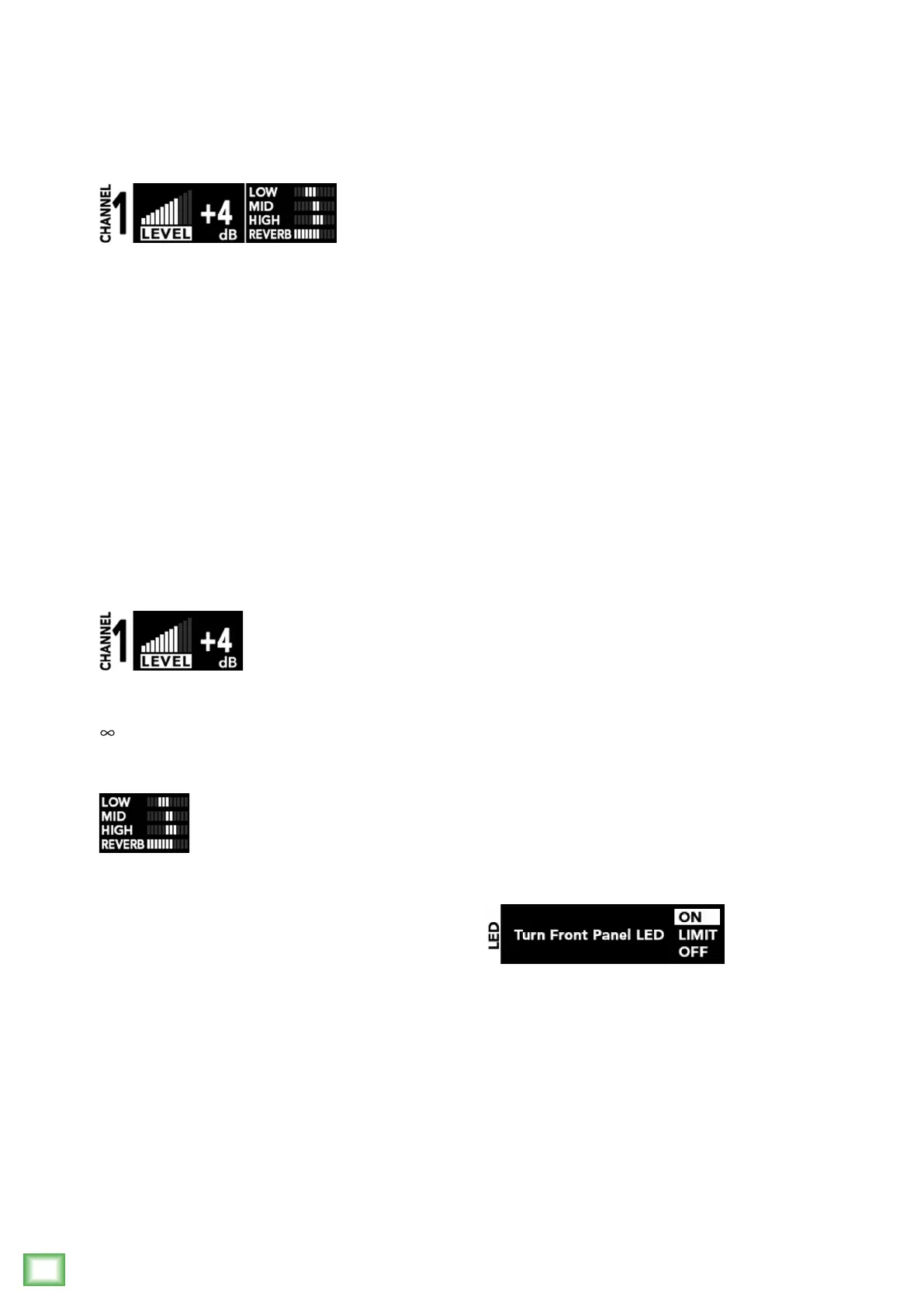
PresstheChannel1or2buttonrepeatedlyuntil
theparameteryouwanttochange(forthatchannel)
ishighlighted:
• Level
• Low
• Mid
• High
• FXSend[Reverb,Chorus,Delay]
Oncetheparameteryouwanttochangeis
highlighted,pressthe+or–button[16]repeatedly
untilyouhaveachievedtheperfectparametervalue.
Let’stakeamoredetailedlookateachoftheve
inputchannelparameters:
Level:
Leveladjuststheoverallsignallevelattheinputs
tothebuilt-inpowerampliers.Itrangesfromoff
(–
dB)to+10dB.
Channel Equalization (EQ):
BothDLMinputchannelshave3-bandEQwith
shelvinghigh,peakingmidandshelvinglow.
Shelvingmeansthatthecircuitryboostsorcutsall
frequenciespastthespeciedfrequency.Forexample,
thelowEQboostsbassfrequenciesbelow80Hzand
continuingdowntothelowestnoteyouneverheard.
Peakingmeansthatcertainfrequenciesforma“hill”
aroundthecenterfrequency.
WithtoomuchEQ,youcanreallyupsetthings.
We’vedesignedalotofboostandcutintoeach
equalizercircuitbecauseweknowthateveryone
willoccasionallyneedthat.ButifyoumaxtheEQ
oneverychannel,you’llgetmixmush.Ifyound
yourselfrepeatedlyusingalotofboostorcut,consider
alteringthesoundsource,suchasplacingamic
differently,tryingadifferentkindofmic,adifferent
vocalist,changingthestrings,orgargling.
Low:
ThelowEQprovidesupto15dBofboostorcut
below80Hz.Thecircuitisatatthecenterposition.
Thisfrequencyrepresentsthepunchinbassdrums,
bassguitar,fatsynthpatches,andsomereallyserious
malesingerswhoeatrawbeefforbreakfast.Thisband
changesincrementallyby±3dB.
Mid:
Shortfor“midrange,”thisEQprovidesupto
15dBofboostorcut,centeredat2.5kHz,alsoatat
thecenterposition.MidrangeEQisoftenthoughtofas
themostdynamic,becausethefrequenciesthatdene
anyparticularsoundarealmostalwaysfoundinthis
range.YoucancreatemanyinterestingandusefulEQ
changesbyturningthemidEQdownaswellasup.
Thisbandchangesincrementallyby±3dB.
High:
ThehighEQprovidesupto15dBofboostorcut
above12kHz,anditisalsoat(noboostorcut)at
thecenterposition.Useittoaddsizzletocymbals,an
overallsenseoftransparency,oranedgetokeyboards,
vocals,guitarandbaconfrying.Turnitdownalittle
toreducesibilanceortomasktapehiss.Thisband
changesincrementallyby±3dB.
FX Send:
Thiscontrolsendsthechannelinputtothebuilt-in
FXprocessor.The16built-inFXmaybeselectedfrom
theSYSscreen[13].Reverb,chorusanddelaymakeup
the16choices.Thechoseneffectisglobal.Besureto
checkoutamoredetaileddescriptionofeacheffectin
AppendixB.
12. Front LED On / Limit / Off
Pressingthechannel1andchannel2buttons[11]
simultaneouslygivesyoutheoptiontoturnthefront
LEDon,offorlimit.Pressthe+or–button[16]to
makeachoice,followedbyanyotherbuttontoexitthe
screen.ChoosinglimitmeanstheLEDisonfull-time.
However,itwillickerwhenthelimiterisactive
[3dBofattenuation,averaged].



 To Next Page