Owner’s Manual
13
Owner’s Manual
DLM8/12 Loudspeaker: Rear Panel Features continued...
13. SYS Button
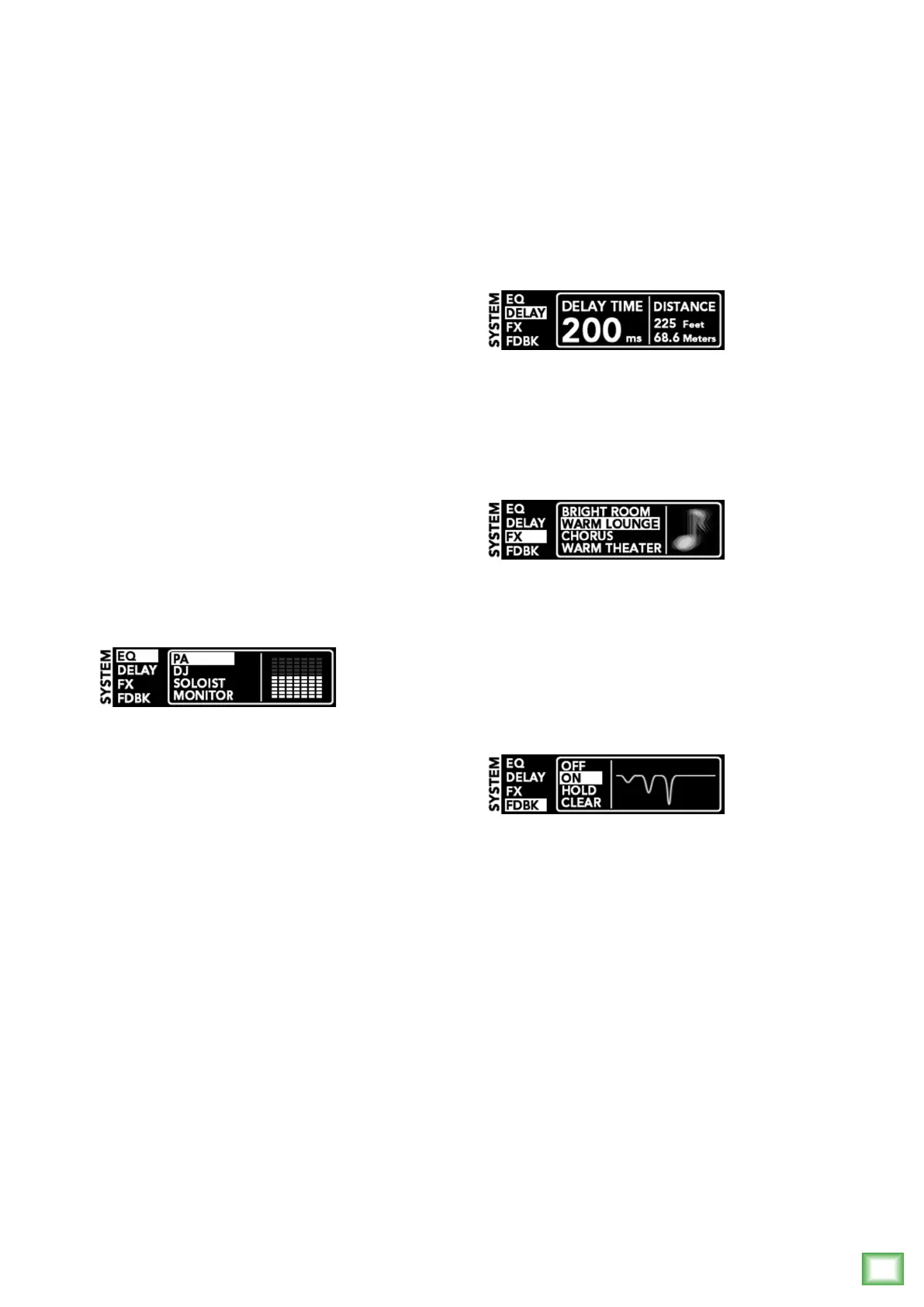
DLMloudspeakershavepowerfulsystemprocessing
toolsbuiltin.Simplypressthesystem[SYS]button
repeatedlyuntiltheparameteryouwanttochangeis
highlighted:
• EQ
• Delay
• FX
• Feedback
Oncetheparameteryouwanttochangeis
highlighted,pressthe+or–button[16]repeatedly
untilyouhaveachievedthesettingyouwantforthe
loudspeakersystem.
Let’stakeamoredetailedlookateachofthefour
factorysystempresetparameters:
EQ:
Hereyouareabletochangetheloudspeaker’s
speakermodetotailorittobestsuityourparticular
application.Therearesevenmodes,includingPA,DJ,
Soloist,Monitor,EQK,EQYandEQJ.
PA Speaker Mode–Thismodeisfullrange,but
focusesonmid-rangeclaritywherevocalsoftenreside.
DJ Speaker Mode–Thismodebumpsthelowsand
highswithamildtucktothemids,perfectformusic
playback.
Soloist Speaker Mode–Thismodefeaturesalow
frequencyroll-offtogetridofunwantedthumps
andaddsboostandsparkletomid-rangeandhigh
frequencies.Thismodeisperfectforplug-and-play
singer-songwriters.
Monitor Speaker Mode–Thismodefeaturesalow
frequencyroll-offandareductionaround2kHzto
ensuremaximumgainbeforefeedbackinmonitor
applications.
KYJ Speaker Modes–Thesemodesmimicthe
voicingsofpopularcompetitiveloudspeakers,allowing
youtoaddMackieDLMloudspeakerstoanexisting
systemwhilemaintainingsoniccontinuitythroughout
thesystem.
Delay:
Delay“delays”theaudiosignalforasetperiodof
time.WithDLMloudspeakers,it’susedforaligning
delaystacks,balconylls,etc,notasaneffect.DLM
delaytimesrangefrom0ms[0.0feet/0.0meters]
to300ms[337.8feet/102.9meters].
FX:
DLMloudspeakersinclude16“gigready”effects,
includingvariousreverbs,delays,chorusesand
combinationsofthese,aswell.Selectyourpreferred
effectfromthelistthenreturntochannel1or2[11]to
adjusttheappropriatelevelforeachsource.
Besuretocheckoutamoredetaileddescriptionof
eacheffectinAppendixD.
Feedback desTROYer:
Themulti-bandFeedbackDestroyerhuntsdown
offendingfeedbackfrequenciesandappliesuptosix
notchltersautomaticallytodestroyfeedbackand
maximizegainpriortofeedback.Thisisagreattoolfor
whenanengineerisnotpresent.
TherearefourFeedbackDestroyersettingstochoose
from:
Off [Default]–TheFeedbackDestroyerisnot
engaged.Ifltershavebeenapplied,thissettingwill
retainitscurrentltersettingsifthereareany,butthey
willnotbeengageduntilitisturnedbackon.Thisis
indicatedbythegrayedoutltergraphic.
On–WhentheautomaticFeedbackDestroyeris
turnedon,scanningoccurscontinuously.Thesixlters
willengagesequentiallywhenfeedbackispresentuntil
allareusedandthenitwillbelocked.Iffeedbackis
identiedonanexistinglter,thenotchwilldeepenin
threestepstofurtherdestroytheoffendingfeedback
frequency.Prettycool,huh?!
Clear–Thisclearsalllters.
Hold–Holdallowsausertoturnoffthecontinuous
scan.Inthismode,ltersthathavebeenappliedare
stillon,butthecircuitisnolongerlookingforfeedback.



 To Next Page