Owner’s Manual
17
Owner’s Manual
Now that you’re hungry, let’s take a look at what
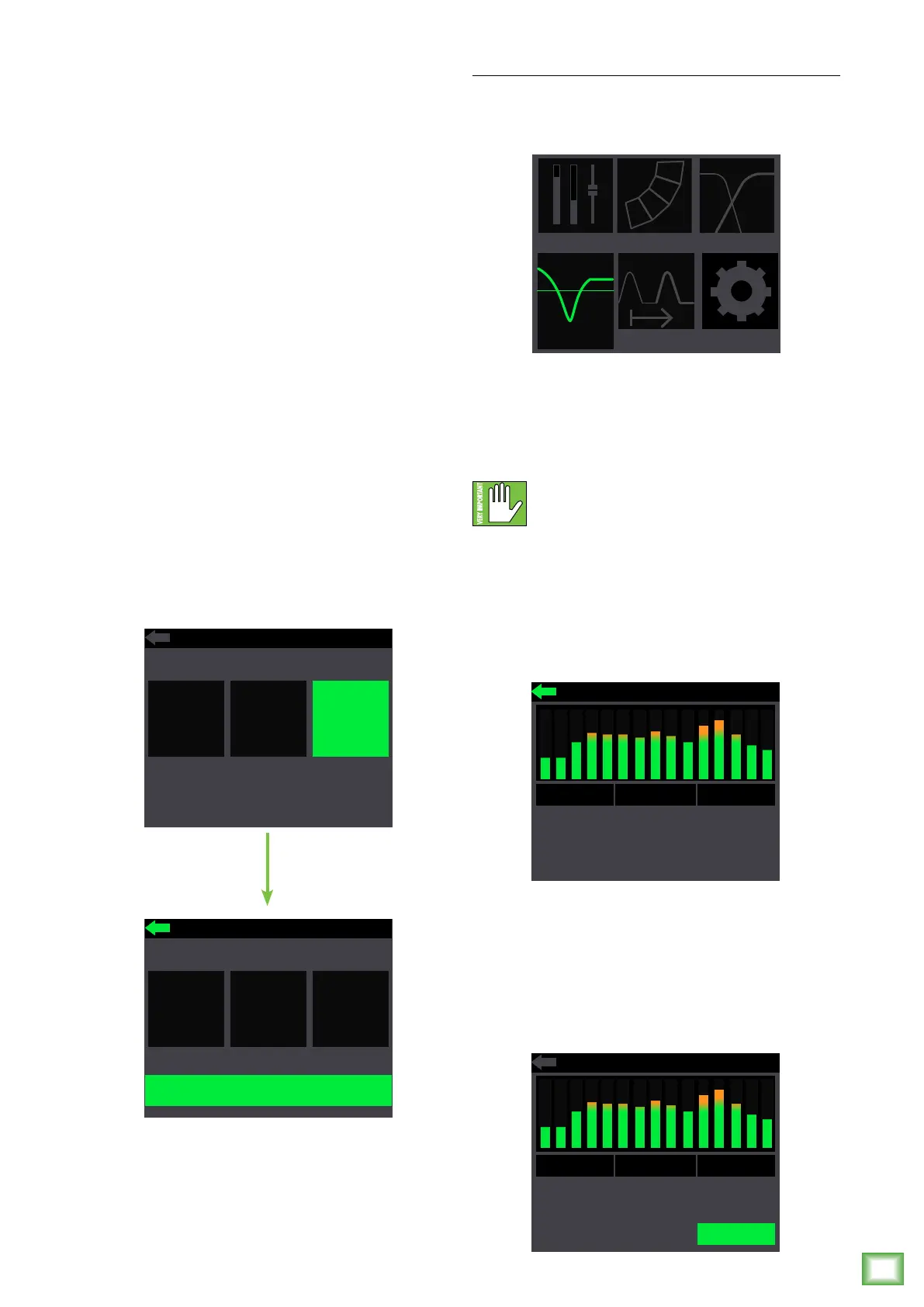
opening the sub menu really displays:
• O – Choose this if there is no subwoofer
connected to the system. Here you are using
a DRM2A loudspeaker only.
• DRM Sub – Choose this if a Mackie DRM8S
subwoofer is connected to the system. The crossover
point is set to 90 Hz to work in perfect harmony with
the Mackie DRM8S Sub. This is what we hope you
choose, thank you for your support!
• Var – Choose this if a non-Mackie DRM8S
subwoofer is connected to the system. Here you
can select the subwoofer’s HPF, ranging from
40 Hz – 60 Hz.
Rotate the speaker control knob until the sub HPF
you desire is illuminated, then push to select it.
If var is selected (as seen below), the frequency
is illuminated and may be changed by rotating the
speaker control knob clockwise (raise the frequency)
and counter-clockwise (lower the frequency).
In addition to the three sub modes, there’s a fourth
and final selection: the lef-facing arrow. Illuminating
and selecting this simply returns you to the menu.
SUBWOOFER HPF
90Hz
VAR
VAROFF
DRM
SUB
SUBWOOFER HPF
90Hz
VAR
VAROFF
DRM
SUB
EQ Setup
On to the bottom row now! The first one listed
is EQ, and, as you might expect, this is where
to adjust the output EQ.
The DRM2A has 3-band EQ with shelving hi, peaking
mid and shelving low. Shelving means that the circuitry
boosts or cuts all frequencies past the specified
frequency. Peaking means that certain frequencies
form a “hill” around the center frequency.
With too much EQ, you can really upset
things. We’ve designed a lot of boost
and cut into the equalizer circuit because
we know that everyone will occasionally need that.
But if you max the EQ, you’ll get mix mush.
In order to change the EQ, first push the speaker
control knob when the EQ icon is illuminated
(see image above). This opens the EQ view:
From here, rotate the speaker control knob until
the parameter you want to change is illuminated.
Push the speaker control knob in to select the
parameter followed by rotating the speaker control
knob clockwise (raise the gain / frequency)
and counter-clockwise (lower the gain / frequency).
MAIN
EQ DELAY
SUB
ARRAY
LoShelf
+7
133
-6
1.27k
+8
15.4k
HiShelfMidPar
LoShelf
+7
133
-6
1.27k
+8
15.4k
HiShelfMidPar



 To Next Page