13
H U I R E F E R E N C E G U I D E
1
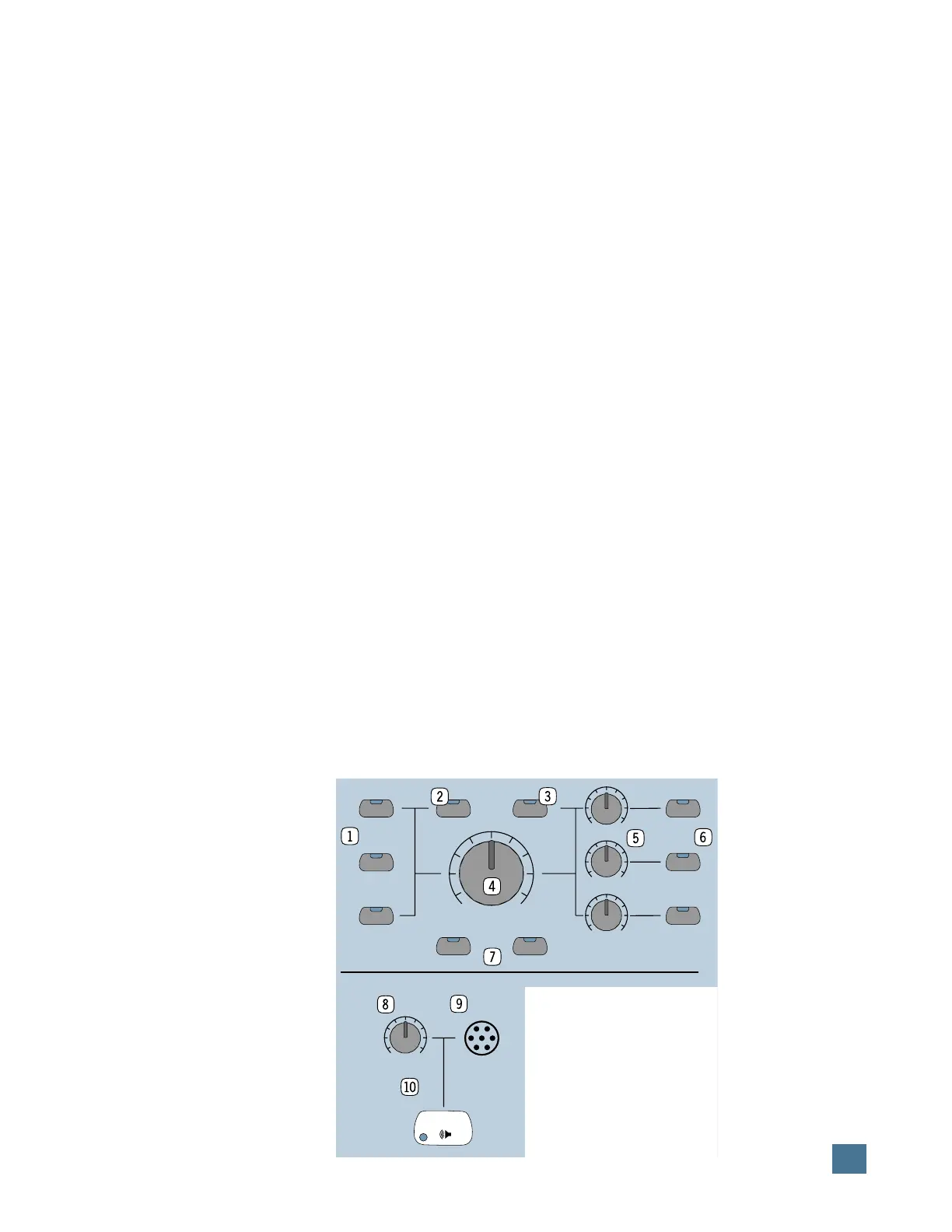
Input source select switches. These
switches allow you to monitor whichever stereo
input sources you have selected. Labeled
IN-
PUT 1
,
INPUT 2,
and
INPUT 3
, they correspond
to the
MONITOR INPUTS 1, 2, and 3
jacks on
HUI’s rear panel.
2
1:1 Discrete switch. This switch deter-
mines whether HUI’s inputs act as three stereo
pairs assignable to any stereo output, or as six
discrete mono inputs assigned to their corre-
sponding outputs only (used for
surround-sound mixing).
3
Mono switch. When this switch is en-
gaged, HUI sums all signals through the
MASTER VOLUME
control into one mono signal.
4
Master Volume control. This level con-
trol determines the overall level of the currently
selected monitor source(s).
5
Output level controls. Each one of these
controls adjusts the output level of its respec-
tive audio output pair.
6
Output select switches. These switches
determine which monitor outputs are being
used. Labeled
OUTPUT 1
,
OUTPUT 2,
and
OUTPUT 3/PHONES
, they correspond to the
MONITOR OUTPUTS 1, 2, 3
and
PHONES
jacks on HUI’s rear panel.
7
Mute and Dim switches. Out of the box, the
MUTE
switch mutes all three
MONITOR OUT-
PUTS
(including
PHONES
), while
DIM
lowers
HUI’s monitor output level by a set amount (de-
fault is 20dB).
To assign mute and dim control to specific out-
puts, press and hold the
OPTION/ALL
and
MUTE
or
OPTION/ALL
and
DIM
switches. The
LEDs in the
OUTPUT
assign switches begin
blinking to indicate which
OUTPUTS
are as-
signed to that particular
function. Press an
OUTPUT
switch to toggle the
MUTE
or
DIM
assignment on and off.
When it’s set the way you
want, press and hold the
OPTION/ALL
and
MUTE
or
OPTION/ALL
and
DIM
switches again to quit.
To change the amount of
dim level (i.e., more or less
than the default 20dB), press
and hold the
OPTION/ALL
and
DIM
switches to enter
the Dim Assignment Mode
(make sure the
DIM
switch
is turned on first if you want
to monitor the dim level as
you adjust it). Turn the
SCROLL
knob left or
right to adjust the dim level, which appears in
the VFD in 1dB increments. (The
SCROLL
knob
is located on the front panel, in the upper right
corner beneath the
INSERT/PARAM
switch.)
Note: For more on how
MONITOR INPUTS
and
OUTPUTS
work with HUI’s surround-sound ca-
pabilities, see pages 17 and 23.
Talkback Section
8
Talkback level control. This controls the
level of the internal (panel) talkback mic only.
9
Talkback panel mic. This on-board mic
allows you to communicate with the talent,
slate take numbers into your session, etc.
Note: Be sure the INTERNAL/EXTERNAL
select switch on the rear panel is set to INTER-
NAL when using the panel mic.
bl
Talkback Enable switch. This switch
turns on/off the talkback panel mic circuit on
both the panel mic and external talkback mics.
Press and hold this switch to talk, and the red
LED in the switch lights to indicate the talkback
function is active. If using the
REMOTE TALKBK
TRIGGER
jack on the rear panel to turn the
talkback mic on and off, the red LED in the switch
lights when the talkback function is active.
To route talkback assignment (it’s routed only
to
OUTPUT 3/PHONES
as a default), press
and hold the
OPTION/ALL
and
TALKBACK
switch. The LEDs in the
OUTPUT
assign switches
begin blinking to indicate which
OUTPUTS
are
assigned to the
TALKBACK
function. Press an
OUTPUT
switch to toggle the
TALKBACK
as-
signment on and off. When it’s set the way you
want, press and hold the
OPTION/ALL
and
TALKBACK
switches again to quit. Of course,
beware of feedback situations!
TALKBACK
MASTER
VOLUME
MUTE
OUTPUT 1
DIM
1:1 DISCRETE MONO
INPUT 1
INPUT 3
INPUT 2
OUTPUT 3/
PHONES
OUTPUT 2
LEVEL 1
LEVEL 3
LEVEL 2
CONTROL ROOM
MIC
LEVEL
MAX
CONTROL ROOM
OO
HUI FEATURES AND CONTROLS


 To Next Page