14
H U I R E F E R E N C E G U I D E
Transport Section
NOTE: The functions of some of these switches
depend on your particular DAW software. There-
fore, you may want to consult your DAW manual
for further details.
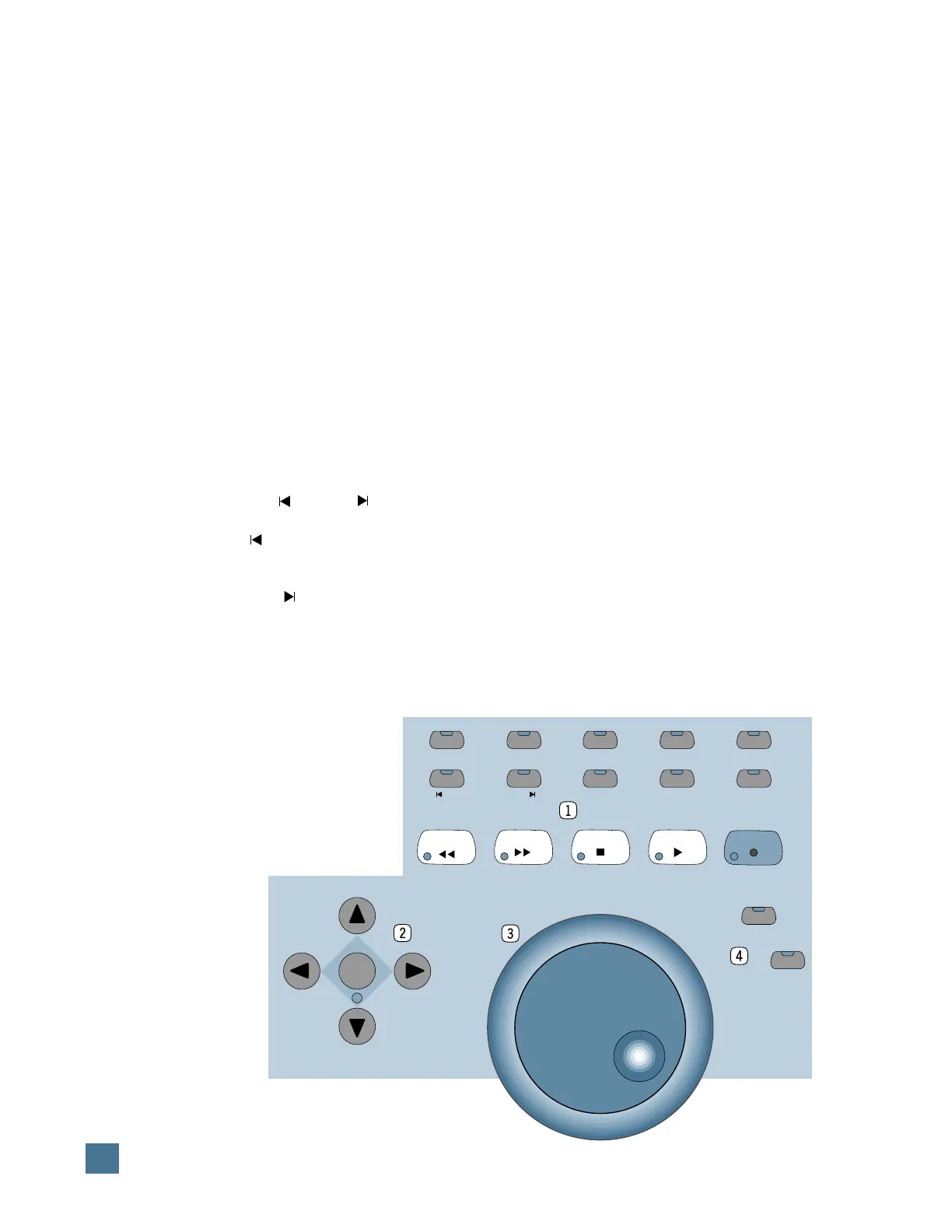
1
Transport switches.
The top row of transport switches includes
AUDITION
,
PRE
,
IN
,
OUT
, and
POST
. These
switches allow you to set up punch-in/punch-
out and playback locations.
•
AUDITION
lets you play back the section
you’ve designated for punch-in/punch-out.
•
PRE
sets up the amount of “pre-roll” before
the actual punch-in point.
•
IN
marks the point at which the punch-in
will begin.
•
OUT
marks the point at which the punch-in
will end (i.e., the “punch-out” point).
•
POST
sets up the amount of “post-roll” after
the punch-out point.
The second row of Transport switches in-
cludes:
RTZ
,
END
,
ONLINE
,
LOOP
, and
QUICK PUNCH
.
•
RTZ
returns the playback cursor in your
DAW to the beginning of the session (or
0/zero).
•
END
moves the playback cursor in your
DAW to the end of the session.
•
ONLINE
is used to bring your DAW online
(or to take it offline), and indicates online status.
•
LOOP
allows you repeatedly play back a
section of your DAW session.
•
QUICK PUNCH
allows you to use your
DAW’s “quick punch” feature.
Similar to the transport buttons on a tape re-
corder or in your DAW, the third row of
transport switches includes
REWIND
,
FAST
FWD
,
STOP
,
PLAY
, and
RECORD
.
2
Mode/Arrow switches. These switches
are used to navigate, zoom, and make selec-
tions in the waveform display. When
MODE
is
toggled, the arrow keys act as horizontal/verti-
cal view expander/contractors. When
MODE
is
disabled, the arrow keys can be used as a cur-
sor location device, similar in function to tab
and arrow keys on a computer keyboard.
3
Jog Wheel. This optical encoder wheel
performs many functions (depending on your
DAW). Because its function is determined by
your DAW, we refer you to your DAW controller
manual.
4
Scrub/Shuttle switches. These switches
control the function of the jog wheel. Again, re-
fer to your DAW controller manual for their
specific functions.
FAST FWD STOP PLAY
RECORD
MODE
REWIND
SCRUB
SHUTTLE
AUDITION
RTZ
PRE
END
IN
ON LINE
OUT
LOOP
POST
QUICK PUNCH
HUI FEATURES AND CONTROLS


 To Next Page