23
H U I R E F E R E N C E G U I D E
32
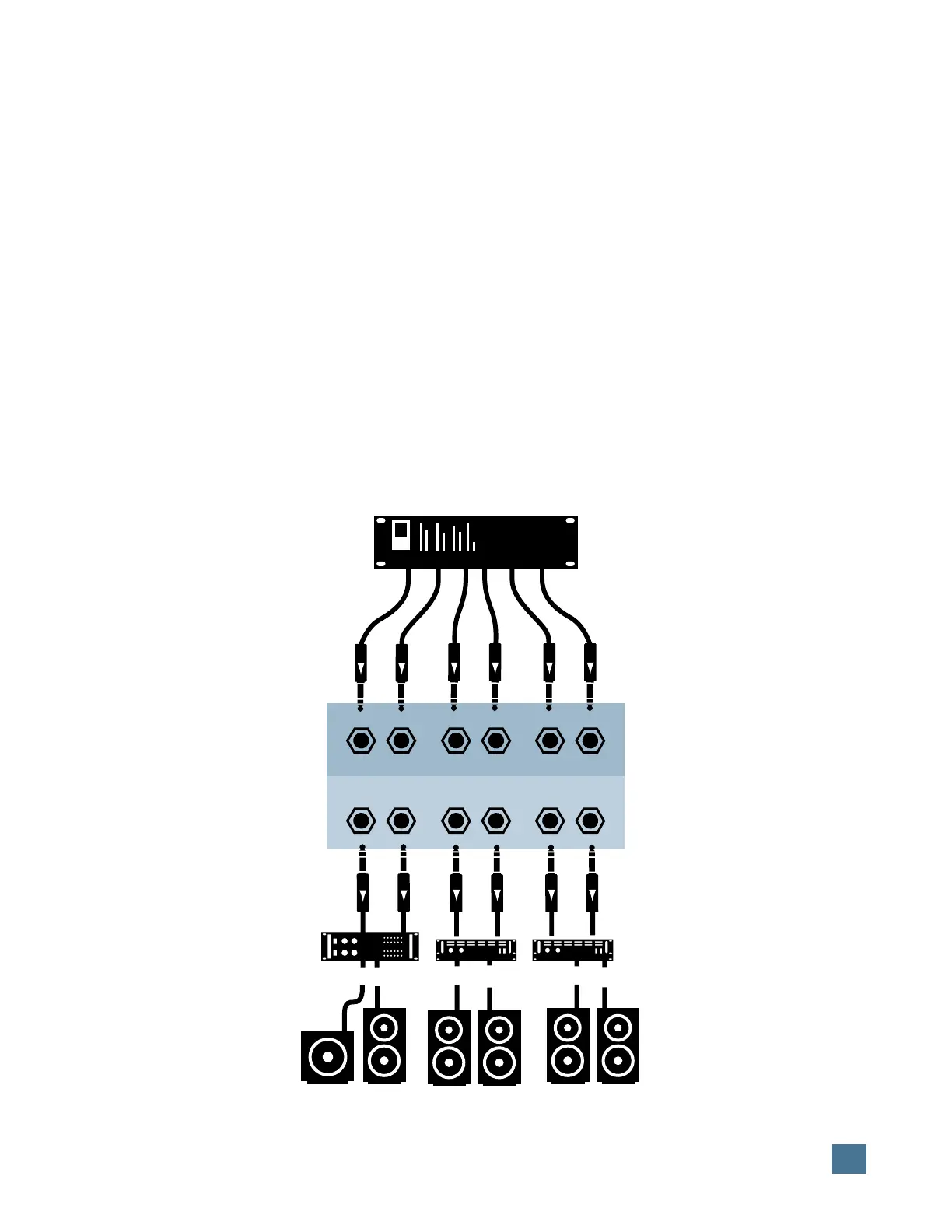
(Sub) (C) (L/S) (R/S) (L) (R)
(Sub) (C) (L/S) (R/S) (L) (R)
MONITOR INPUTS
MONITOR OUTPUTS
1
3 2 1
Power Amp 3
Subwoofer Center
Speaker
Right
Surround
Speaker
Left
Speaker
Right
Speaker
Left
Surround
Speaker
Power Amp 2
Power Amp 1
DAW audio interface
APPLICATION HOOKUPS
Surround-Sound Hookup
(5.1 configuration shown)
Surround-Sound Hookup
Scenario: Film, DVD, home theater mixing.
Source Material: Dialog, sound effects, mu-
sic, ambience stems, Foley, etc.
Outputs: As above.
Audio Hookup: To patchbay and HUI.
For monitoring when recording or mixing for
surround-sound, we suggest the following dis-
crete signal arrangements. Of course, using a
half-normalled or multed patchbay to simulta-
neously feed the signals to the final mix
recording deck and to HUI (for monitoring)
would make life much easier. Consult your fa-
vorite pro audio or music dealer for more
information on patchbays.
Be sure the 1:1 DISCRETE button is
switched on for the following applications.
For 5.1 Surround-Sound
On HUI’s rear panel, connect your DAW audio
interface outputs to:
Input 1 = L/R inputs
Input 2 = L/R Surround inputs
Input 3 = Center/Subwoofer inputs
Output assignments (to control room amplifi-
ers) would follow the same basic signal routing
paths.
For 4.1 Surround-Sound
On HUI’s rear panel, connect your DAW audio
interface outputs to:
Input 1 = L/R inputs
Input 2 = Center/Mono surround inputs
Input 3 = Subwoofer
Output assignments (to control room amplifi-
ers) would follow the same basic signal routing
paths.
Digital Control Hookup: Studio sync as ap-
plicable.
For further explanation of HUI’s surround-
sound monitoring abilities, turn back to page 17.


 To Next Page