53
Use the multiple string
F0 00 00 66 03 0F 03 00 F7 (request groups from Set 1)
F0 00 00 66 03 0F 03 01 F7 (request groups from Set 2)
F0 00 00 66 03 0F 03 02 F7 (request groups from Set 3)
F0 00 00 66 03 0F 03 03 F7 (request groups from Set 4)
F0 00 00 66 03 0F 03 04 F7 (request groups from Set 5)
F0 00 00 66 03 0F 03 05 F7 (request groups from Set 6)
F0 00 00 66 03 0F 03 06 F7 (request groups from Set 7)
F0 00 00 66 03 0F 03 07 F7 (request groups from Set 8)
F0 00 00 66 03 0F 03 08 F7 (request groups from Set 9)
to replace the single string
F0 00 00 66 03 0F 02 01 F7
for backing up all groups via MIDI.
Product: SR40•8/56•8 Date: 1/03/97
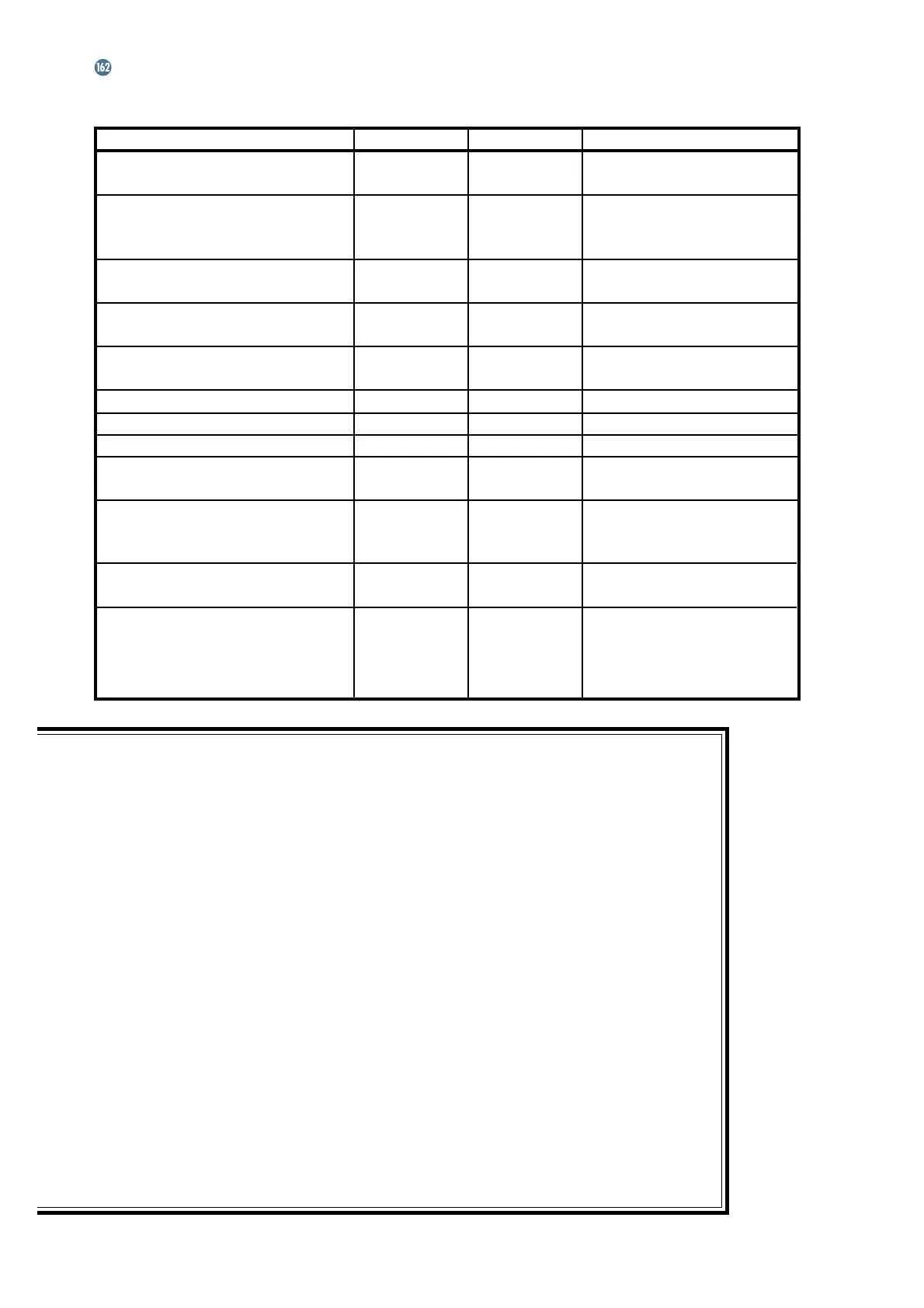
MIDI Implementation Chart Version: 1.2
Function Transmitted Recognized Remarks
Basic Channel Default 16 16 Channel 16 only
Changed
Mode Default X X Not Applicable
Messages X X
Altered X X
Note
Number Mute Node O O See Appendix B
Velocity Note ON O O
Note OFF O O See Appendix B
Aftertouch Keys X X
Ch's X X
Pitch Bend X X
Control Change X X
Program Change O O 0-99 (100-127 ignored)
System Exclusive O O See MIDI Sysex Detail
on pages 10-11
System Common Song Pos X X
Song Sel X X
Tune X X
System Real-time Clock X X
Clock Commands X X
Local On/Off X X
Aux All Notes Off X X
Messages
Active Sensing X X
System Reset X X
O: Yes
X: No
We solicit your feedback. If there is any-
thing about the operation of the SR40•8/
SR56•8 console or
ULTRA MUTE
that you
think could be improved, feel free to write us
with your comments and suggestions. The
more input we get from you, the better we
can provide you with the tools you need to
get the job done.
MIDI IMPLEMENTATION CHART







 To Next Page