Debugging your scripts 73
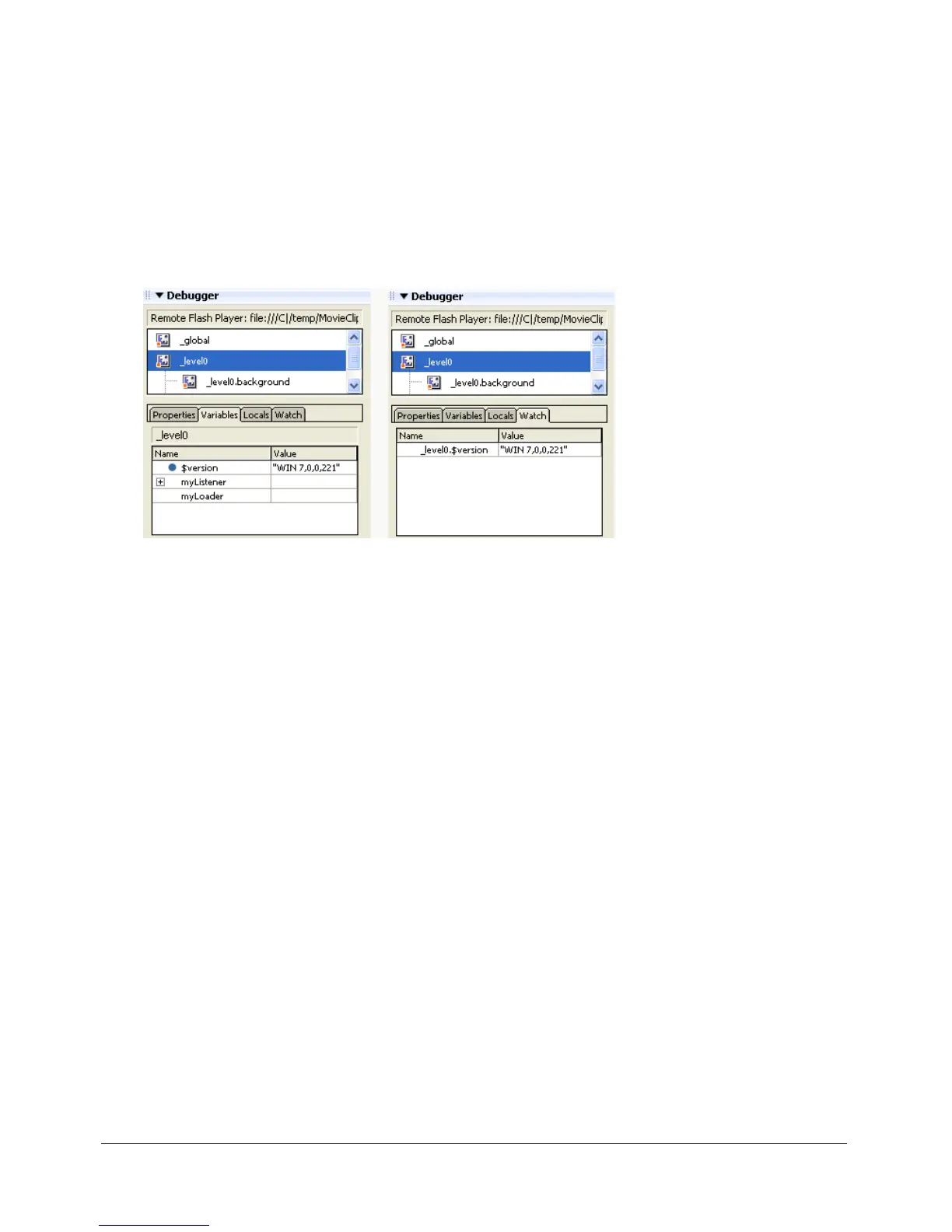
Using the Watch list
To monitor a set of critical variables in a manageable way, you can mark variables to appear in the
Watch list. The Watch list displays the absolute path to the variable and the value. You can also
enter a new variable value in the Watch list the same way as in the Variables tab.
If you add a local variable to the Watch list, its value appears only when Flash Player is stopped at
a line of ActionScript where that variable is in scope. All other variables appear while the SWF file
is playing. If the Debugger can’t find the value of the variable, the value is listed as Undefined.
The Watch list can display only variables, not properties or functions.
Variables marked for the Watch list and variables in the Watch list
To add variables to the Watch list, do one of the following:
• On the Variables or Locals tab, right-click (Windows) or Control-click (Macintosh) a selected
variable and then select Watch from the context menu. A blue dot appears next to the variable.
• On the Watch tab, right-click (Windows) or Control-click (Macintosh) and select Add from
the context menu. Enter the target path to the variable name and the value in the fields.
To remove variables from the Watch list:
• On the Watch tab, right-click (Windows) or Control-click (Macintosh) and select Remove
from the context menu.



 To Next Page