CONTROL ELEMENTS
Multi-function display
78 Operating manual MT 32 / 36
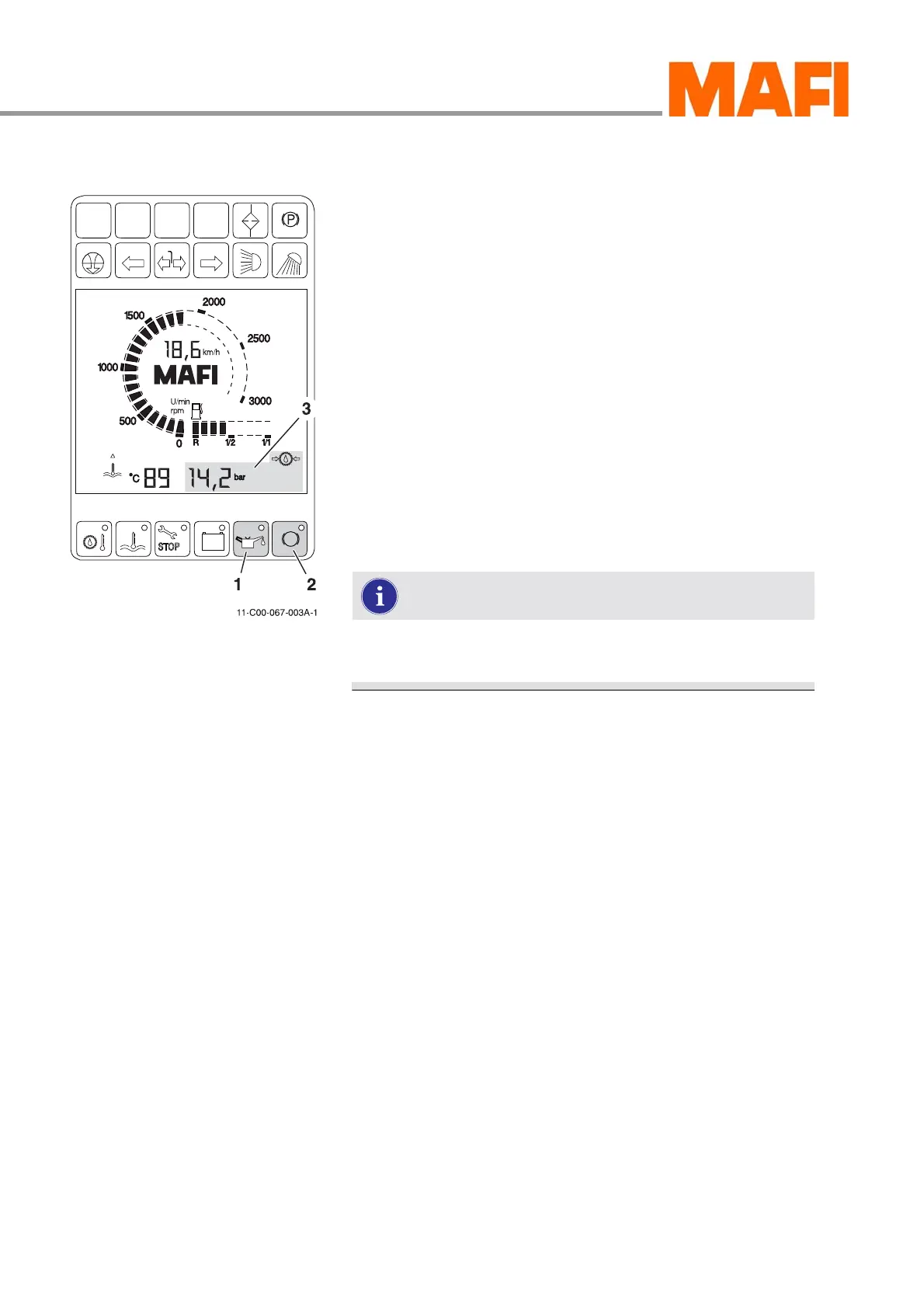
Pressure display
Fig. 67: Pressure display
1 “Oil pressure” button
2 “Air pressure” button
3 “Pressure” indicator
Press button 1 and 2 to display the pressures listed below.
All pressures are shown in bar.
Button 1:
z Engine oil pressure
z Transmission oil pressure
Button 2:
z Air reserve pressure, circuit 1
z Air reserve pressure, circuit 2
z Air reserve pressure, circuit 3
z Transmission oil pressure
After switching on the ignition, the transmission oil
pressure is displayed by default.
Deviations from the nominal specifications that could damage
the MT are indicated by an LED in the button, see “Indicators
on the multi-function display” on page 131.
Selecting the oil pressure indicator
X Press button 1.
3 The engine oil pressure is displayed in the LCD display.
X Press button 1 again.
3 The transmission oil pressure is displayed in the LCD
display.



 To Next Page