CONTROL ELEMENTS
Multi-function display
Operating manual MT 32 / 36 79
Selecting the reserve pressure indicator
X Press button 2.
3 The reserve pressure for the rear axle (circuit 1) appears
on the LCD display.
Press button 2 several times so that you can view the air
reserve pressures of the front axle (circuit 2) and the park-
ing brake (circuit 3) as well as the transmission oil pressure
(basic position).
The selected indicator remains active until you switch
to a new indicator or switch off the ignition.
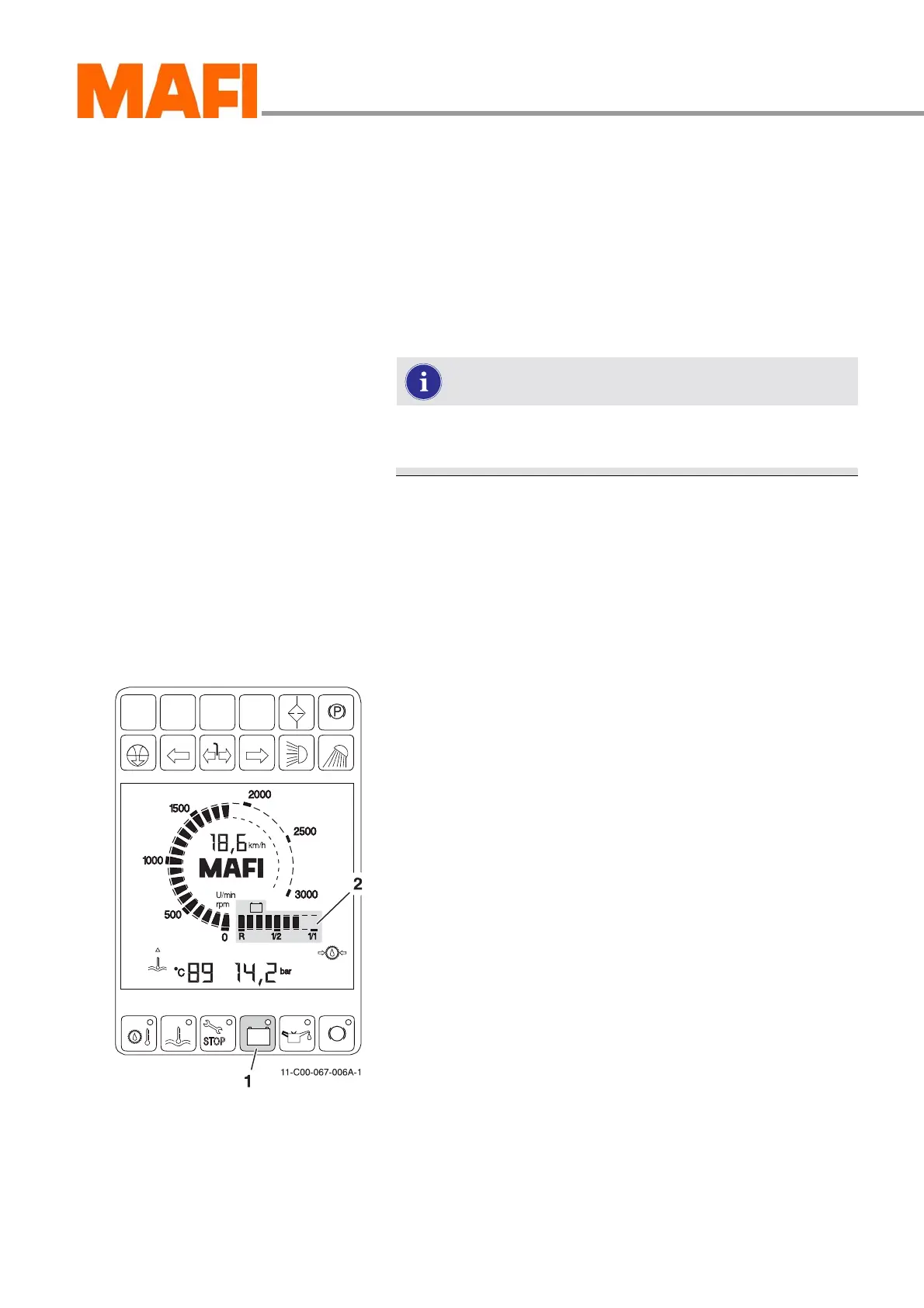
On-board voltage display
The on-board voltage display shows the current charging volt-
age of the vehicle battery. The display indicates the charging
voltage in the range of 20 V (R) to 28 V (1/1). Every notch of
the display equals 1 V. If the charge falls below the necessary
charging voltage, an LED lights up in the button, see “Indica-
tors on the multi-function display” on page 131.
Fig. 68: On-board voltage display
1 “On-board voltage” button
2 “On-board voltage” display
Select on-board voltage display
X Press button 1 and hold it down.
3 The LCD display indicates the charging voltage.
The charging voltage indicated in fig. 68 is 26 V.
X Release button 1 again.
3 The fuel supply appears on the LCD display again.



 To Next Page