8
Getting to know your phone
Getting to know your phone
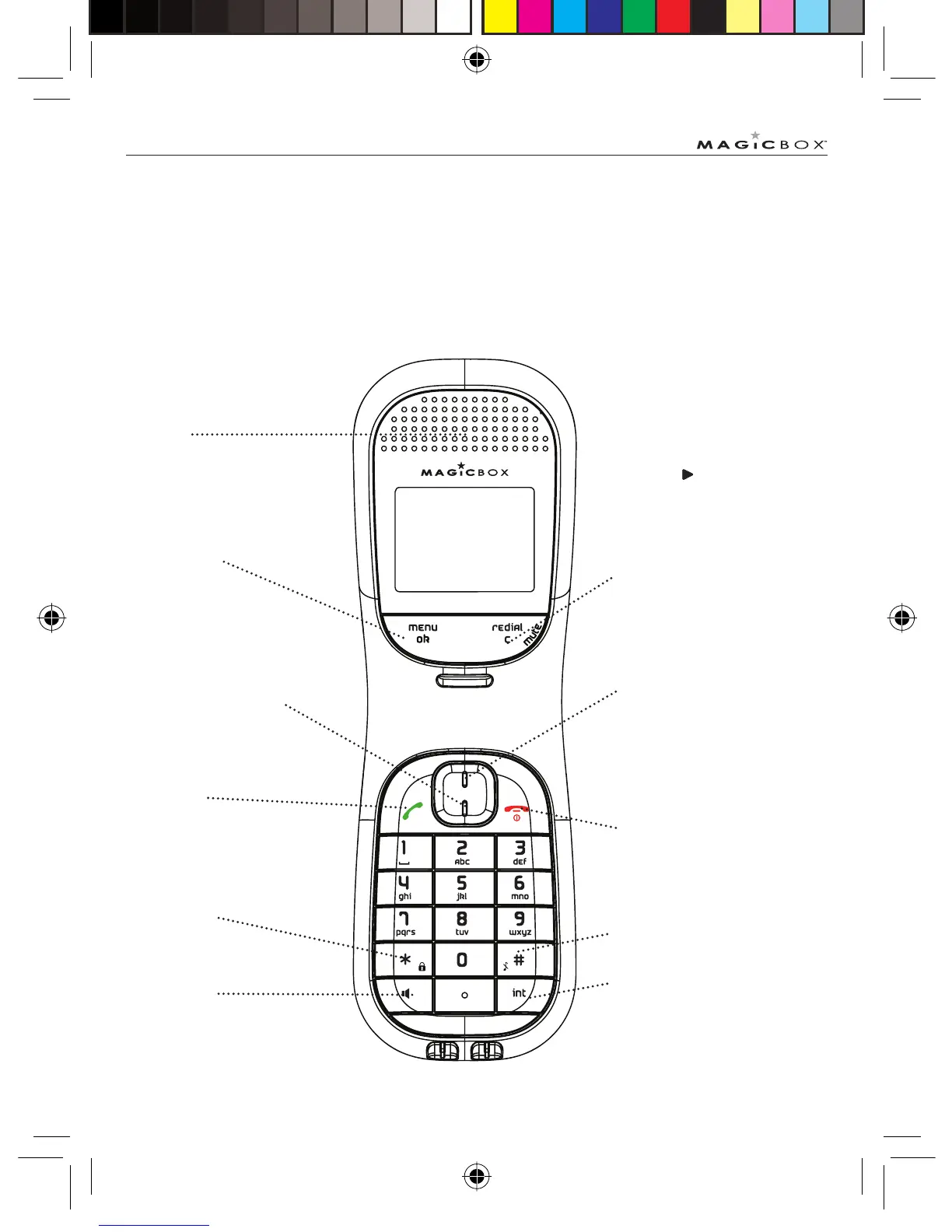
Overview of your handset
Earpiece
Menu / OK
Use to access and select the
options in the menu
Call log / Scroll Up / Volume
up
Call Log and shortcut to Answer
Machine menu
Redial / Clear / Back / Mute
Clear incorrect input during text
editing
Back / to return to previous menu
Mute microphone during call
When the
appears press this
key to see more information on
screen
From standby screen, press to
access Dialled Calls list
Talk / Recall
End Call / Exit / Switch
Handset on/off
Phonebook / Scroll Down
/ Volume down
Keypad lock
Handsfree
HASH - to change the case when
entering letters/editing
Intercom - to make a internal
call
Colombo UG.indd Sec8:8Colombo UG.indd Sec8:8 24/7/08 17:27:0524/7/08 17:27:05



 To Next Page