Non Real-Time Functions: Deleting Splice Markers and Splice Audio
26
Once you are familiar with recording, playback, and the many real-time modulations of the Morphagene, you may want to dig into
the deeper non-realtime functions. When dealing with large numbers of Splices, these more abstract processes can be useful, but
they are by no means necessary for enjoyment of the module.
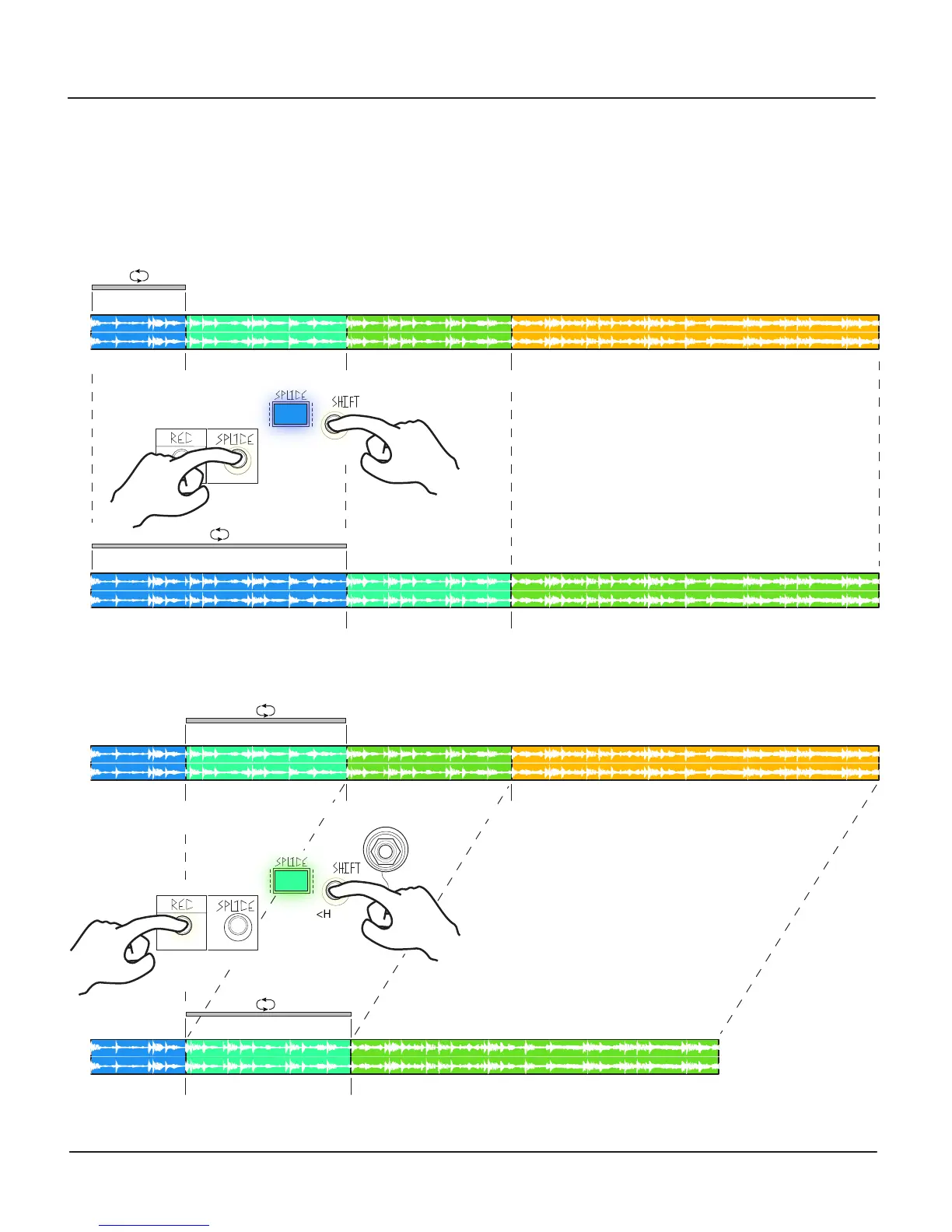
Deleting Splice Markers
As you recall, Splice Markers are created by Pressing (and releasing) the Splice Button or sending a gate to the Splice input. It is
possible to remove a Splice Marker by holding the Shift Button and then pressing the Splice Button. This merges the currently
selected Splice with the next one. Note: Alternately recording and deleting Splices while the SD Card is busy (SHIFT Button
Flashing) may result in losing recorded material.
Deleting Splice Audio
It is also possible to delete the whole region (including audio) for the currently-selected Splice, by holding Shift and pressing the
REC Button.
Note: Alternately recording and deleting Splices while the SD Card is busy (SHIFT Button Flashing) may result in losing recorded materal.
Splice Marker 1 Splice Marker 2 Splice Marker 3
1.
Splice 1
Splice Marker 1 Splice Marker 2
Splice 1
Splice Marker 1 Splice Marker 2
Splice 2
<Hold>
<Press>
Splice Marker 1 Splice Marker 2
Splice 2
Splice Marker 3
1.
<Press>
<Hold>
2.
2.


 To Next Page