Non Real-Time Functions: Delete All Splice Markers and Clearing the Reel
27
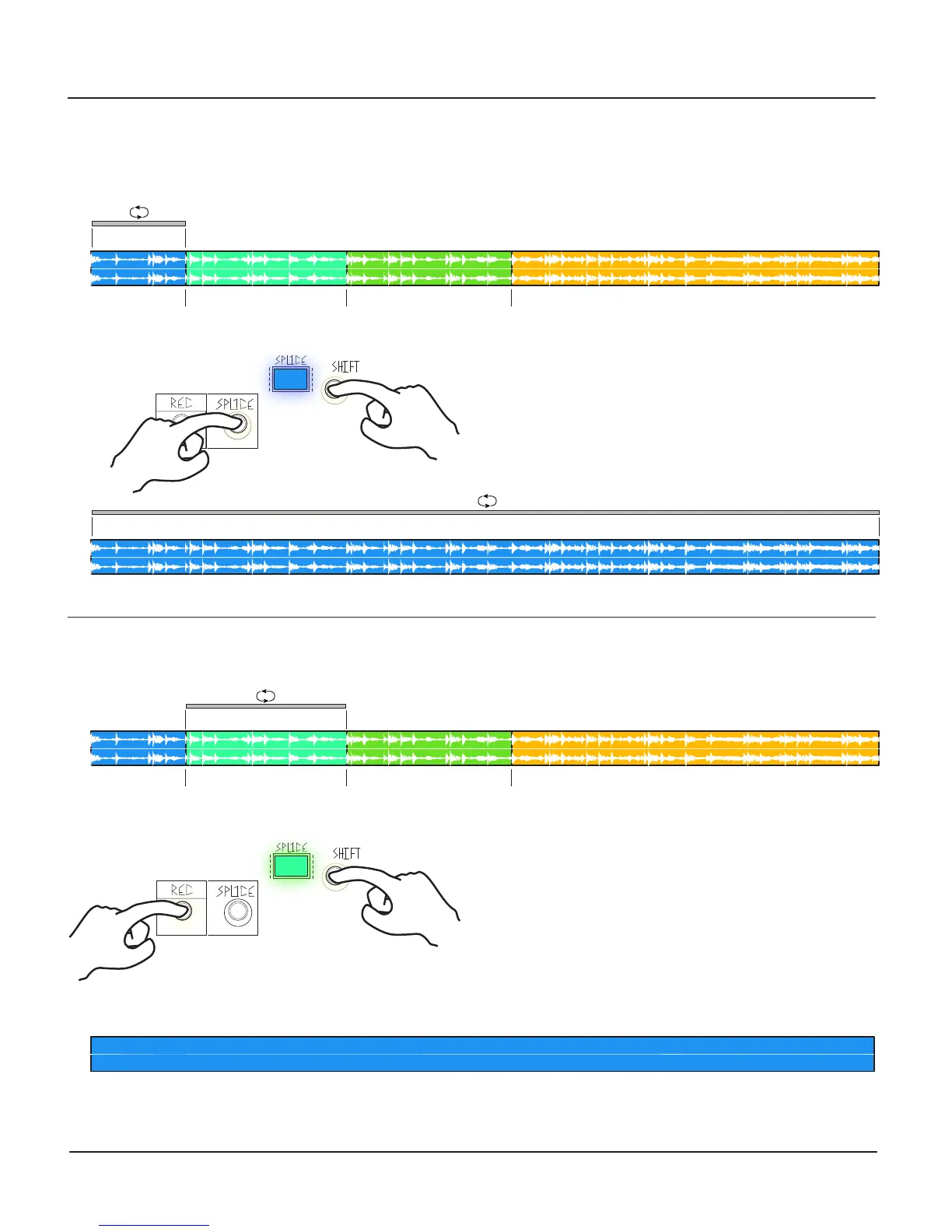
Delete All Splice Markers
For either of the previous combos, you can delete ALL of the respective items in the Reel by holding for 3 seconds. Delete all
Splice Markers by holding the Shift Button and then holding the Splice Button for 3 seconds.
Clearing the Reel
Delete all audio in the Reel by holding the Shift Button and the REC Button for 3 seconds.
Splice Marker 1 Splice Marker 2 Splice Marker 3
Splice 1
Splice 1
<Press and Hold for 3 seconds>
<Hold>
1.
Splice Marker 1 Splice Marker 2
Splice 2
<Hold>
<Press and Hold for 3 seconds>
Splice Marker 3
1.
Reel Length= 0 seconds (2.9 minutes of record time remaining)
Record to New Reel when ready.
2.
2.


 To Next Page