Non Real-Time Functions: Reels and File Naming Convention
28
Reels
Reels are collections of audio up to ~2.9 minutes in length. Each Reel can be divided into up to 300 Splices using the Splice
controls. One Reel is active on the Morphagene at any given time. Additional Reels (and their Splice Markers) are stored on the
included microSD Card in the form of standard .wav les.
MG is always storing your latest recordings and splices to the microSD Card. If you do not want to write over a card, remove it once
you have loaded the desired Reel. Do not remove microSD Card while it is busy, as indicated by the Shift Button Flashing.
Note: If no microSD Card is present, then only one Reel may be created, Reel mode cannot be entered.
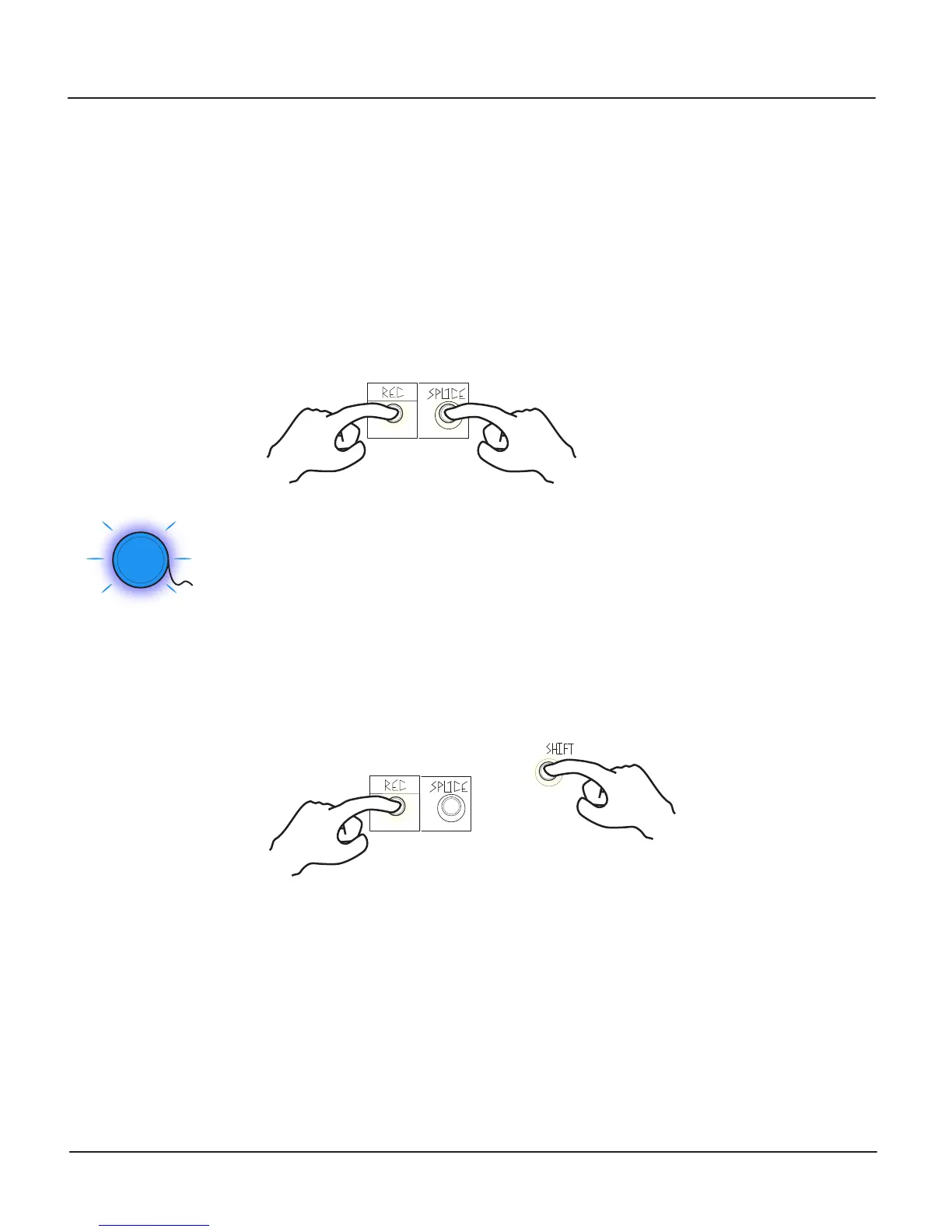
To select a Reel, enter Reel Mode by holding the Splice Button and
pressing the REC Button. While using Reel Mode, it is important to
remove or turn o modulation to REC, Splice, Shift, and Organize.
The Reel Activity Window ashes to indicate the Reel mode is active. While in Reel mode, the Organize
control and CV Inputs are used to select the Reel that is loaded into the Morphagene. Reels are
color-coded at the Reel Activity Window and with S.O.S. set clockwise, the output of the Morphagene is a
brief preview of the highlighted Reel. Select the Reel for loading and exiting Reel mode with the same
button combination, holding Splice and Pressing Record.
The nal Reel (selected by the Organize Panel Control at full clockwise) ashes Pink and White and has no
audio preview. Exit Reel Mode with this Reel selected to create a new Reel. Up to 32 Reels may exist on a
single microSD Card.
While in Reel mode, Reels can also be deleted by holding Shift and pressing Record.
If only one Reel is present and it is deleted, a new Reel is automatically created and Reel Mode is exited. While in Reel Mode,
remove modulation to REC, Splice, Shift, and Organize.
File Naming Convention:
Reels take the form of 32-bit oat, 48000Hz stereo-only .wav les. Any program that can export such les can create Reels for the
Morphagene, or be used to edit Reels that have been created by the Morphagene. Examples include Audacity and Reaper. Splice
Markers take the form of standard audio markers in the .wav le, which can be created, moved, and deleted using Reaper and
other software.
The Morphagene expects to nd the 1-32 Reels in the Root directory of a FAT32-formatted microSD Card. The Reels are named as
follows: mg1.wav, mg2.wav, mg3.wav, ...mg9.wav, mga.wav, mgb.wav, …mgw.wav. Note: each le must be 2.9 minutes or
less and stereo in order for the Morphagene to recognize and load the les.
<Press> <Hold>
<Hold>
<Press>
2.
1.
1.
2.


 To Next Page