BOXER SERIES 10-20 KVA PRODUCT DESCRIPTION
AG-SD-109 Publishing Date: 13.10.2015 Revision No: 0 Rev. Date:
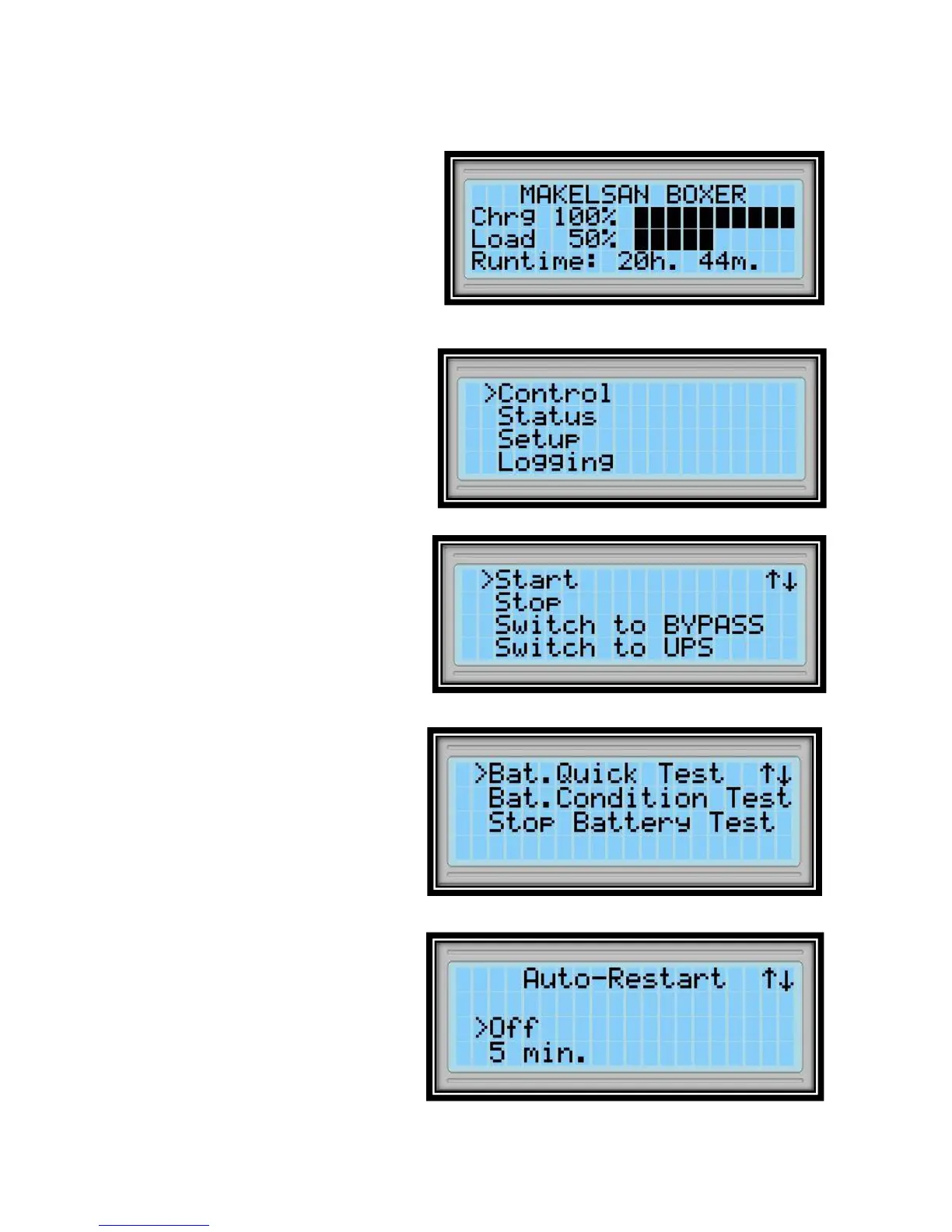
2.4.1 Opening Screen
When the front panel monitor is turned
on, firstly opening screen is observed.
Model name, charge status, load status
and remaining back-up time are
displayed. In case of any alarm case,
alarms are shown as scrolling text in the
first line. If no button is pressed for 5
minutes, system returns to the opening
screen.
2.4.2 Main Menu
Switch from opening screen to the main
menu through ENT button.
2.4.3 Navigating Through the
Menus
Press UP/DOWN keys to move the
cursor arrow in the screen.
Open a sub-menu with ENT button, go
back to the previous menu with ESC
button. Control sub-menu is
shown on left. Some menus consist of
more than one page. Switch among the
pages with UP/DOWN buttons.
Some menus have changeable options
like ON/OFF, durations or quantities.
To change setup in such menus, choose
variable with ENT, set new value with
UP/DOWN buttons and save it with
ENT button. Cancel with ESC button.









 To Next Page