Using the system
47
Whilst the measurements are taking place, it is possible to monitor the progress
of the measurement on the SOP Player window using, for example the Multi-view,
Intensity PSD or Log sheet tabs.
Vial position files
Normally you set a range of wells from which to sample, based on a defined start and end
point and capturing all wells that fall into that range. However, to offer greater flexibility,
for example if you wanted to sample every other column in the tray, with the others
empty, the NanoSampler system caters for this with vial position files. These are simple
tab-delimited text files that define your sampling "map" and can be generated in any text
editor, for example Notepad, or by using Microsoft Excel. In addition to defining the
sampling schedule, the names entered into the text file are used in the measurement file.
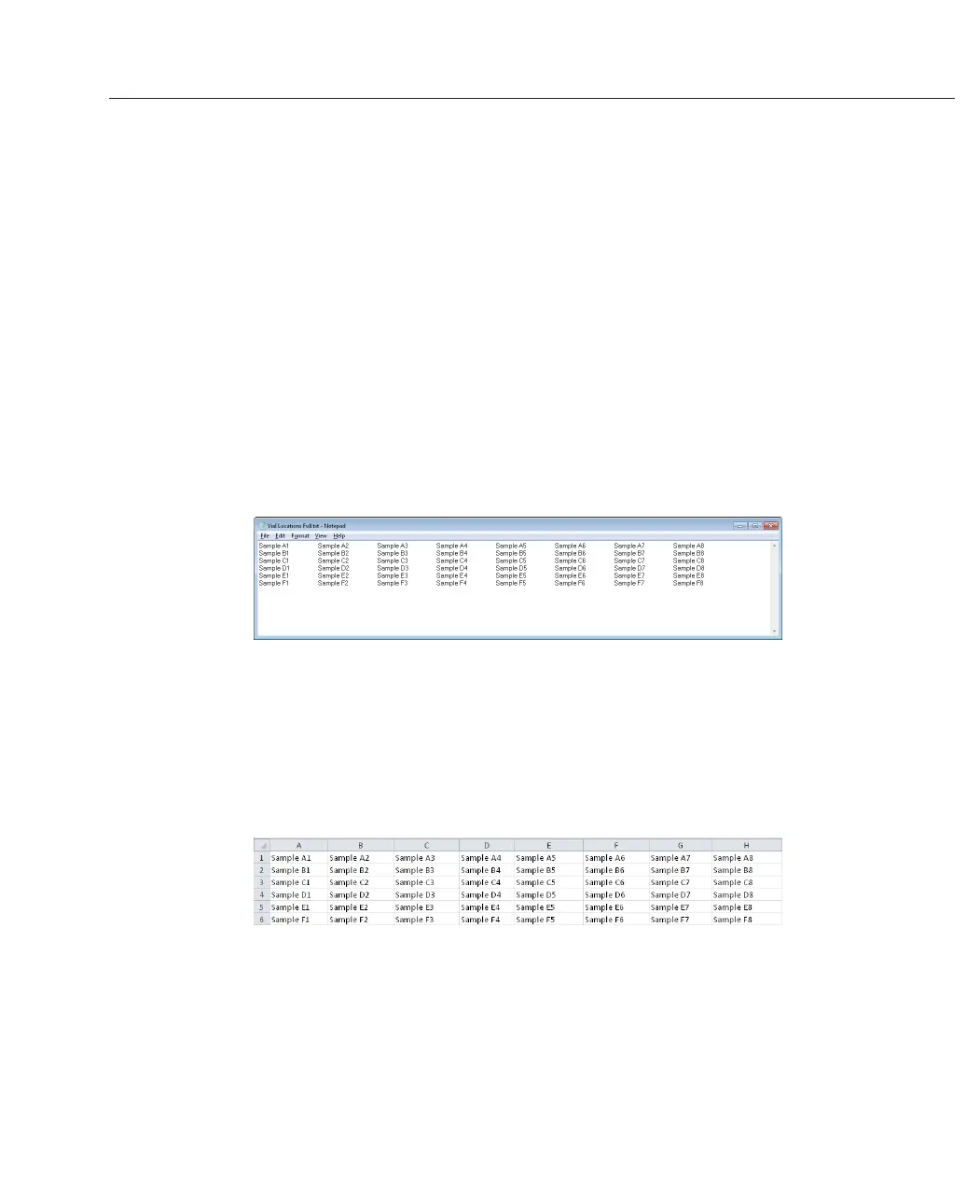
Using Notepad to create position files:
The file should be configured as shown in the image below:
Tabs are used to separate measurement vials. If a measurement is not required from the
vial, no text should be entered (i.e. the presence of text tells the system to measure that
position).
Using Microsoft Excel to create position files:
The file should be configured as shown in the image below:
If no measurement is required from a vial, ensure the cell is left empty.



 To Next Page