MicroCal iTC
200
Washing Module User Guide 15
Part 3: Hardware Connections
The connections between the washing module, the MicroCal iTC
200
controller PC and the MicroCal iTC
200
cell unit are made through a standard USB 4-port hub.
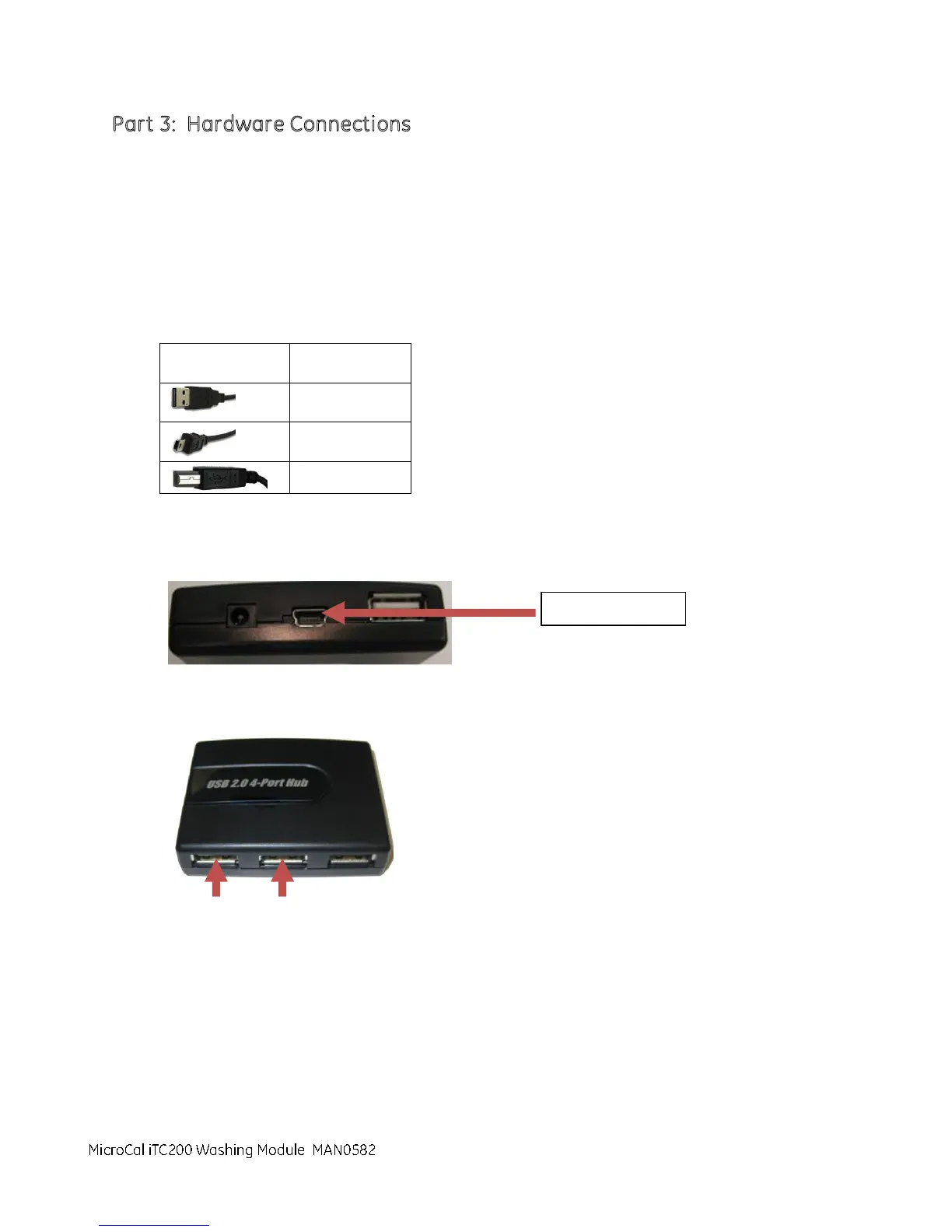
The hardware necessary to connect the three pieces of the system includes:
1 USB 2.0 4-port hub
1 Type A-B (mini) USB connector
2 Type A-B (standard) USB connectors
Table 1
1. Identify the only cable with the USB type B (mini) cable end. Connect the type B (mini) cable end to
the USB hub. Connect the USB type A end of that cable to the labeled Controller PC USB port.
2. Connect the USB type A ends of two USB cables to the hub as shown below.
3. Connect the USB type B ends to the USB 1 and USB 2 connectors on the rear of the MicroCal iTC
200
cell unit .
4. Place the washing module on top of the MicroCal iTC
200
cell unit .
5. Connect the USB type A end from the washing module to the hub.
6. Connect the green grounding strap wire between the washing module and the MicroCal iTC
200
cell
unit.
MicroCal iTC200 Washing Module



 To Next Page