o
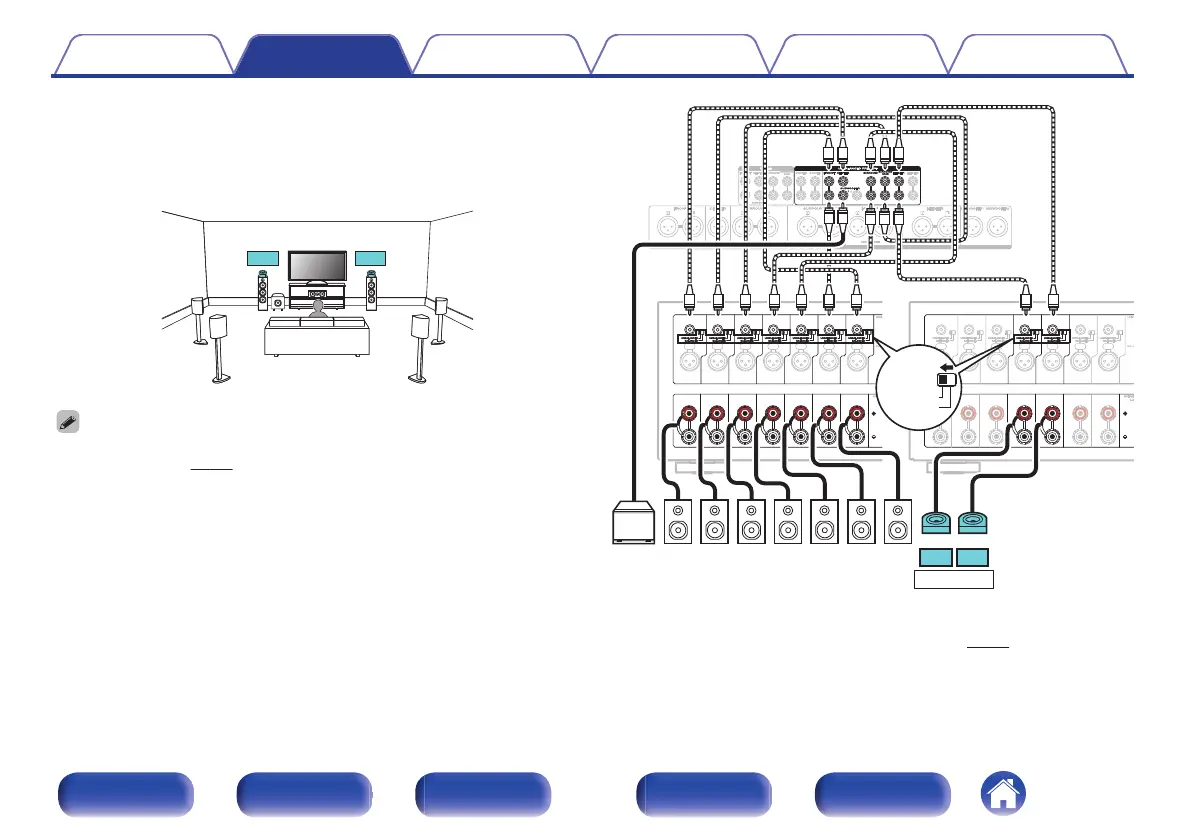
Example connection when using one set of
Dolby Atmos Enabled speakers
.
C
SBL
SBR
SW
SL SR
FL
FR
FDL FDR
0
Set “Height” - “Dolby Sp” to “2ch” in the menu when connecting in this
configuration. (v
p. 219)
.
CHANNEL1
(FL)
CHANNEL2
(FR)
CHANNEL3
(SL)
CHANNEL4
(SR)
CHANNEL7
(C)
CHANNEL1
(FL)
CHANNEL2
(FR)
CHANNEL3
(SL)
CHANNEL4
(SR)
CHANNEL7
(C)
CHANNEL5
(SBL)
CHANNEL6
(SBR)
CHANNEL5
(SBL)
CHANNEL6
(SBR)
CHANNEL7
(C)
CHANNEL7
(C)
CHANNEL1
(FL)
CHANNEL2
(FR)
CHANNEL3
(SL)
CHANNEL4
(SR)
CHANNEL1
(FL)
CHANNEL2
(FR)
CHANNEL3
(SL)
CHANNEL4
(SR)
CHANNEL5
(SBL)
CHANNEL6
(SBR)
CHANNEL5
(SBL)
CHANNEL6
(SBR)
SW SR SL FR FLC
FDLFDR
【
MM8077
】
SBLSBR
BALANCED
z
The surround Dolby or back Dolby speakers can be connected instead of the
front Dolby speakers. In this case, set the Dolby Atmos Enabled speakers to be
connected under “Height” - “Layout” in the menu. (v p. 220)
Contents
Connections Playback Settings Tips Appendix
59
Front panel Display Rear panel Remote Index


 To Next Page