24
NAMES AND
FUNCTIONS
BASIC
CONNECTIONS
BASIC
OPERATIONS
BASIC
SETTINGS
PRACTICAL
CONNECTIONS
ADVANCED OP-
ERATIONS
IF YOU EXPERIENCE
PROBLEMS
MISCELLANEOUS
ADVANCED
OPERATIONS
ENGLISH
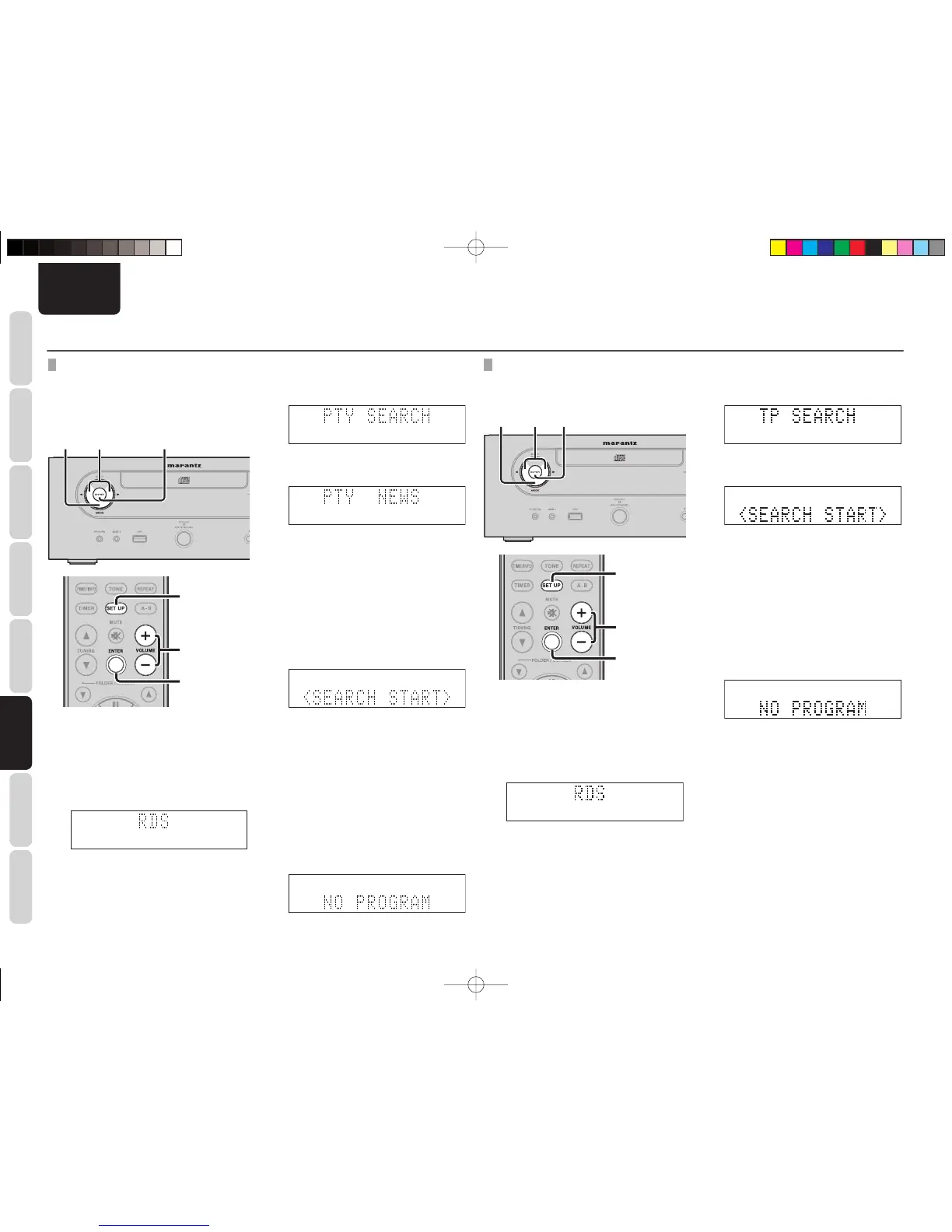
PTY SEARCH
• Use this function to fi nd RDS stations broadcasting
a designated program type (PTY).
• For a description of each program type, refer to
“Program Type (PTY)”.
1. 2. 4. 6. 5. 6.
2. 4. 6.
3. 5. 6.
1.
1. Press the MODE button on the front panel
for 3 or more seconds or the SET UP
button on the remote controller while in FM
mode.
2. Press the 1/2 buttons on the front panel
or the VOLUME button on the remote
controller to select “RDS.”
3. Press the ENTER button to select the RDS
function.
4. Press the 1/2 buttons on the front panel
or the VOLUME button on the remote
controller to select “PTY Search.”
5. Press the ENTER button to set PTY search
selection mode.
6. Press the 1/2 buttons on the front panel
or the VOLUME button on the remote
controller to call up the desired program
type.
• When receiving an RDS station, its
program type is displayed fi rst.
• When not receiving an RDS station,
“PTY” fl ashes.
7. Press the ENTER button to set PTY search
selection mode.
8. Press the ENTER button.
RDS search starts automatically and the
RDS indicator fl ashes.
• If no station broadcasting the designated
program type is found, all bands being
received are searched.
• The station name is displayed on the
display after the search ends.
9. If no station broadcasting the designated
program type is found after searching
all frequencies, “NO programme” is
displayed.
TRAFFIC PROGRAM SEARCH (TP SEARCH)
Use this function to fi nd RDS stations broadcasting
a traffi c program (TP).
1. 2. 4. 3. 5. 6.
2. 4.
3. 5. 6.
1.
1. Press the MODE button on the front panel
for 3 or more seconds or the SET UP
button on the remote controller while in FM
mode.
2. Press the 1/2 buttons on the front panel
or the VOLUME button on the remote
controller to select “RDS.”
3. Press the ENTER button to select the RDS
function.
ADVANCED OPERATIONS
4. Press the 1/2 buttons on the front panel
or the VOLUME button on the remote
controller to select “TP Search.”
5. Press the ENTER button to set TP search
selection mode.
6. Repress the ENTER button. The RDS search
starts automatically and the RDS indicator
fl ashes.
• If no TP station is found, all bands being
received are searched.
• The station name is displayed on the
display after the search ends.
7. If no station broadcasting the designated
program type is found after searching
all frequencies, “NO programme” is
displayed.
M-CR502TDAB01ENG.indd24M-CR502TDAB01ENG.indd24 09.2.41:35:39PM09.2.41:35:39PM



 To Next Page