5
NAMES AND
FUNCTIONS
BASIC
CONNECTIONS
BASIC
OPERATIONS
BASIC
SETTINGS
PRACTICAL
CONNECTIONS
ADVANCED
OPERATIONS
IF YOU EXPERIENCE
PROBLEMS
MISCELLANEOUS
NAMES AND
FUNCTIONS
ENGLISH
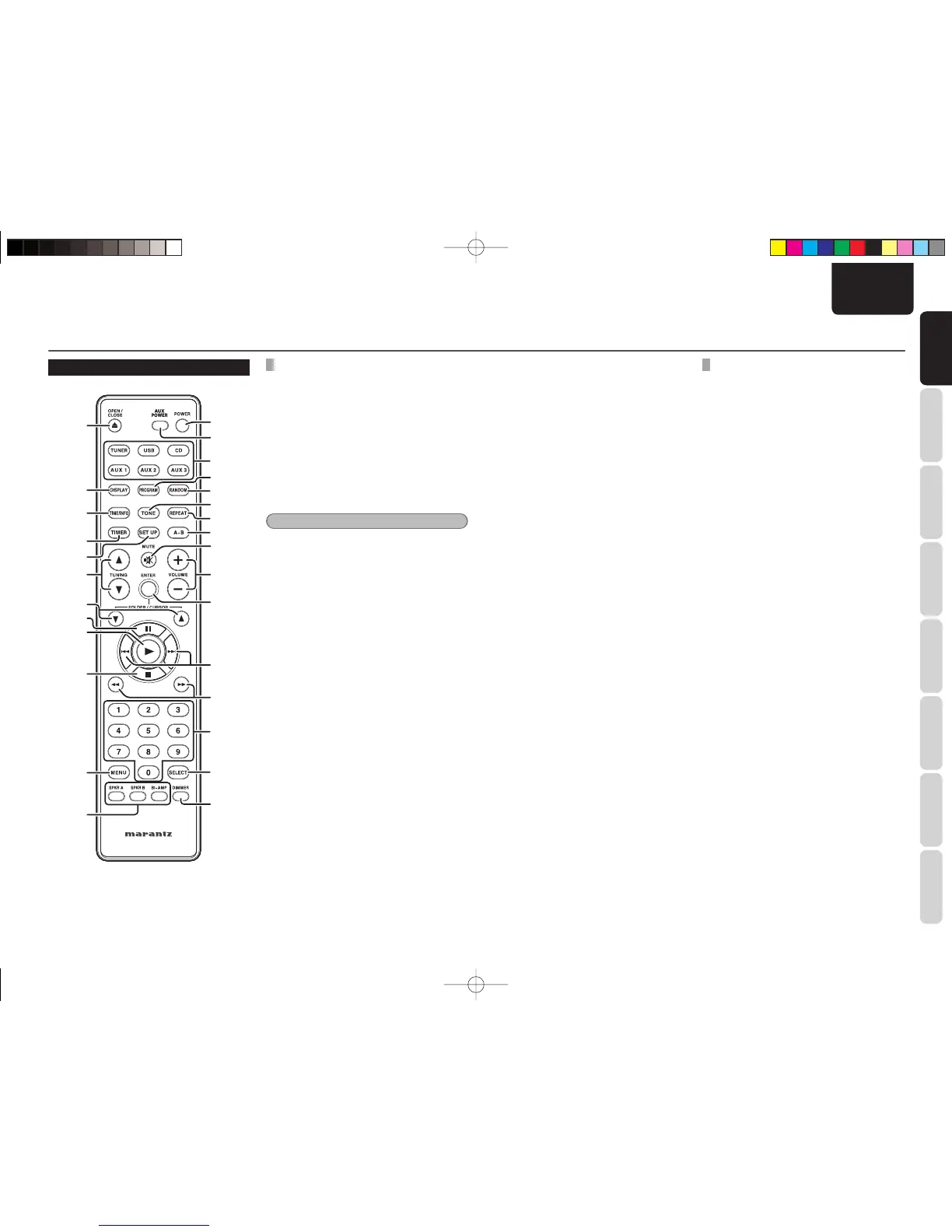
REMOTE CONTROLLER
COMMON OPERATIONS
z POWER button
Used to turn on the unit’s power or put the unit in
standby mode.
x AUX POWER button
Used to turn on the power of an iPod connected to
IS201 or put it in standby mode.
c Input source select button
Selects the input source.
Note:
The TUNER button is also used to switch between
AM, FM and DAB.
n TONE button
Adjusts the audio tone. (See page 16)
. MUTE button
Mutes audio output. If pressed again, muting is
canceled and the original volume level is restored.
⁄0 VOLUME + button,
VOLUME – button
Adjust the audio volume.
⁄1 ENTER button
⁄5 SELECT button
Performs the same operations as the click wheel
select button on an iPod.
⁄6 DIMMER button
Adjusts the brightness of the display panel. (See
page 16)
⁄7 Speaker mode select button
Selects the speaker mode by pressing the button
matching the connected speaker terminals.
NAMES AND FUNCTIONS
¤7
¤8
¤4
¤5
⁄7
⁄6
c
z
n
⁄0
⁄1
.
x
v
⁄2
⁄3
b
m
,
⁄5
⁄4
⁄8
⁄9
¤1
¤2
¤3
¤0
¤6
⁄8 MENU button
Performs the same operations as the click wheel
MENU button on an iPod.
¤4 SET UP button
Calls up the SETUP menu. (See page 22, 23, 27,
31)
¤5 TIMER button
Used to adjust the clock, turn the timer ON/OFF, and
set SLEEP mode. (See page 15)
¤7 DISPLAY button
Displays the time and timer setting. (See page 15)
CD/USB OPERATIONS (CD/USB MODE)
v PROGRAM button
Initiates program play. (See page 19)
b RANDOM button
Plays tracks in random order. (See page 18)
m REPEAT button
Repeatedly plays a given track or all tracks on a
given disc. (See pages 18)
, A-B (A-B repeat) button
Sets the start point, A, and end point, B, to use
when repeatedly playing a specifi ed part of a disc.
(See pages 18)
⁄2 § (next track) button
∞ (previous track) button
Advances to the start of the next track.
Returns to the start of the current track or start of
the previous track.
⁄3 6 (fast forward) button
5 (rapid rewind) button
Fast forwards when held down during playback.
Rapid rewinds when held down during playback.
⁄4 Numeric button group
Used to specify the track number to be played.
⁄9 7 (stop) button
Stops playback.
¤0 2 (play) button
Starts playback.
¤1 8 (pause) button
Pauses playback.
M-CR502TDAB01ENG.indd5M-CR502TDAB01ENG.indd5 09.2.41:35:28PM09.2.41:35:28PM















 To Next Page