29
NAMES AND
FUNCTIONS
BASIC
CONNECTIONS
BASIC
OPERATIONS
BASIC
SETTINGS
PRACTICAL
CONNECTIONS
ADVANCED OP-
ERATIONS
IF YOU EXPERIENCE
PROBLEMS
MISCELLANEOUS
ADVANCED
OPERATIONS
ENGLISH
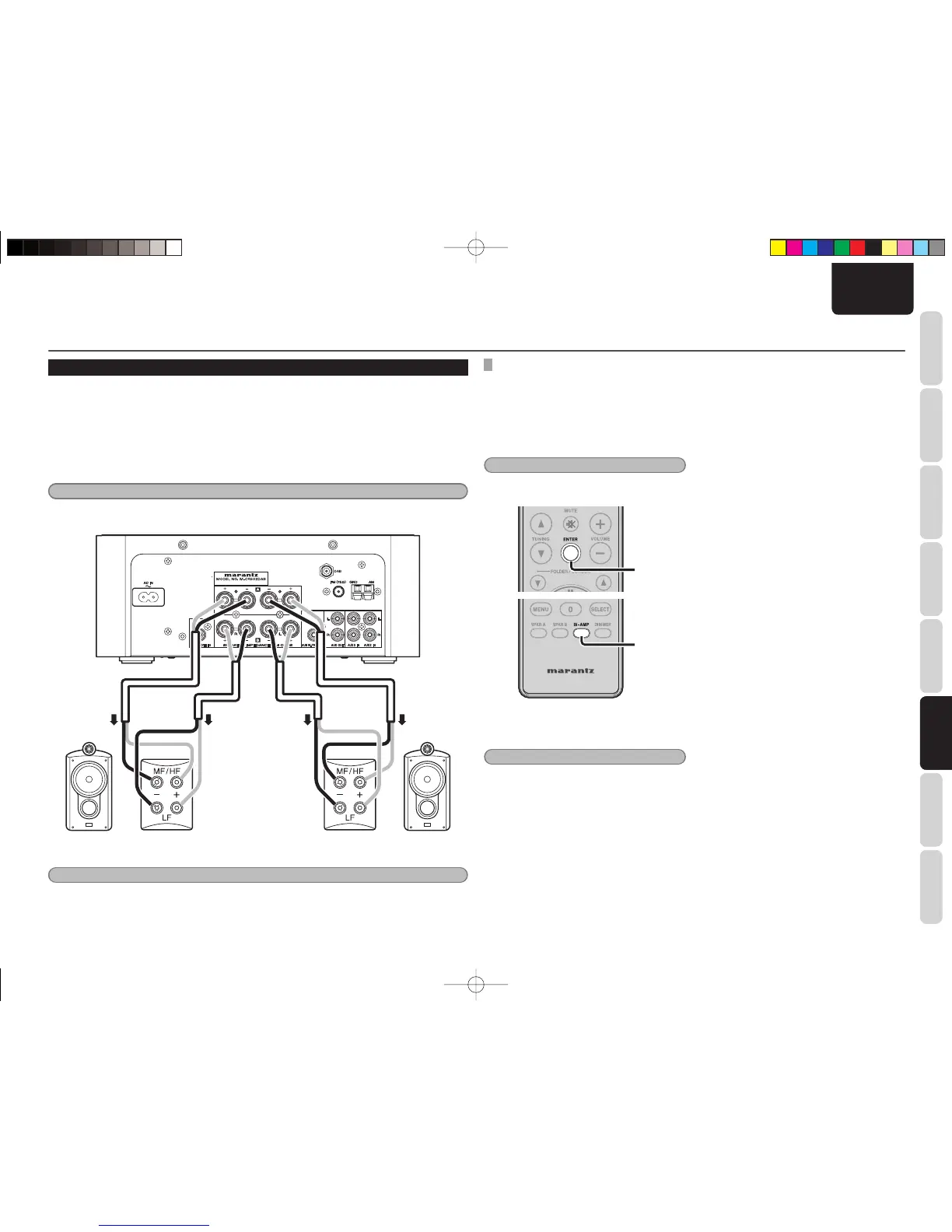
LISTENING TO MUSIC USING BI-WIRING
Bi-wiring can be used to connect speakers using two pairs of speaker cables to connect the unit and speaker
system.
Before making connections, check that the speaker system supports bi-wiring.
What is Bi-Wiring?
Bi-wiring is a technique used to improve sound quality where separate speaker cables are used to connect
to terminals for the low-end and mid-range frequencies.
This connection method can help eliminate interference in the mid-range caused by back-EMF generated by
the speaker unit used for the low-end.
Note:
Be sure to set the same fi lter for both Speaker A and Speaker B when listening to music on speakers connected
using bi-wiring. (See “SETTING AMP CHARACTERISTICS” on page 27)
R channel
speaker
L channel
speaker
Note:
Be sure to remove the short plate connecting the LF and MF/HF connectors on the speaker. Failure to do so may
result in fi re and/or damage to the equipment during use.
ADVANCED OPERATIONS
SETTING SPEAKER OUTPUT
• Set the speaker output of the unit to BI-AMP.
• Maximum amp output switches from 50 W to 25
W per channel.
• BI-AMP mode is canceled for speaker output if
SPKR A or SPKR B is set.
• The default setting is SPKR A.
Note:
Set the audio volume appropriately before making
speaker settings.
2.
1.
1. Press the BI-AMP button on the remote
controller.
Note:
The display returns to normal if the BI-AMP button
on the remote controller is pressed for 3 or more
seconds.
2. Press the ENTER button.
The display changes from fl ashing to lit.
M-CR502TDAB01ENG.indd29M-CR502TDAB01ENG.indd29 09.2.41:35:42PM09.2.41:35:42PM



 To Next Page