30
NAMES AND
FUNCTIONS
BASIC
CONNECTIONS
BASIC
OPERATIONS
BASIC
SETTINGS
PRACTICAL
CONNECTIONS
ADVANCED OP-
ERATIONS
IF YOU EXPERIENCE
PROBLEMS
MISCELLANEOUS
ADVANCED
OPERATIONS
ENGLISH
ADVANCED OPERATIONS
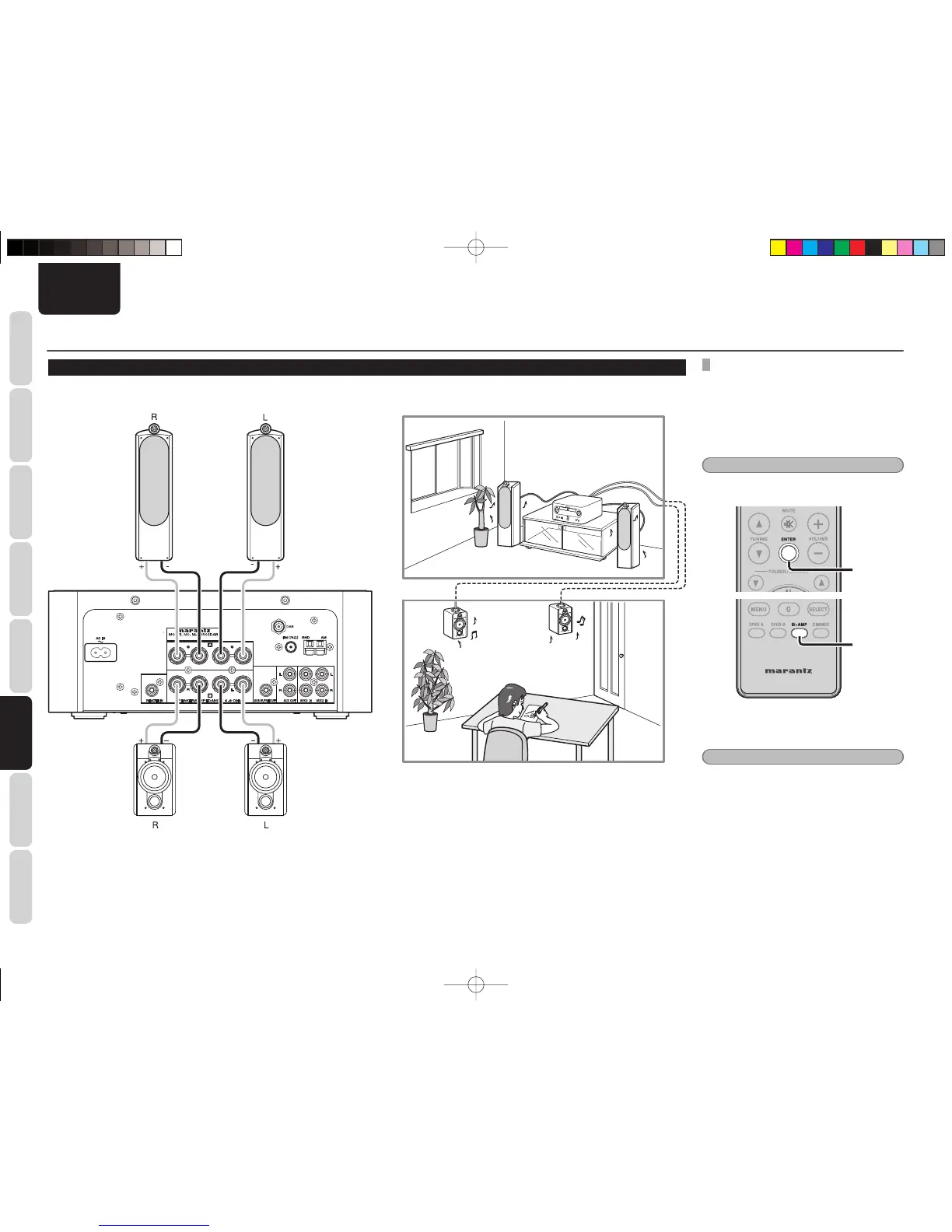
LISTENING TO MUSIC IN TWO LOCATIONS USING A MULTI-DRIVE CONNECTION
You can listen to music in different rooms using this unit with two pairs of speaker systems.
SETTING SPEAKER OUTPUT
• Set the speaker output of the unit to BI-AMP.
• Maximum amp output switches from 50 W to 25
W per channel.
• BI-AMP mode is canceled for speaker output if
SPKR A or SPKR B is set.
• The default setting is SPKR A.
Note:
Set the audio volume appropriately before making
speaker settings.
2.
1.
1. Press the BI-AMP button on the remote
controller.
Note:
The display returns to normal if the BI-AMP button
on the remote controller is pressed for 3 or more
seconds.
2. Press the ENTER button.
The display changes from fl ashing to lit.
M-CR502TDAB01ENG.indd30M-CR502TDAB01ENG.indd30 09.2.41:35:42PM09.2.41:35:42PM















 To Next Page