26
NAMES AND
FUNCTIONS
BASIC
CONNECTIONS
BASIC
OPERATIONS
BASIC
SETTINGS
PRACTICAL
CONNECTIONS
ADVANCED OP-
ERATIONS
IF YOU EXPERIENCE
PROBLEMS
MISCELLANEOUS
ADVANCED
OPERATIONS
ENGLISH
SWITCHING RDS INFORMATION DISPLAY
2.
1. Use the procedure described at “AUTO
PRESET,” “MANUAL PRESET” or “CALLING
UP REGISTERED BROADCAST STATIONS”
to tune in the frequency of an RDS station.
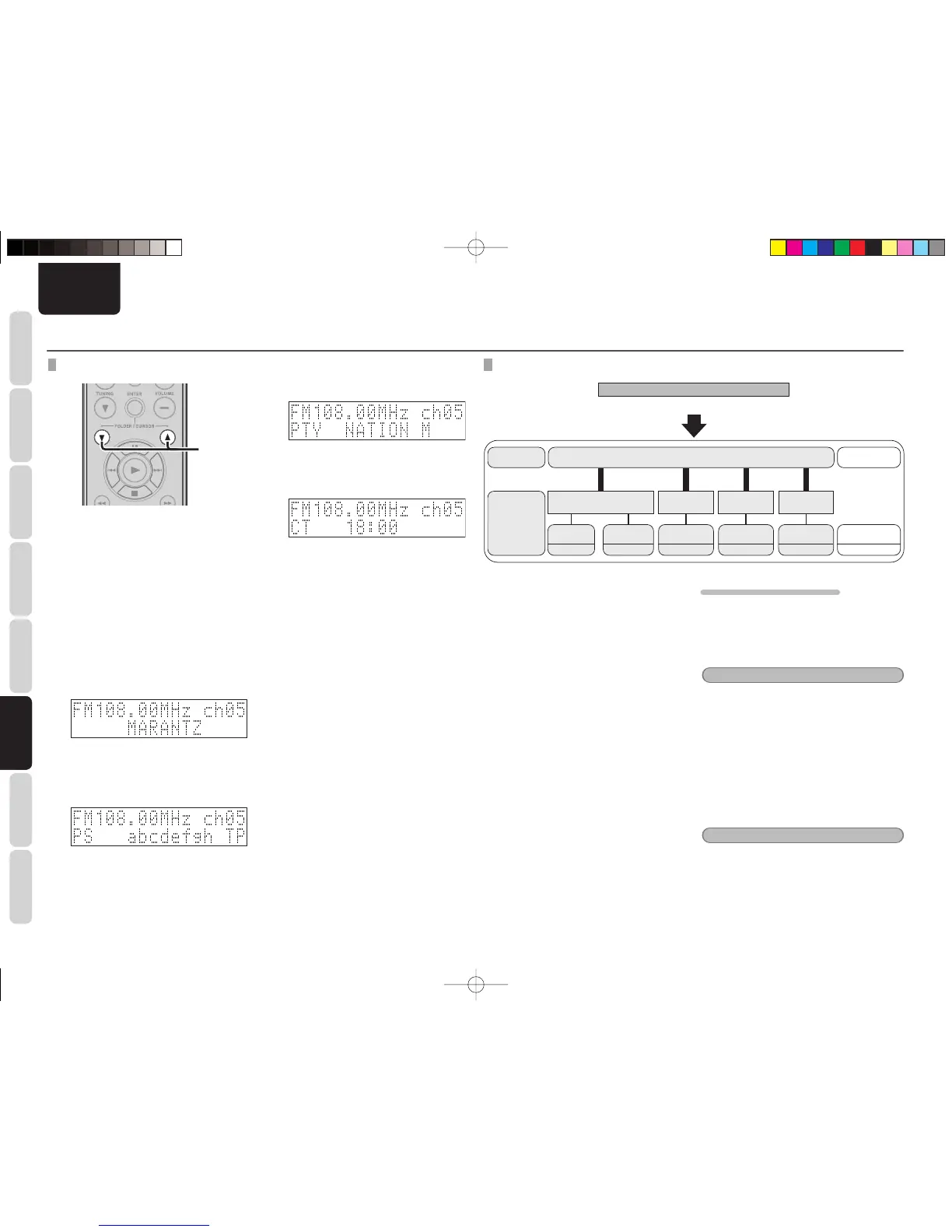
2. Press the FOLDER/CURSOR button to
switch the RDS information shown.
• The display switches as shown below
each time the FOLDER/CURSOR button
is pressed.
q STATION NAME:
Displays the station name if the search
mode is set to PRESET and a name has
been registered for the station.
↓
w PS:
Displays the program service name and
frequency of the station being received.
The above is an example of a case where
there is TP data, but no RT data.
↓
ADVANCED OPERATIONS
e PTY:
Displays the program type of broadcast
being received.
↓
r CT:
Displays the current time.
DAB (DIGITAL AUDIO BROADCASTING)
DAB Signal
Ensemble
Service
Components
Ensemble
Name
Station Name
Program type
National DAB
(Service 1)
Alpha 1
(Primary)
Pop Music
Parliament
(Secondary)
News
Alpha 2
Sports
Alpha 3
Classic
Alpha 4
Educate
(Service 2) (Service 3) (Service 4)
DAB Service Diagram
• Since the DAB system is broadcasted in digital
format, DAB system can supply crystal-clear audio
and stable reception even in mobile objects. DAB
is a new generation radio which can provide data
service and supplementary multi-media services.
• DAB broadcasts multiple services under one
Ensemble that are called service components.
• Each component contains inherent programs;
news, music, sports, and many more.
• Each Ensemble and service component has
its label, and users can recognize a current
broadcasting station and service contents by
using the label.
• The main service component is broadcast
as Primary while the others are broadcast as
Secondary.
• Also rich character information is serviced through
Dynamic Labels; song title, artist composer etc.
LISTENING TO DAB BROADCAST
Before listening to a DAB broadcast, check that the
DAB antenna is connected to the unit.
1. Select DAB as the input source using the
INPUT button on the unit or the TUNER
button on the remote controller.
Note:
• When selecting DAB for the fi rst time, the unit
automatically selects the receivable broadcast
stations. This selection takes about 90 seconds to
fi nish.
• When changing the input source with the INPUT
button on the unit, be sure to put the remote
controller into TUNER mode by pressing its
TUNER button.
2. Select the broadcast station that you
want with the 1/2 buttons on the unit or
the TUNING 3/4 buttons on the remote
controller and press the ENTER button.
Note:
If the selected DAB service cannot be received,
"Station not available" is displayed on the display
panel.
M-CR502TDAB01ENG.indd26M-CR502TDAB01ENG.indd26 09.2.41:35:40PM09.2.41:35:40PM



 To Next Page