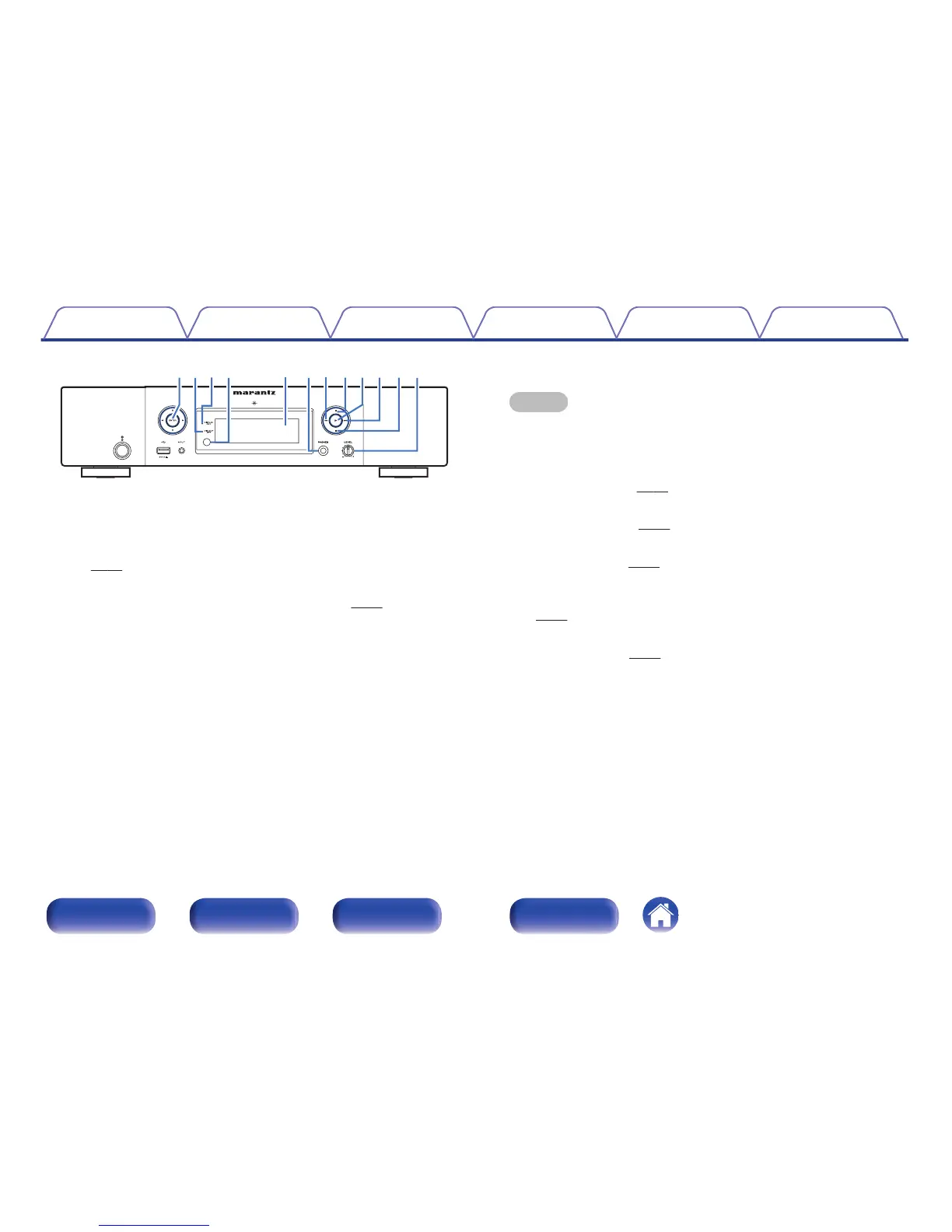
F
ENTER button
This determines the selection.
G
Digital output off indicator (DIG. OUT OFF)
This indicator lights up when the digital output setting is set to off.
(v p. 37)
H
DISPLAY OFF indicator
This indicator lights up when the display is off. (v p. 37)
I
Remote control sensor
This receives signals from the remote control unit.
J
Display
Various information is displayed here.
K
Headphones jack (PHONES)
Used to connect headphones.
NOTE
To prevent hearing loss, do not raise the volume level excessively when using
headphones.
L
Fast-reverse/Reverse-skip button (8)
Returns to the start of the currently playing track. Press and hold to fast-
reverse the track. (v p. 44)
M
Pause button (3)
Pauses playback. (v p. 44)
N
Play button (1)
Playback starts. (v
p. 44)
O
Fast-forward/Forward-skip button (9)
Plays the next track. Press and hold to fast-forward the track.
(v p. 44)
P
Stop button (2)
Stops playback. (v p. 44)
Q
Headphone volume control knob (LEVEL)
Adjusts the headphone volume.
Contents
Connections Playback Settings Tips Appendix
13
Front panel Rear panel
Remote control
unit
Index



 To Next Page