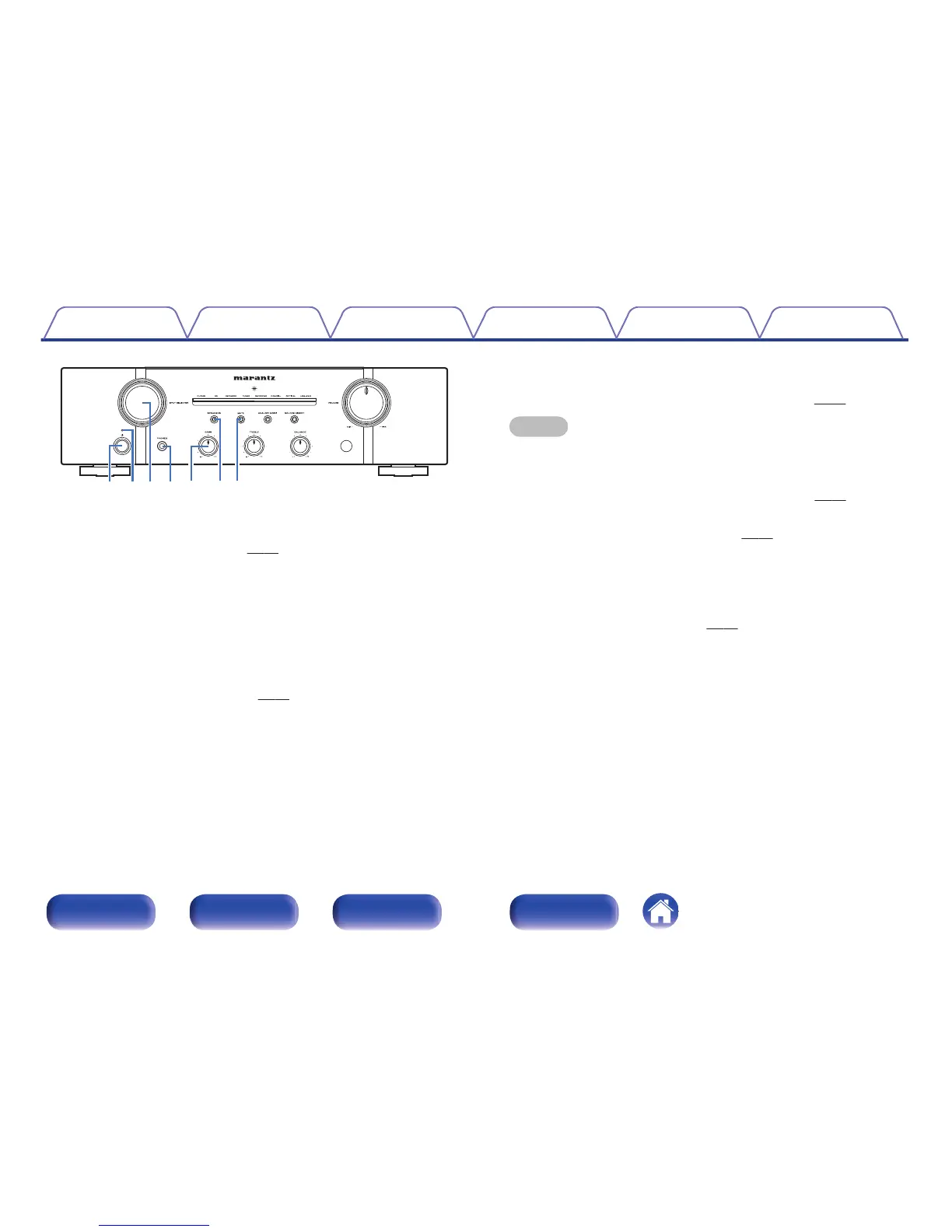
A
Power operation button (X)
This turns the power on/off. (v p. 27)
B
Power indicator
This is lit as follows according to the power status:
0
Power on : Off
0
Standby : Red
0
Power off : Off
0
When the protection circuit is activated : Red (blinking)
C
Input source select knob (INPUT SELECTOR)
This selects the input source. (v
p. 28)
D
Headphones jack (PHONES)
Used to connect headphones.
Turn off speaker output when using headphones. (v p. 28)
NOTE
To prevent hearing loss, do not raise the volume level excessively when using
headphones.
E
BASS control knob
This setting adjusts the volume level for the bass. (v p. 28)
F
Speaker output button/indicator (SPEAKERS)
This switches speaker output on/off. (v
p. 28)
Indicates the status of the unit’s as follows:
0
Speaker output on: Blue
0
Speaker output off: Off
G
MUTE button / indicator
This switches the mute on/off. (v p. 28)
0
Mute on: Red
0
Mute off: Off
Contents
Connections Playback
Settings
Tips Appendix
8
Front panel Rear panel
Remote control
unit
Index







 To Next Page