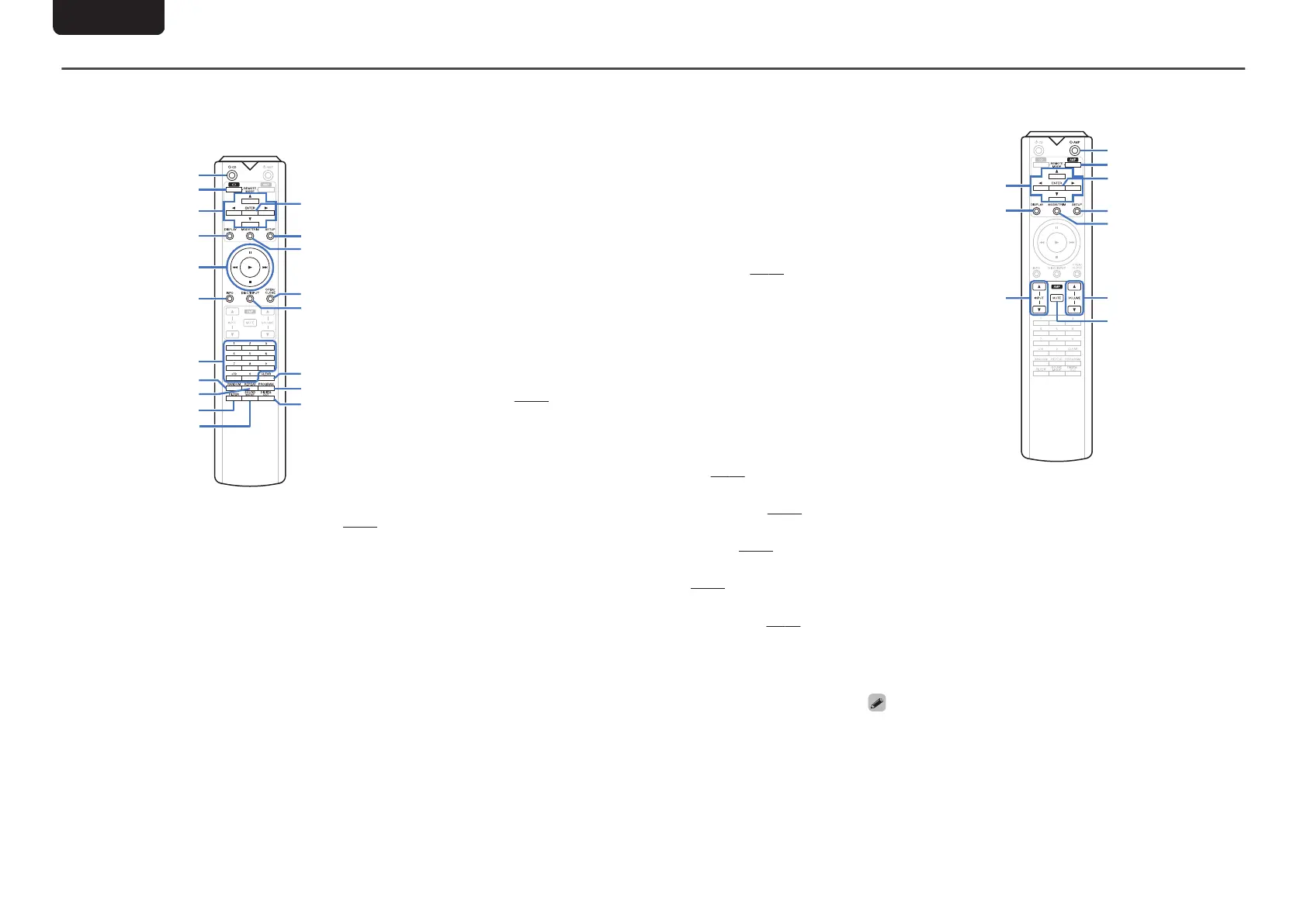
Remote control unit
n
Operating this unit
To operate CD player, press REMOTE MODE CD button
to switch the remote control to the CD operation mode.
.
q
w
e
r
t
u
i
o
Q0
Q1
y
Q7
Q9
Q8
Q3
Q5
Q6
Q2
Q4
A
Power operation button (X CD)
This turns the power on/off (standby). (v p. 11)
B
Remote mode select button (REMOTE MODE CD)
This switches the remote control operating mode to CD.
C
Cursor buttons (uio p)
These select items.
D
DISPLAY button
This turns the display on/off. Press and hold to turn the
illumination lamp on/off.
E
System buttons
These perform playback related operations.
0
Skip buttons (8 / 9)
0
Stop button (2)
0
Play button (1)
0
Pause button (3)
F
Information button (INFO)
This switches the track information shown in the display
during playback.
G
Number buttons (0 – 9, +10)
These enter numbers into the unit.
H
RANDOM button
Switches the random playback.
I
REPEAT button
Switches the repeat playback.
J
FILTER button
This switches the filter characteristics. (v
p. 24)
K
SOUND MODE button
This switches the playback layer of a Super Audio CD.
L
ENTER button
This determines the selection.
M
SETUP button
This displays the setting menu on the display.
(v
p. 25)
N
Playback mode switching button (MODE/TRIM)
This switches the playback mode.
O
OPEN/CLOSE button
Opens and closes the disc tray. (v
p. 13)
P
DISC/INPUT button
Used to select the playback media mode. (v p. 11)
Q
CLEAR button
This clears the program registration. (v p. 14)
R
PROGRAM button
This sets program playback. (v
p. 14)
S
DIGITAL OUT button
This switches the digital audio out on/off. (v p. 12)
n
Amplifier operations
A Marantz amplifier can be operated.
.
A
Cursor buttons (uio p)
B
DISPLAY button
C
Input source select buttons (INPUT df)
D
Power operation button (X AMP)
E
Remote mode select button (REMOTE MODE AMP)
F
ENTER button
G
SETUP button
H
Volume balance adjustment menu button (MODE/
TRIM)
I
VOLUME buttons (df)
J
MUTE button
0
The remote control may not operate some products.
ENGLISH
7



 To Next Page