ENGLISH
Remote
control
0
Buttons
for
Super
Audio
CD
player
7
o---~~:':.:'
I
~
:
:
..
:;·
::=ts~
01--+--
.....
~-"------,,=.:"----,-_::_____,
0----4~~
"";--'
~
·
0
·-!---;-:"""--......F"
0--+-+-~~
0--t-rrt\:::::r:=~
~-1-+~-"<._
---
G)~"-+-.....:..,..;:~
----
481-1--+..8'
48~
.......
,
..,;:
,
~":::'
' I
I
I
i :
I1D
I '
: .
:
:i-
~if··-~-if~
...
-;···~
,
. •'
• •I
1: 4 6 : :
;: :r
; . 7 9 :!
:
:.r:~
::·::'·
~~·
·
=mN3
..
+=
:
+-~
«D-+~~~3++-~
4D
~
~-1---+--l
41!),---1--!----l
RC001PMSA
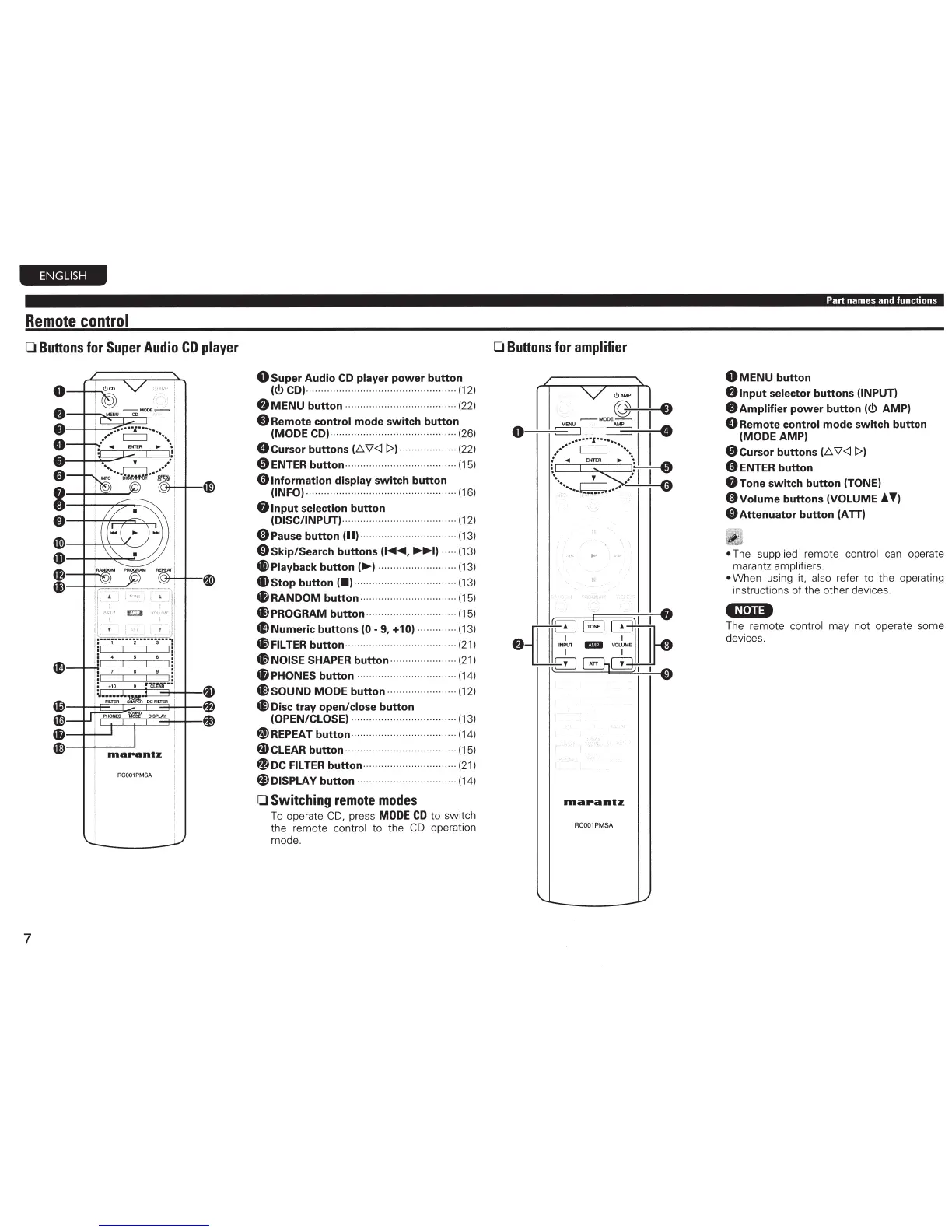
0
Super
Audio
CD
player
power
button
(<!>CD)·
--
····--·--
··
··------·--·
······
--·····
· · ·
(12)
f)
MENU
button
· ·
··
· · · · · · · · · · · · · · · · · · · · · · · · · · · · · · · · ·
(22)
8
Remote
control
mode
switch
button
(MODE CD)··
···
················
··
··················· (26)
0
Cursor
buttons
(D.
V<ll>)· · · · · · · · · · · · ·
··
· · · · (22)
0ENTER
button--·············
···
···
···
·
..
··
·····(15)
01nformation
display
switch
button
(INFO)···
··
···
·····
··
············
··
·········
··
··
··
······
(16)
Olnput
selection
button
(DISC/INPUT)···························
··
·········
(12)
(1)
Pause
button
(II)··········
···
···················
(13)
0
Skip/Search
buttons
(~,
~I
· · · · · (13)
~Playback
button
(..,.) · · · ·· · · · · · · · · · · · · · · · · · · · · ·
(13)
4Dstop
button
(•)
·········
··
· ······
··
··· · ·······
(13)
48RANDOM
button·--········
··
·················--(15)
48
PROGRAM button········
···
··················· (15)
~Numeric
buttons
(0-
9,
+10) ············· (13)
f9
FILTER button···················
···
···············
(21
)
4D
NOISE SHAPER button··········
··
··
···
·····
(21
)
~PHONES
button,,,,,
..
..
.
,,
......
..
......
(1
4)
4(i)sOUND MODE
button
............ , ......... (12)
4i>Disc
tray
open/close
button
(OPEN/CLOSE) ................................... (13)
@>REPEAT
button
................................... (14)
~CLEAR
button
· · · .... , .......... · ··· · ·
(15)
~DC
FILTER
button
----
--
..
.
..
. , , .... · .......
(21)
~DISPLAY
button
,
,,,
... , .................
..
.
(14)
0 Switching
remote
modes
To operate
CD,
press MODE
CD
to
switch
the remote control
to
the
CD
operation
mode.
0
Buttons
for amplifier
0
RC001PMSA
Part
names
and
functions
0
MENU
button
f)
Input
selector
buttons
(INPUT)
8
Amplifier
power
button
(<!>
AMP)
0
Remote
control
mode
switch
button
(MODE AMP)
0
Cursor
buttons
(D. V<ll>)
0 ENTER
button
8Tone
switch
button
(TONE)
0Volume
buttons
(VOLUME!
T)
0Attenuator
button
(ATT)
iii
• The supplied remote control
ca
n opera
te
marantz amplifiers.
• When
us
i
ng
it, also refer to the operating
instructions of
the
other devices.
•M.a••
The remote control may not operate some
devices.



 To Next Page