ENGLISH
Part
names
and
functions
For
buttons not explained here. see the page indicated
in
parentheses (
).
Front
panel
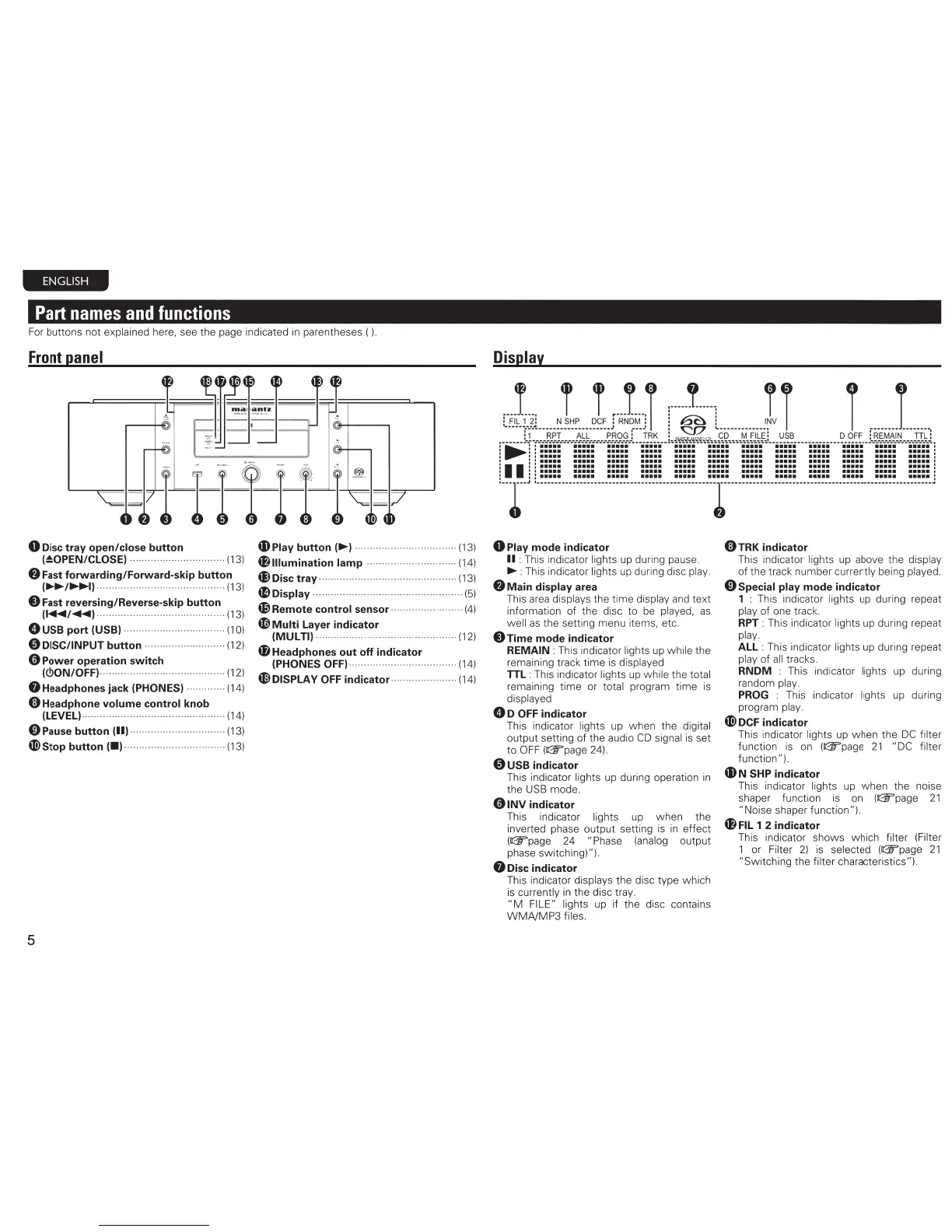
0
Disc
tray open/close button
4DPiay
button(~)
........................
....
.. .. ..
(13)
(~OPEN/CLOSE)
..............
..
..
............. . (13)
f)
Fast forwarding/Forward-skip button
~~~/~)
........................................... (13)
0 Fast reversing/Reverse-skip button
(~/
....
) ........................................... (13)
0 USB port (USB) .......... ....
..
..........
.. ..
...
(1
0)
0 DISC/INPUT button ...........................
(12)
0 Power operation switch
(<!>ON/OFF)
··
···
··
.................
.....
.............
(12)
8 Headphones jack (PHONES) ............. (14)
4&111umination
lamp ................
..
............ (14)
~Disc
tray ············
···
······· ·······
··· ···
·········· · (13)
~Display
.................................
....
.. ..
....
..
...
(5)
d9Remote control sensor ........................ (4)
4D
Multi Layer indicator
(MULTI) ........
..
..............
..
.....................
(12)
48
Headphones out off indicator
(PHONES
OFF)
............................
.... ....
(14)
4DDISPLAY
OFF
indicator
....
..
..
.....
..
..... (14)
ti) Headphone volume control knob
(LEVEL) .......
..
...
.........
....
................
...
.
...
(14)
0Pause
button
(11)
.... ....
................
...
.... (13)
«!>stop button I•J
........
.. ..
........
..
..
........
. (13)
5
Display
l"i!tJ.L
..
J
....
l.re~~Ji
r··~--L
......
J i i ,
.....
1
....
,
.......
!.-1-.-.·---~~I-.-.·---~~-~---------~-~9--g.J
...
!.~~--.i~~~~'!'..~£~~~~~~~m~L-~-~~-------------~-~~~--!-.~~~-~-~~---·--.:g:_~L
.......
::·····
.......................................................
.
: 1 1
•••••
••••• ••••• ••••• •••••
••••• ••••• •••••
••••• ••••• •••••
•
••••
I
1 I I
••••• ••••• ••••• ••••• •••••
••••• ••••• •••••
••••• ••••• •••••
•
••••
:
: : :
••••• ••••• ••••• ••••• •••••
••••• ••••• •••••
••••• ••••• •••••
•
••••
I
••••••••••
••••••••••••••••••••••••••••••••••••••••••••••••••••••••
I :
I.....
..... ..... ..... .....
.....
.....
.....
..... .....
.....
.
....
:
!
--I-'
!.~~~-~~-
--~-~~~~-
---
~~~~~----
~~~-
~~--
-~-~~~~--
--~r
---~~
~-~
~
-
--~~~~---
-~~~~~--
--~~~~~---~~-~~~-
---~~~~~-J
0 Play mode indicator
II
: This indicator lights
up
during pause.
~
:
This
indicator lights
up
during disc play.
f)
Main display area
This
area
displays the time display
and
text
information of the disc to
be
played,
as
well
as
the setting menu items, etc.
0Time
mode indicator
REMAIN : This indicator lights up while the
remaining track time
is
displayed
TIL:
This indicator lights
up
while the total
remaining time or total program time
is
displayed
0 D
OFF
indicator
This indicator lights up when the digital
output setting of the audio
CD
signal
is
set
to
OFF
(113f'page
24).
0 USB indicator
This indicator lights up during operation
in
the
USB
mode.
01NV
indicator
This indicator lights up when the
inverted phase output setting
is
in
effect
(113f'page
24 "Phase
(analog
output
phase switching)").
8
Disc
indicator
This indicator displays the disc type which
is
currently
in
the disc tray.
"M
FILE" lights up if the disc contains
WMNMP3
files.
OTRK
indicator
This indicator lights
up
above the display
of the track number currently being played.
0 Special play mode indicator
1 : This indicator lights
up
during repeat
play of one track.
RPT
: This indicator lights up during repeat
play.
ALL
: This indicator lights
up
during repeat
play of
all
tracks.
RNDM : This indicator lights up during
random
play.
PROG
: This indicator lights
up
during
program
play.
~
DCF
indicator
This indicator lights up when the
DC
filter
function
is
on
((W'page
21
"DC filter
function").
4D
N SHP indicator
This indicator lights up when the noise
shaper function
is
on
((W'page
21
"Noise shaper function").
48
FIL
1 2 indicator
This indicator shows which filter (Filter
1 or Filter
2)
is
selected
(113f'page
21
"Switching the filter characteristics").



 To Next Page