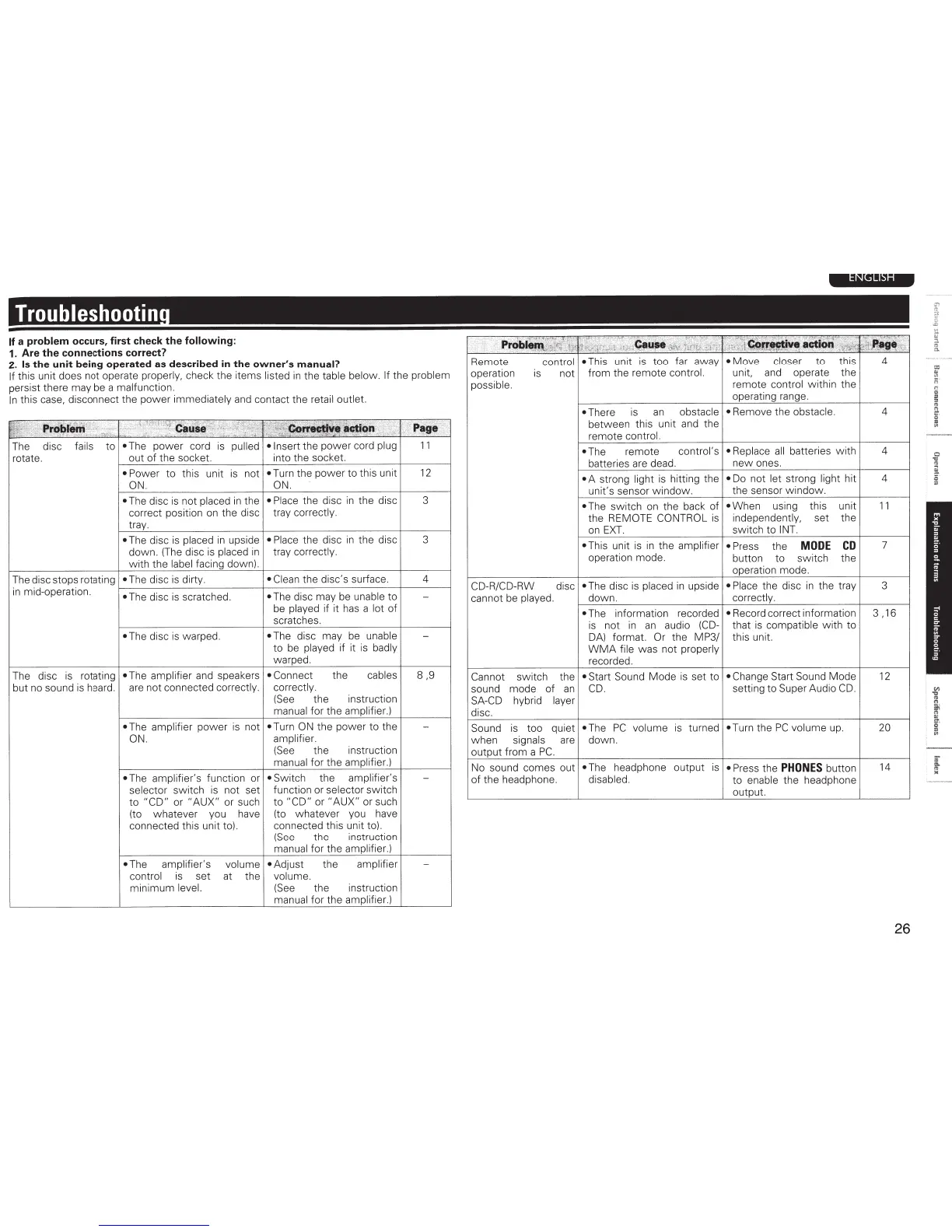
Troubleshootin
If a
problem
occurs, first check
the
following:
1.
Are
the
connections correct?
2.
Is
the unit being operated
as
described
in
the owner's
manual?
If
this unit does not operate
properly,
check the items
listed
in
the
table below. If
the
problem
persist there may be a
malfunction.
In
this
case, disconnect the
power
immediately
and contact the
retail
outlet
;
¥;·
'\~
'.
""
...
Prol;»ferri
:
"'::'
..
·::
.
~.:
·,"'"
''-f
<;IIIIJSe
'
;;~
,v~
?~;,~~
.
:,_
:
'~~
co~•
'
•
C!ion
·:>'''
·
•. : :
:L
· . .
'*'
' • .
:·
..
Ht'
P•SJ•
The
disc
fails
to
•The
power
cord
is
pulled
•Insert
the
power
cord
plug
11
rotate.
out of the
socket
into the
socket
•
Power
to
this
unit
is
not
•
Turn the
power
to
this unit
12
ON
.
ON.
•
The disc
is
not
placed
in
the
• Place the disc
in
the disc
3
correct position on the disc tray
correctly.
tray.
• The disc
is
placed
in
upside
• Place the disc
in
the disc 3
down
. (The disc is
placed
in
tray
correctly.
with
the
label
facing down).
The disc stops rotating
•
The disc
is
dirty.
• Clean
the disc's surface.
4
in
mid-operation.
•
The disc
is
scratched.
•
The disc may be
unable
to
-
be
played
if
it has a
lot
of
scratches.
•The
disc
is
warped.
•The
disc may be unable
-
to
be
played
if it
is
badly
warped.
The
disc
is
rotating
•
The
amplifier
and speakers
• Connect
the
cables
8,9
butnosoundishea~.
are not connected
correctly. correctly.
(See
the
instruction
manual
for the
amplifier.)
•
The amplifier
power
is
not
•
Turn
ON
the power to the
-
ON. amplifier.
(See
the instruction
manual
for the
amplifier.)
•
The
amplifier's function or
•
Switch the amplifier's
-
selector
switch
is
not set function or selector
switch
to
"CD"
or
"AUX"
or such
to
"CD"
or
"AUX"
or su
ch
(to
whatever you have
(to
whatever
you have
connected this unit to). connected this unit to).
(See
the instruction
manual
for the
amplifier.)
•The
amplifier's
volume
•Adjust
the
amplifier
-
control
is
set
at
the
volume.
minimum
level.
(See
the instruction
manual
for the
amplifier.)
Remote
control •
This unit
is
too far away
•
Move
closer
to this 4
operation
is
not from the remote
control.
unit. and operate the
possible. remote
control
within the
operating range.
•
There is
an
obstacle
between this unit and the
remote
control.
•
The remote
control's
batteries are dead.
•
A strong
light
is hitting the
unit's sensor
window
.
•
The switch
on
the back of
the REMOTE
CONTROL
is
on
EXT.
•
This unit
is
in
the
amplifier
operation mode.
•
Remove the
obstacle.
• Replace
all
batteries
with
new
ones.
•
Do
not
let
strong
light
hit
the sensor w indow.
•
When using this unit
independently,
set the
switch to
INT.
• Press the
MODE
CD
button to switch the
operation mode.
CD-R/CD-RW
disc
•
The disc
is
placed
in
upside
• Place the disc
in
the tray
4
4
4
11
7
3
cannot be
played.
down.
correctly.
~--
------------------4-------
~------
------T-----
~
•
The information recorded
•
Record correct information
is
not
in
an
audio
(CD-
that
is
compatible
with
to
DA)
format
Or
the
MP3/
this
unit
WMA
file
was not
properly
recorded.
Cannot
switch the
•
Start Sound
Mode
is set
to
• Change
Start Sound Mode
sound mode of
an
CD.
setting to Super Audio
CD.
SA-CD
hybrid
layer
disc.
Sound
is
too
quiet
•
The
PC
volume
is
turned •
Turn the
PC
volume up.
when
signals
are
down
.
output from a
PC.
No sound comes out
•
The headphone output
is
•
Press the
PHONES
button
of
the headphone.
disabled.
to
enable
the headphone
output
3,16
12
20
14
26
=
"'
"'
ii
'
"
"
"
"
g
"
~
,
...,
1
I
£:
,
'"'
~
:t
.
c
=
..



 To Next Page