ENGLISH
Cautions
on
handling
• Before turning
the
power switch on
Check
once again that
all
connections are correct and that
there are
no
problems
with the connection
cables.
•When
leaving
home for
long periods
of
time, be sure to
unplug
the power cord from the
po
wer
outlet.
•
Proper
ventilation
If
the unit
is
left
in
a room full
of
the smoke from cigarettes,
etc
.,
for long
periods
of
time, the surface of the
optical
pickup may get dirty, preventing it from receiving the
signals
properly.
•
About condensation
If
there
is
a major difference
in
temperatu
re
between the
inside
of
the unit
an
d its sur
ro
undings, condensation may
form on parts inside the
unit,
ca
using the unit to
fail
to
operate
properly.
If
this happens,
let
t
he
unit sit for
an
hour or
two
w
it
h
the power
off
and wait
until
there is
little
difference
in
temperature before usi
ng
the unit.
• Cautions on using
mobile
phones
Using a
mobile phone near this unit may
result
in
noise. If
that occurs, move the
mobile
phone aw
ay
from the u
ni
t
when it is
in
use.
•
Moving the unit
3
Turn
off
the
pow
er and
unplug
the power cord from the
power
outlet.
Ne
xt, disconnect the cables
connected to
other system
un
its
before moving the unit.
Discs
Discs
playable
on
this
unit
0
Super Audio
COs
Super
Au
di
o
COs
with the fo
ll
ow
ing
logos indi
ca
ted
bel
ow
can
be
pla
yed
on this unit.
SUPER
AUDIO
CD
8MusicCDs
Discs ma
rk
ed with the
logo
at ri
gh
t c
an
be
pla
yed in this
unit.
8
CD-R/CD-RW
4N•U•
•
Discs in spec
ial
shapes (heart
-sh
aped discs,
octag
on
al
discs,
etc.) cannot
be
pl
ayed.
Do
n
ot
attempt to
pla
y
them,
as
doing
~
so
ca
n damage t
he
unit.
• Some discs and some
-
:::-
recording formats cannot
be
--
played.
•
Non-finalized discs cannot be
played.
*What
is
finalization?
>C\
Y!/;:;;J
Finalization is the process t
ha
t makes recorded
CD-R
/
CD-RW
di
scs
p
laya
ble
on compatible
pla
yers.
Holding
discs
Loading
discs
•
Pla
ce
t
he
di
sc
in t
he
tray,
label
side up.
•
Make sure t
he
disc
tr
ay is
fu
ll
y
open when i
ns
ert
in
g the di
sc.
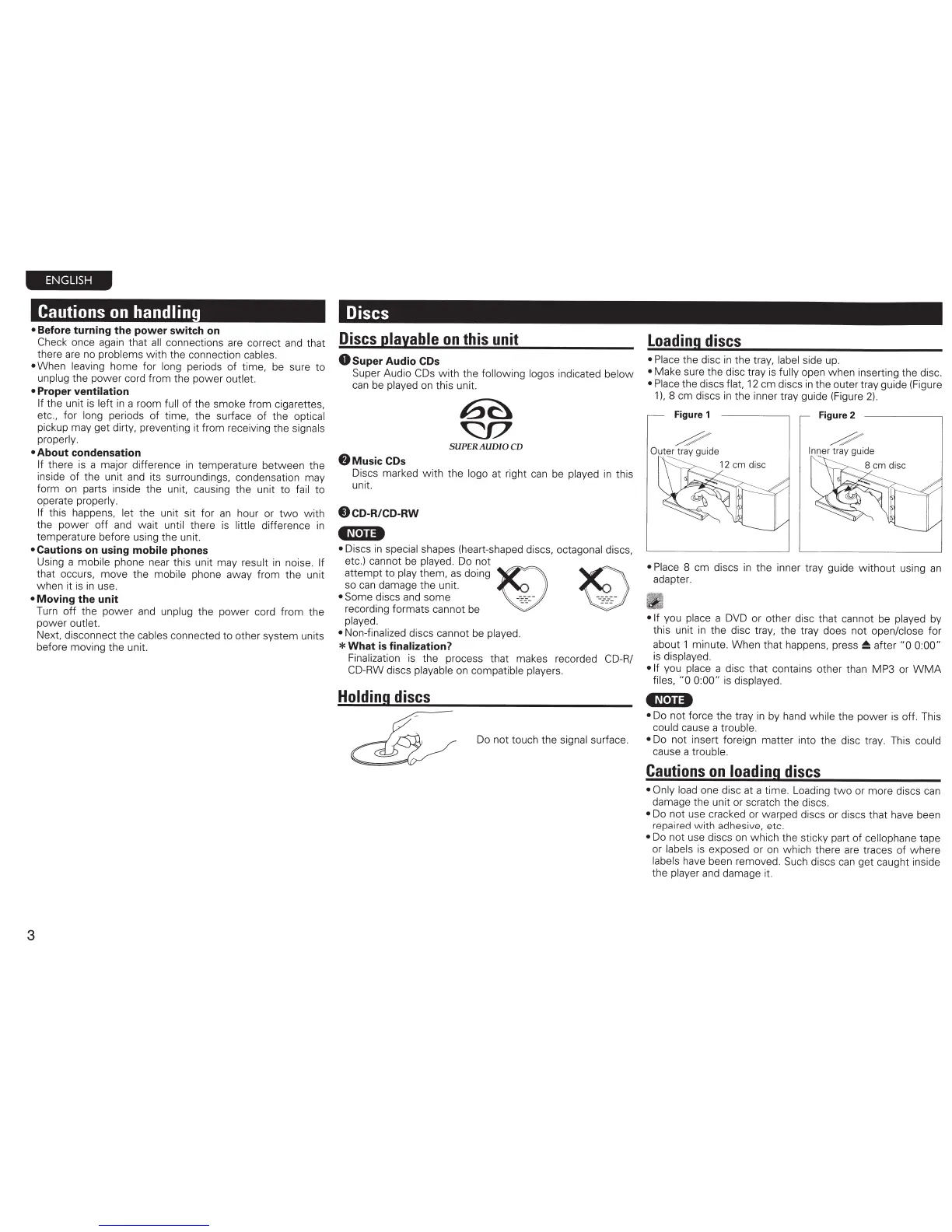
• Place
the discs
flat,
12 em discs in
the outer tray guide
(F
igure
1
),
8
em discs in the inner
tr
ay gu
id
e (Figure
2)
.
•
Pla
ce
8 em discs
in
the inner tray guide w ithout using an
adapte
r.
•If
you
pla
ce a
DV
D or other disc that cann
ot
be played
by
this
unit in the disc tray, t
he
tr
ay
does
no
t
open/close
for
about 1 minut
e.
When that happens,
pr
es
s
~
after
"0 0:0
0"
is displayed.
•If
you
place
a
disc t
ha
t contains other th
an
MP3 or
WM
A
f
il
es, "0 0:00" is dis
pla
yed.
•~t.n•
•
Do n
ot
fo
rce the t
ra
y in
by
ha
nd
while t
he
power is
off
. This
could
cause a
trouble.
Do
no
t touch the
sign
al
surface.
•
Do not insert forei
gn
matter into the
di
sc
tray. This
cou
ld
cause a
trouble.
Cautions
on
loading
discs
• Only load
one
disc at a time. Loading
two
or more discs c
an
dam
age
the unit or scratch the discs.
•
Do
no
t use cracked or warped discs or discs that have been
r
epa
ir
ed
with adhesive, etc.
•
Do not use discs on which t
he
sticky part of ce
ll
ophane tape
or
la
bels
is
e
xp
osed or
on
wh
ich there
ar
e traces of
wh
ere
labels
have been remov
ed
.
Suc
h
di
scs
ca
n get
cau
ght inside
the
pl
ay
er
and damage it.



 To Next Page