12
NAMES AND
FUNCTIONS
BASIC
CONNECTION
BASIC
OPERATION
ADVANCED
CONNECTIONS
TROUBLESHOOTING
OTHERS
ADVANCED
CONNECTIONS
ENGLISH
APPLICATION
OPERATION
ADVANCED CONNECTIONS
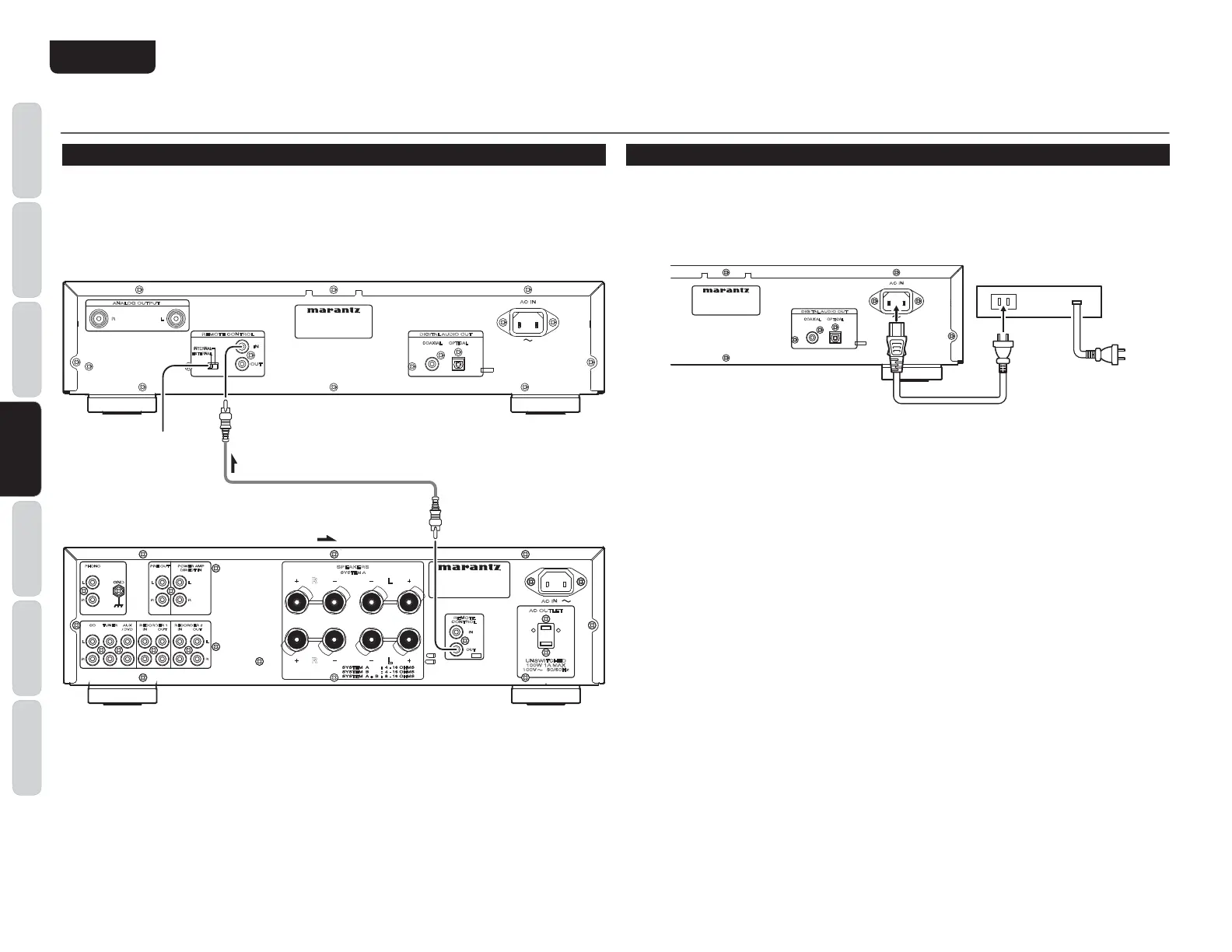
REMOTE CONTROL CONNECTION
Connecting this player to additional Marantz audio equipment using the supplied remote control cable
enables remote control of the connected equipment as a single audio system.
s When connecting equipment incorporating a remote sensor, connect the
“
remote control out
”
connector
of the equipment to the
“
remote control in
”
jack of the CD player.
When doing this, set this pla
yer
’
s switch to
“
EXTERNAL.
”
This will stop its remote control IR receiver
f
rom operating and the player can now be controlled via the remote control IR receiver of the attached
equipment.
L
R
GND
CD AUX
/
DVD
TUNER
OUTIN
RECORDER 1
OUTIN
RECORDER 2
R
L
L
R
PHONO
AC IN
AC OUTLET
UNSWITCHED
100W 1A MAX
100V 50/60Hz
OUT
IN
REMOTE
CONTROL
R
L
POWER AMP
DIRECT IN
PRE OUT
R
L
R
SPEAKERS
SYSTEM A
L
R L
AC IN
DIGITAL AUDIO OUT
IN
OUT
REMOTE CONTROL
ANALOG OUTPUT
R L
OPTICALCOAXIAL
INTERNAL
EXTERNAL
HZiid
¹
:MI:GC6A#
º
GZbdiZXdccZXidgXVWaZhjeea^ZY
/H^\cVaÅdl
6bea^ÄZg
TIMER PLAY
This unit can perform timer play by cooperating with your audio timer.
Connect this unit
’
s power cord to the audio timer
’
s power socket and the timer
’
s power cord to power
outlet.
s For connection to audio timer and it
’
s operation, please refer to the instruction manual of your audio
timer.
AC IN
DIGITAL AUDIO OUT
OPTICALCOAXIAL
6jY^dI^bZg



 To Next Page