14
NAMES AND
FUNCTIONS
BASIC
CONNECTION
BASIC
OPERATION
ADVANCED
CONNECTIONS
REMOTE CONTROLLER
OPERATION
TROUBLESHOOTING
OTHERS
APPLICATION
OPERATION
ENGLISH
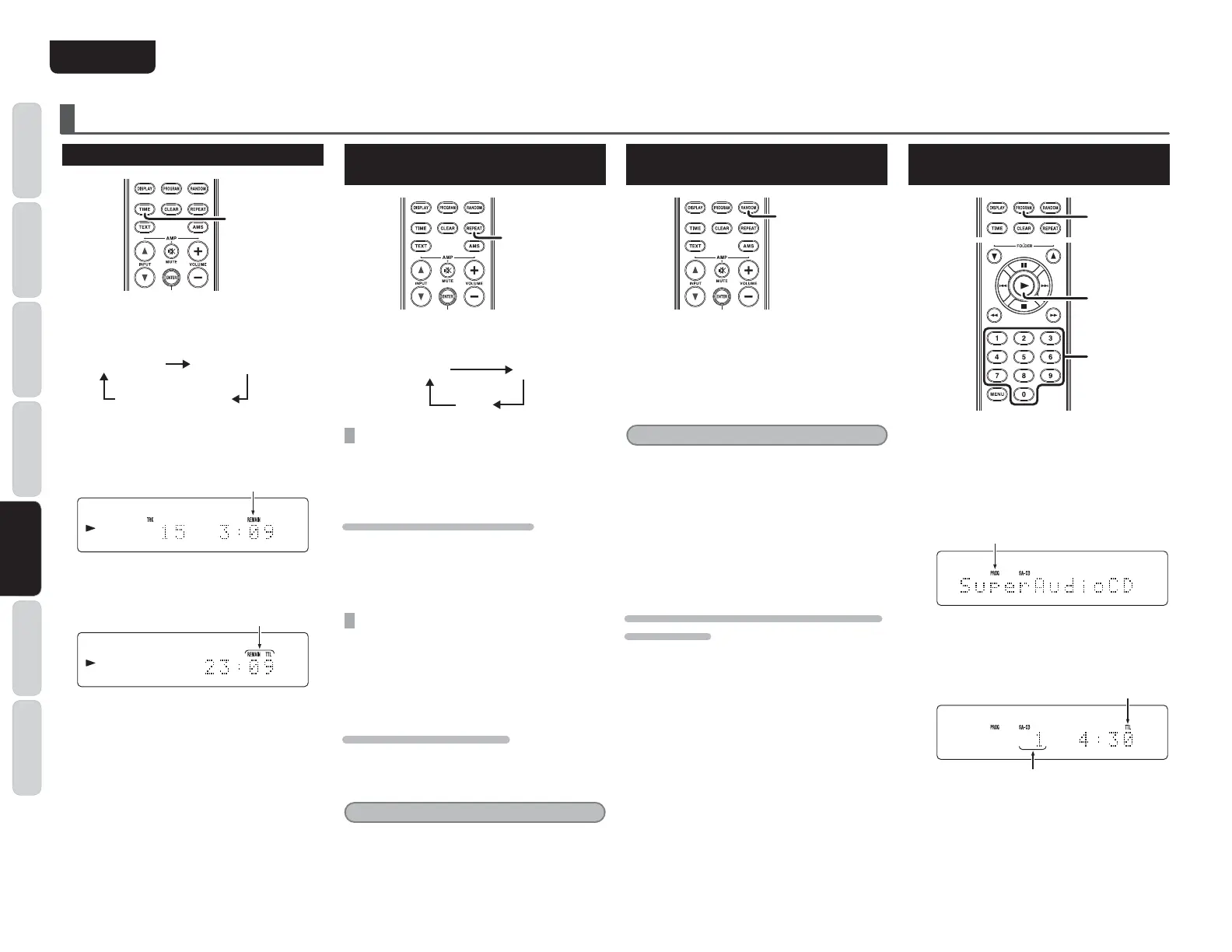
TO CHANGE TIME DISPLAY
TIME
Press the TIME button on the remote control.
Each time TIME button is pressed, display will
change in the following order.
Track elapsed
time
Track remaining
time
Total remaining
time
s Track remaining time
(The remaining playing time from the playing
point to the end of the current track)
¹
G:B6>C
º
^hY^heaVnZY
s Total remaining time
(The remaining playing time from the playing
point to the end of the last track)
¹
G:B6>CIIA
º
^hY^heaVnZY
Track information does not appear when
“
Total
remaining time
”
is displayed.
APPLICATION OPERATION (CD OPERATION)
REPEATED DISC PLAY
(REPEATPLAY)
REPEAT
Each time the REPEAT button on the remote control
is pressed, the repeat mode cycles in the following
order.
OFF 1
ALL
ONE TRACK REPEAT
Press REPEAT button on the remote two times.
“
1
”
,
“
RPT
”
indicators will light and the track will be
played repeatedly.
TO EXIT FROM ONE TRACK REPEAT
Press the REPEAT button on the remote control
twice.
“
1
”
“
RPT
”
indicator will disappear, repeat
mode will be off and it returns to normal play
mode.
ALL TRACK REPEAT
When
“
Repeat
”
mode is off, press the REPEAT
button on the remote control twice. The
“
RPT
”
in
dicator will light up and all track repeat play
begins.
TO RETURN TO NORMAL PLAY
Press the REPEAT button on the remote control
once.
“
RPT
”
indicator will disappear, repeat mode
will be off and it returns to normal play mode.
Note:
Random Play and AMS Play cannot be conducted
when the unit is in Repeat Mode.
PLAYING TRACKS IN A RANDOM
SEQUENCE (RANDOM PLAY)
RANDOM
When the RANDOM button on the remote
control is pressed in stop mode, and then the 2
button is pressed, the unit shuffles the track order
automatically and plays all tracks randomly in the
shuffled order.
The display
’
s
“
RNDM
”
(random) indicator will
light-up.
Note:
Repeat Play and AMS Play cannot be conducted
when the unit is in Random Mode.
s If the E button on the main unit, or the E
button on the remote control
are pressed during
R
andom Play, the player jumps to the next track
of the shuffled order.
s To search through the current track during random
play, press and continue holding the /,
Z/E buttons on the main unit or press the
, Z buttons on the remote control.
TO EXIT FROM RANDOM PLAY AND RETURN TO
NORMAL PLAY
Press the button, and then press the RANDOM
button while playback is stopped.
The RNDM (random) in
dicator goes off, and random
play is released.
PLAYING TRACKS IN A SPECIFIC
SEQUENCE (PROGRAM PLAY)
1.
2.
4.
You can arrange and play tracks in a specific
sequence. Up to 24 tracks to be played can be
programmed.
1. EgZhh PROGRAMWjiidcdc i]Z gZbdiZ ^c
hidebdYZ#
¹
PROG
º
^cY^XVidgl^aaWa^c`VcY
^i\dZhidegd\gVbbdYZ#
A^\]ihje
2. 8]ddhZ V igVX` id WZ egd\gVbbZY l^i]
cjbZg^XWjiidchdci]ZgZbdiZ#
(Example: The 15th track is chosen and it’s
length is 4min30sec)
A^\]ihje
&hiigVX`egd\gVbbZY



 To Next Page