15
NAMES AND
FUNCTIONS
BASIC
CONNECTION
BASIC
OPERATION
ADVANCED
CONNECTIONS
REMOTE CONTROLLER
OPERATION
TROUBLESHOOTING
OTHERS
APPLICATION
OPERATION
ENGLISH
APPLICATION OPERATION (CD OPERATION)
3. L^i] i]Z hZfjZcXZ YZhXg^WZY ^c hiZe 2
VWdkZ!egd\gVbVcdi]ZgigVX`#GZeZVii]Vi
hZfjZcXZ id egd\gVb Vaa i]Z igVX`h ndj
lVci#NdjXVcegd\gVbjeid(%igVX`h#
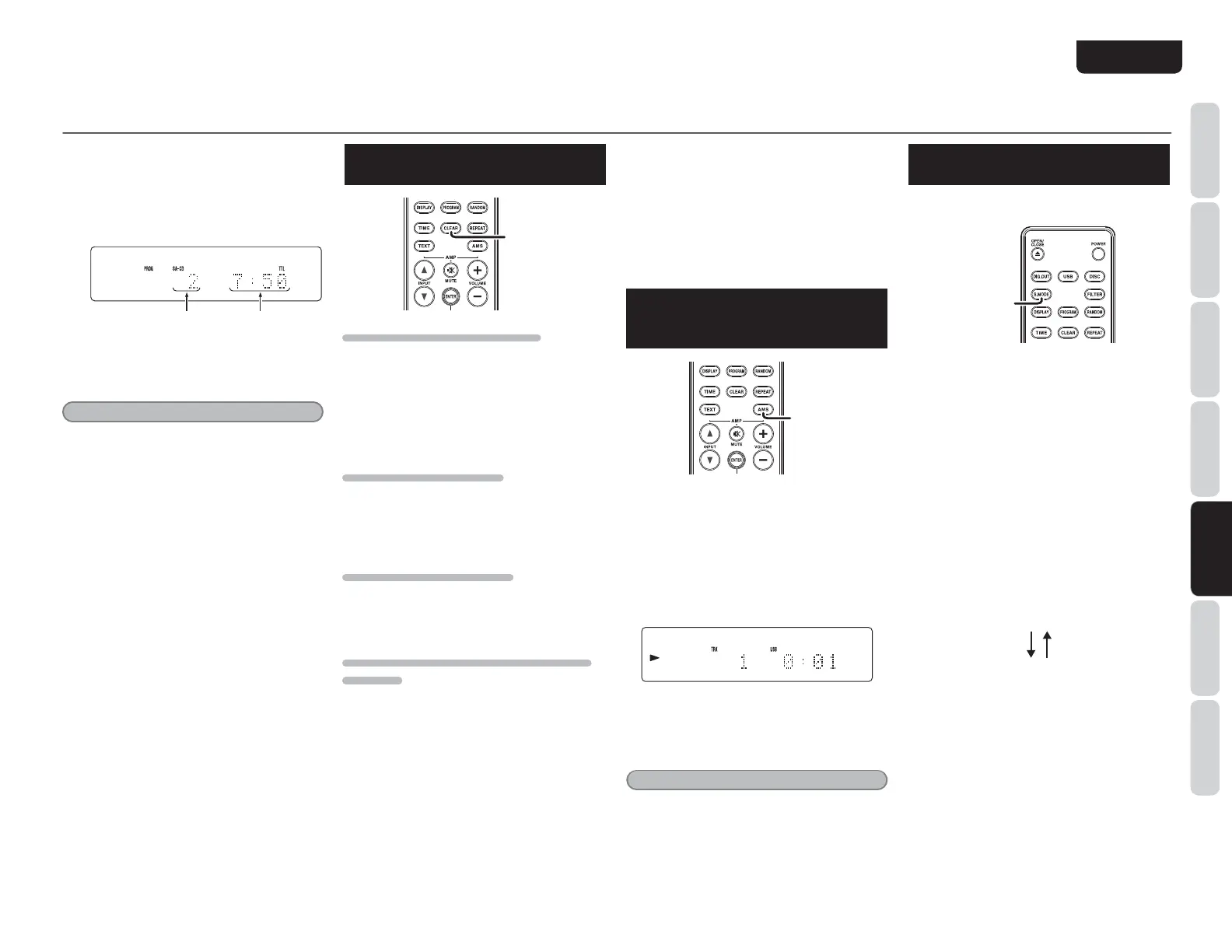
(Example: The 7th track is chosen and total
length of 7th and 15th is 7min50sec)
IdiVaegd\gVbbZY
cjbWZg
IdiVaeaVn^c\i^bZd[
egd\gVbbZYigVX`h
4. EgZhh 2 Wjiidc id hiVgih eaVnWVX` ^c
egd\gVbbZYdgYZg#
Note:
Repeat Play, Random Play, and AMS Play cannot
be conducted while the unit is in PROGRAM mode
(i.e. when the PROG indicator is lit).
TO CHECK THE PROGRAMMED
TRACKS
CLEAR
TO DELETE A PROGRAMMED TRACK
1. EgZhh CLEAR Wjiidc ^c hide bdYZ l]Zc
egd\gVb ]Vh WZZc bVYZ L]Zc
¹
PROG
º
^cY^XVidg^ha^\]i^c\je#
2. :kZgn i^bZ egZhh CLEAR Wjiidc! i]Z
egd\gVbbZY igVX`h VgZ YZaZiZY ^c dgYZg
[gdbi]ZaVhiigVX`egd\gVbbZY#
TO CLEAR WHOLE PROGRAM
Press STOP button two times while in program
play. In the stop mode, press STOP button once.
Program can also be cleared by pressing OPEN/
CLOSE button to open th
e disc tray.
TO ADD TRACKS TO PROGRAM
Tracks can be added to the end of program when
program is remaining (
“
PROG
”
indicator is lighting
up) and in stop mode.
PLEASE BE CAREFUL ABOUT THE FOLLOWING
MATTERS
s When programming 1st through 9th tracks in a
disc that has over 10 tracks by using numeric
buttons. For instance, programming the 3rd track
after programming the 1st track, press 3 button
more than approximately 1.5 seconds after 1
button is pressed. When a program is finalized,
the time is updated.
s Likewise, when programming a track at 10th or
after. For example, to program 13th track, press 3
button within approximately 1.5 seconds after 1
button is pressed.
s When programming a track in a disc that has less
than 9 tracks. For instance, to program the 5th
track after 4th track has been programmed, press
5 button more than approximately 0.5 second
after 4 button is pressed.
SEARCHING YOUR FAVORITE
TRACKS (AMS (AUTOMATIC
MUSIC SCAN) PLAY)
AMS
This feature is convenient for searching where your
favorite track is.
If the AMS button is pressed while a track is
stopped, the PLAY indicator
“
2
”
flashes, and the
first ten seconds of each track on the disk will be
played starting from the first track.
Also, if the AMS button is pressed during playback,
the PLAY indicator
“
2
”
flashes, and the program
jumps to the next track after approximately
10 second
s elapses on the display time.
Once you find a song that you want to listen to,
press the AMS button again or press the 2 button.
The PLAY indicator lights up and normal playback
resumes from the current track.
Note:
AMS Play cannot be conducted while the unit is in
PROGRAM mode.
SWITCHING SOUND MODE
(SUPER AUDIO CD)
Please set Start Sound Mode to
“
SA-CD
”
(see
page 16).
S.MODE
1. EgZhh S.MODE Wjiidc ^c hide bdYZ cdi
eaVn^c\#
I]Z XjggZcian hZaZXiZY aVnZg dg VgZV ^h
h]dlcdci]ZY^heaVn#89dgHjeZg6jY^d
89
>[ S.MODE Wjiidc ^h egZhhZY V\V^c! V
eaVnVWaZ aVnZgdgVgZV l^aa WZ h]dlc! VcY
i]Z aVnZg dg VgZV l^aa WZ hl^iX]ZY id cZl
dcZ#
L]ZcaVnZgdgVgZV^hhl^iX]ZY!ID8l^aa
WZgZVYV\V^c#
I]ZhdjcYbdYZXVccdiWZX]Vc\ZY[dg
6jY^d89h VcY Y^hXh l^i]dcanV HjeZg
6jY^d89VgZV
#
I]Z hdjcY bdYZ dc ]nWg^Y aVnZg Y^hXh
l
^aaWZX]Vc\ZY^ci]Z[daadl^c\dgYZg#
Super Audio CD stereo area
CD layer
2. EgZhhi]ZS.MODEWjiidcYjg^c\eaVnWVX`#
I]Z XjggZcian hZaZXiZY aVnZg dg VgZV ^h
h]dlcdci]ZY^heaVn#89dgHjeZg6jY^d
89
>[ S.MODE Wjiidc ^h egZhhZY V\V^c! i]Z
eaVnWVX`^hhideeZY!VcYi]ZaVnZgdgVgZV
l^aaWZhl^iX]ZYidcZldcZ#
L]Zc ndj lVci id a^hiZc Vi i]Vi VgZV!
egZhh2WjiidcV\V^c#I]ZeaVnWVX`l^aaWZ
hiVgiZY#



 To Next Page