17
NAMES AND
FUNCTIONS
BASIC
CONNECTION
BASIC
OPERATION
ADVANCED
CONNECTIONS
REMOTE CONTROLLER
OPERATION
TROUBLESHOOTING
OTHERS
APPLICATION
OPERATION
ENGLISH
NORMAL PLAYBACK
0
2
7
8
1. 3. 2. 4.
1.
2.
4.
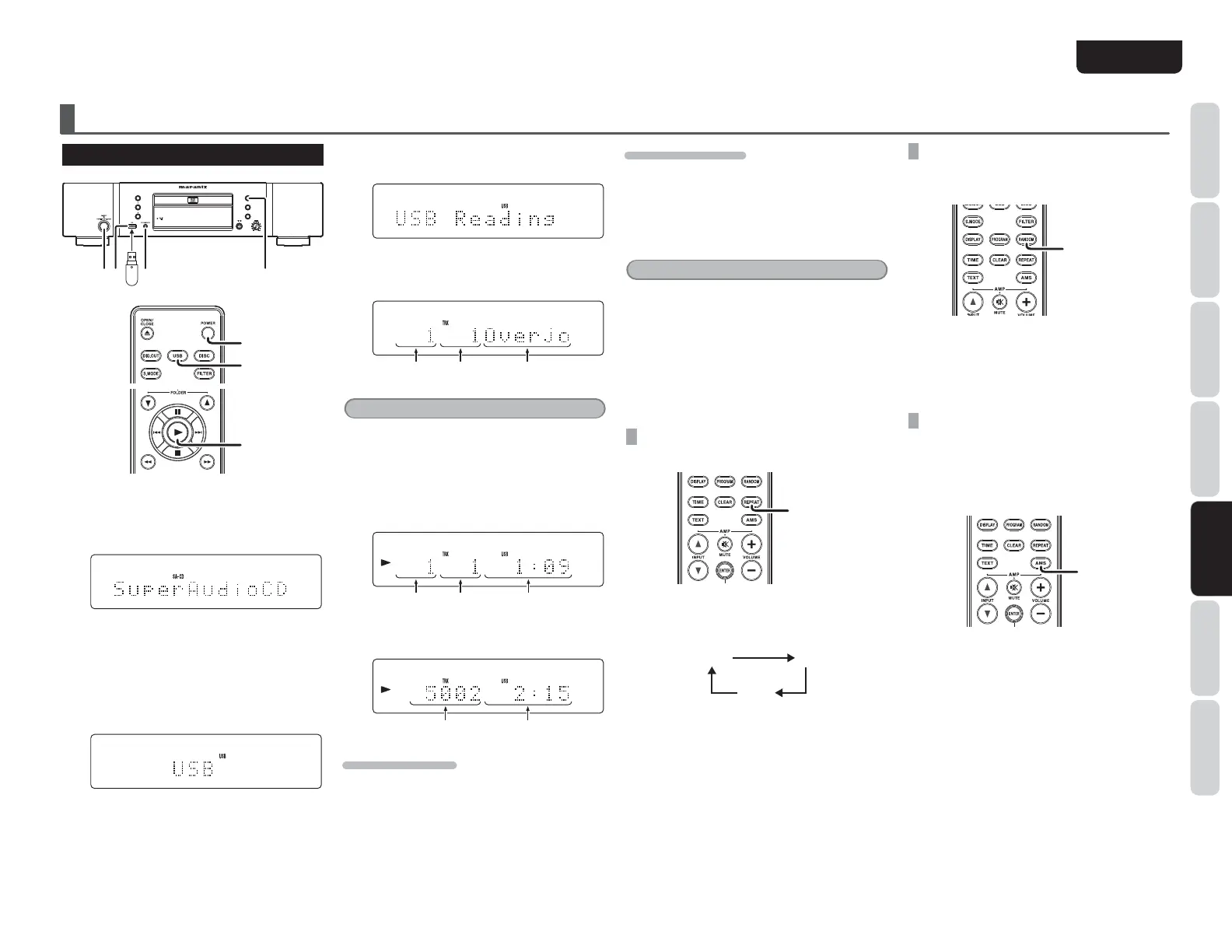
1. 8dccZXii]ZJH7bZY^jbidi]ZJH7edgi
dci]Z[gdcieVcZa#
2. @ZZeegZhh^c\i]ZPOWERHl^iX][dgVWdji
VhZXdcYidijgcdci]ZhnhiZb#
I]Z Y^heaVn XnXaZh [gdb
¹
TOC Reading
º
→
¹
No Disk
º
l]Zc cd Y^h` ^h adVYZY →
¹
SuperAudioCD
º
l]Zc i]Z HiVgi HdjcY
BdYZhZii^c\^hHjeZg6jY^d89#
3. EgZhh i]Z DISC MEDIA/USB Wjiidc dc
i]Z[gdci eVcZa! dg i]ZUSB Wjiidc dci]Z
gZbdiZXdcigda#
APPLICATION OPERATION (USB/iPod OPERATION)
4. L]^aZi]Zjc^ihZVgX]Zh[dgJH7bZY^V!i]Z
Y^heaVnl^aagZVYVh[daadlh#
L]Zc i]Z jc^i [^c^h]Zh \Zii^c\ i]Z JH7
bZY^jb [^aZ ^c[dgbVi^dc! i]Z Y^heaVn
X]Vc\Zhidi]Z[daadl^c\#
;daYZgCd# ;^aZCd# ;^aZCVbZ
Note:
When no USB medium is connected, the display
cycles from
“
USB Reading
”
→
“
USB
”
.
5. EgZhhi]Z2Wjiidc#
HZaZXiZY ÄaZ ^c[dgbVi^dc l^i]^c i]Z bZcj
VcYi^bZ^c[dgbVi^dcVgZY^heaVnZY#
;daYZgCd# ;^aZCd# I^bZ>c[dgbVi^dc
L]Zci]ZgZVgZbdgZi]Vc&%%%hdc\h!i]Z
Y^heaVnX]Vc\ZhidVeeZVgVh[daadlh#
;^aZKdajbZ I^bZ>c[dgbVi^dc
TO STOP PLAYBACK
Press the button.
TO PAUSE PLAYBACK
Press the button.
Pause indicator will light and playback is paused at
the point that the button is pressed.
To resume playback, press the button again or
press the 2 button.
Tip
s When playing USB media/iPod files, the unit
can play up to 65,535 files, 700 folders, and a
maximum of 8 levels.
s The iPod
’
s equalizer cannot be operated from
the Marantz player. We recommend that you turn
“
off
”
the iPod
’
s equalizer before connecting the
i
Pod to the main unit.
s Some operations may differ depending on the
iPod model.
USING
“
REPEAT PLAY
”
MODE
You can repeatedly play a single song or all songs.
REPEAT
Each time the REPEAT button on the remote
control is pressed, Repeat Play mode cycles in the
following order.
OFF
ALL
1
Press the 2 button to begin playback in the selected
repeat mode (see page 14).
PLAYING TRACKS IN A RANDOM
SEQUENCE (RANDOM PLAY)
You can randomly play songs.
RANDOM
Press the RANDOM button on the remote control
while the player is stopped to turn random mode
ON or OFF.
Press the 2 button when random mode is turned
ON to start Random Play (see page 14).
SEARCHING YOUR FAVORITE TRACKS
(AMS (AUTOMATED MUSIC SCAN) PLAY)
You can play the first 10 seconds of each track
starting from the first track.
Press the AMS button on the remote control to
automatically begin AMS play (see
page 15).
AMS



 To Next Page